
EMAIL SUPPORT
dclessons@dclessons.comLOCATION
USImplement Direct Internet Access
Digital innovation is overwhelming the branch and WAN. Most employees and customers work in branch offices, leading to a significant increase in devices accessing internet-based applications. However, the digital transformation of many enterprises is hindered due to the adoption of traditional network architectures. The traditional WAN topology backhauls all the internet traffic to the data centers resulting in packet latency, drops, and jitter. Also, the network is being constantly challenged with high costs that are associated with deployment and complex management.
One of the many ways to overcome these challenges within an organization is to use DIA with Cisco SD-WAN. DIA is a component of the Cisco SD-WAN architecture in which certain internet-bound traffic or public cloud traffic from the branch can be routed directly to the internet, thereby bypassing the latency of tunneling internet-bound traffic to a central site.
Benefits of using DIA include:
-
Reduced bandwidth consumption, latency, and cost savings on WAN links by offloading the internet traffic from the private WAN circuit.
-
Improved branch office user experience by providing DIA for employees at remote site locations.
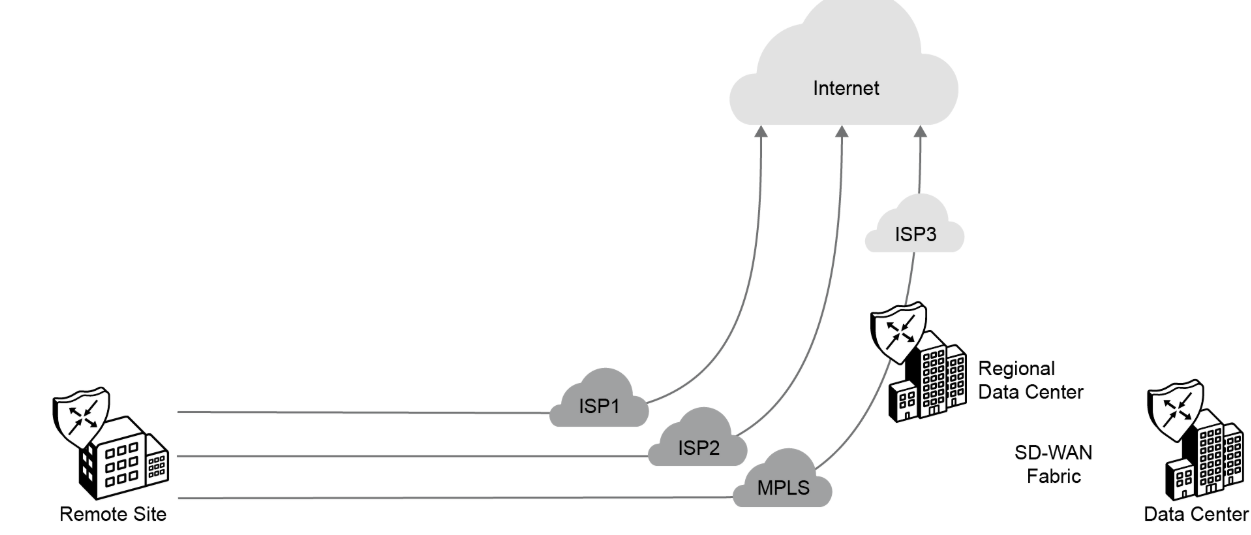
You can use one or more local DIA exits to backhaul traffic to the regional hub through the Cisco SD-WAN fabric and exit to the internet. The selection of which traffic can exit directly to the internet, and which one goes through a central site, is done on a per-VPN basis. A default route per VPN can be injected into the VPN for such internet access. You can configure NAT as required, such as for blocking unsolicited inbound traffic.
Ensure that the following is in place before deploying DIA:
-
The Cisco SD-WAN controllers are set up and deployed.
-
The Cisco WAN Edge routers are configured using device templates to establish a functional and secure overlay fabric to pass data traffic across the distributed sites of the organization.
-
The network devices near the Cisco WAN Edge routers are configured.
Using Segmentation and NAT
In DIA, segmentation is used to keep authenticated employees or users separate from guest users. All Cisco SD-WAN designs are based on the use of VPN to segment the routing table, thus allowing multiple default routes to exist on the same WAN Edge router. In WAN Edge routers, each VPN is a virtual routing and forwarding (VRF) instance and completely isolated from one another. All VPNs other than VPN 0 and VPN 512 are used to carry data traffic across the overlay network. These VPNs, 1-511 and 513-65530, are referred to as service-side VPNs. For these VPNs to operate, each one must have an operational interface (or subinterface). The remainder of what is configured in these VPNs depends on the network needs. You can configure features specific for the user segment, such as Border Gateway Protocol (BGP), Enhanced Interior Gateway Routing Protocol (EIGRP), Open Shortest Path First (OSPF), Routing Information Protocol, Virtual Router Redundancy Protocol (VRRP), quality of service (QoS), traffic shaping, and policing.
For DIA, NAT translation for packets exiting into the internet within the branch is enabled on the WAN Edge routers via NAT overload. NAT overload is the mapping of multiple unregistered IP addresses to a single registered IP address by using different ports.
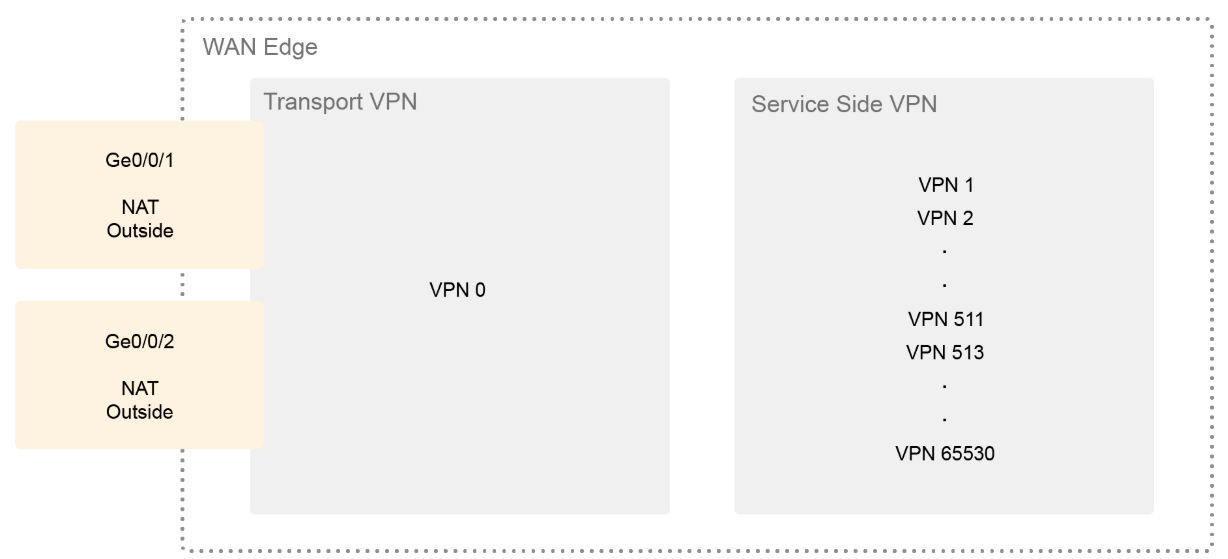
To achieve this functionality on WAN Edge devices, configure NAT on all WAN transport interfaces that face the internet. The NAT operation on outgoing traffic is performed in VPN 0, which is always only a transport VPN. The router's connection to the internet is in VPN 0.
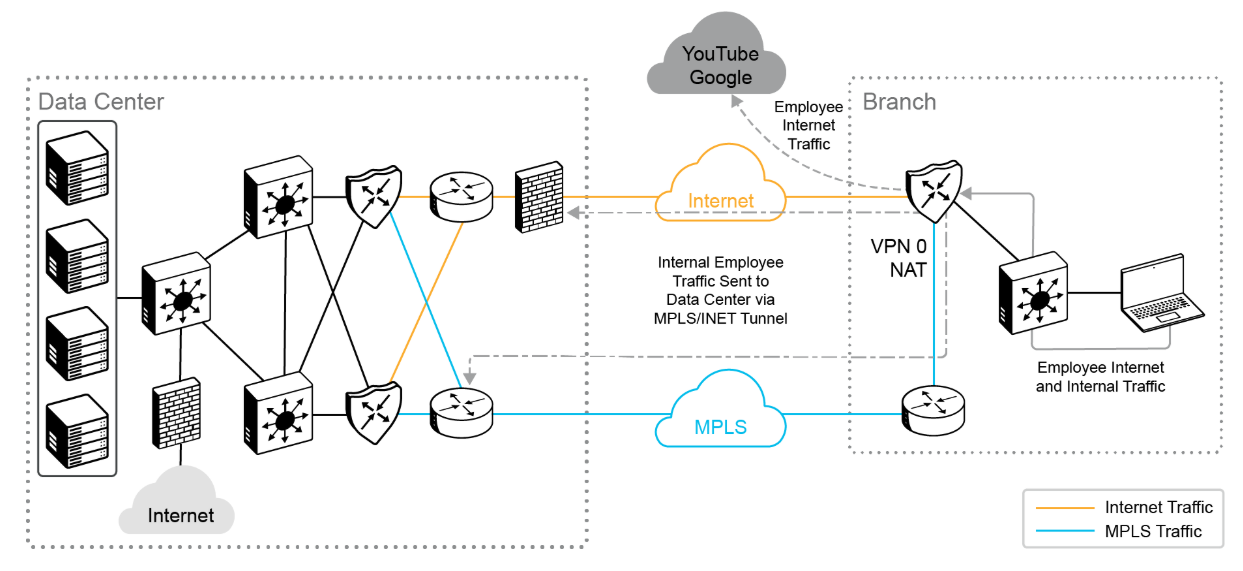
For DIA, as shown in the preceding figure, NAT overload can be configured on the internet transport interfaces connecting to the ISP's network. The source IP address of internal traffic that is destined for the internet is translated to the interface IP address and exits directly to the internet. The rest of the traffic remains within the overlay network and travels between two routers on the secure IPsec tunnels.

Comment
TABLE OF CONTENTS
- Onboarding & Provisioning Configuring Templates
- Authentication between vSmart & vBond
- Authentication between vSmart Controller
- Authentication between vBond & vEdge Router
- Authentication between vEdge Router & vManage NMS
- Authentication between vSmart Controller & vEdge Router
- Viptela Specific Port Terminology
- Deploy & Configure vManage & Generate Certificate
- Deploy & Configure vBond & Generate Certificate
- Deploy & Configure vSmart & Generate Certificate
- Configure vEdge & Generate Certificate
- SDWAN & NAT
- Secure DataPlane Bringup
- Enterprise CA for SDWAN Instances
- ZTP Process & PnP Overview
- Control Plane & Data Plane Operation - Unicast Routing Overview
- Configuring OMP & Its attributes
- Configure Unicast Overlay Routing
- Routing Configuration Example
- Segmentation Overview
- Configuring Segmentation
- Segmentation Configuration Example
- Data Traffic across Private WANs
- NAT in SDWAN & Data Encryption
- SD-WAN Viptela Policy Overview
- SD-WAN Centralized & Localized Control Policy Overview
- SD-WAN Centralized & Localized Data Policy
- Service Chaining
- Traffic Flow Monitoring
- vEdge Router as NAT Device
- Zone Based Firewalls
- Configure Centralized Control Policy
- Configuring Centralized Data Policy
- Configuring Cflowd Traffic Monitoring
- Configuring Zone based Firewall
- Service Chaining Configuration Example
- Configuring Service Side NAT
- Configuring Transport side NAT
- Control Policy Example 1: Hierarchical Topology
- Multi-Region Fabric
- Control Policy Example 2: Implementing Traffic Engineering
- Control Policy Example 2: Dynamic On-Demand Tunnels
- LAB Deploy Cisco SD-WAN Edge Routers
- LAB Deploy SDWAN Controllers
- LAB Deploy Cisco SD-WAN Devices Using Configuration Group
- LAB Implement Service-Side Routing Protocols
- LAB Implement TLOC Extensions
- LAB Implement Control Policies
- LAB Implement Data Policies
- LAB Implement Application-Aware Routing
- LAB Implement Branch and Regional Internet Breakouts
- LAB Migrate Branch Sites
RECENT POSTS
- Exploring Cisco ISE Authorization Policy Elements
- Understanding Cisco ISE Authentication and Authorization Policies
- Installing Context-Aware Network Access Control using Cisco ISE Policies
- Designing Network Access Control that is Scalable using Cisco ISE Architecture
- Enterprise Network Access Control and Policy Enforcement using Cisco ISE
- Secure Device Administration and Network Access Using AAA Architecture
- Designing Enterprise-Class Hybrid Cloud Connectivity Using AWS Networking Services
- Exploring Core AWS Networking and Messaging Concepts for Modern Cloud Architectures
- Understanding Key AWS Services for Modern Cloud Architectures
- Building a Strong AWS Foundation with Amazon S3, EC2, and Virtual Private Cloud



LEAVE A COMMENT
Please login here to comment.