
EMAIL SUPPORT
dclessons@dclessons.comLOCATION
USImplementing Fabric Enabled Wireless Networks
Fabric-enabled wireless networks, or SD-Access wireless networks, are deployed based on the following principles:
- WLCs connect externally to the fabric.
- WLCs integrate with the fabric control plane nodes via LISP.
- APs join in local mode to the WLC that belongs to the site.
- Flex Connect or WLC connectivity over WAN is not supported.
- The latency between AP and WLC must be less than 20 ms.
- The border advertises the WLC management subnet to the fabric.
- The border advertises fabric prefixes to the WLC management network.
SD-Access Wireless Components—WLC
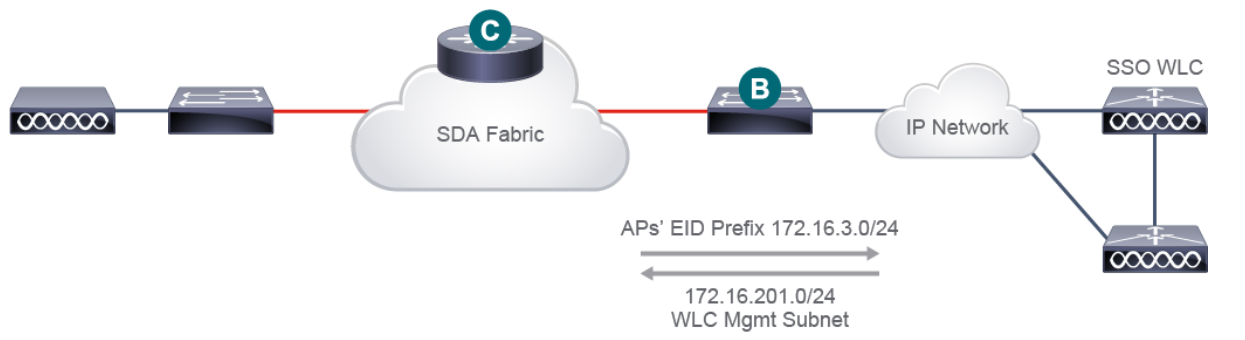
A fabric-enabled wireless network is connected externally to the fabric and connects to the fabric via the underlay network. The WLC integrates with the fabric control plane node using LISP for AP and wireless endpoint registration. When adding a WLC to the fabric, Cisco DNA Center configures the WLC with IP addresses of fabric control plane nodes and a shared secret for secure communication.
SD-Access Wireless Components—AP
In SD-Access wireless networks, APs have the following characteristics:
- APs connect directly to the fabric edge.
- APs belong in overlay space on fabric edges.
- APs get registered in the control plane database.
- All APs across the entire fabric reside in one IP subnet.
A single subnet for all APs provides simplified IP design for AP onboarding
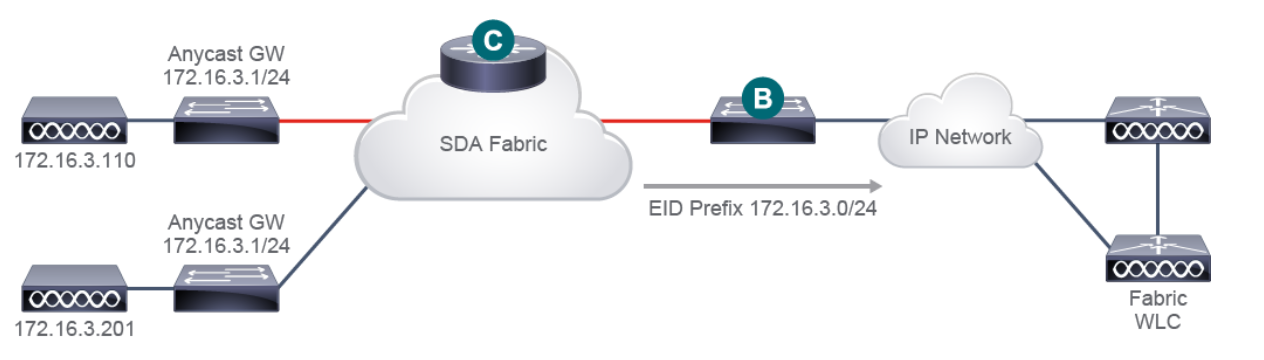
Fabric-enabled APs connect to the fabric via a dedicated overlay called INFRA_VN. This is a special overlay for APs and Internet of Things (IoT) extended nodes. INFRA_VN is an overlay network in the global routing table (GRT). This means that no VRF leaking or fusion router is required to establish connectivity between the APs and a WLC.
SD-Access Wireless Components—Clients
SD-Access wireless clients connect and communicate over the fabric as follows:
- Client subnets are distributed on fabric edge switches.
- There is no need to define client subnets on the WLC.
- A client subnet maps to the VLAN with anycast gateway on all fabric edge switches.
- All wireless roaming is in Layer 2.
- Wireless client traffic is distributed without hair pinning to the centralized controller.
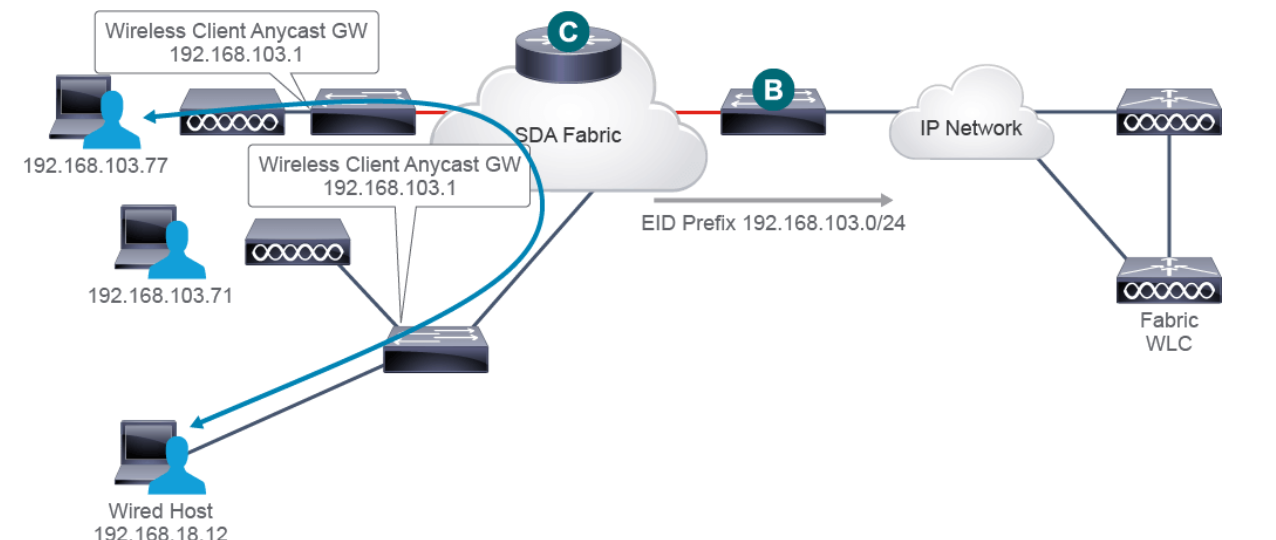
- Wireless and wired clients can reside in the same IP network.
Communication with the wired clients happens directly over the fabric.
Adding WLC to Fabric
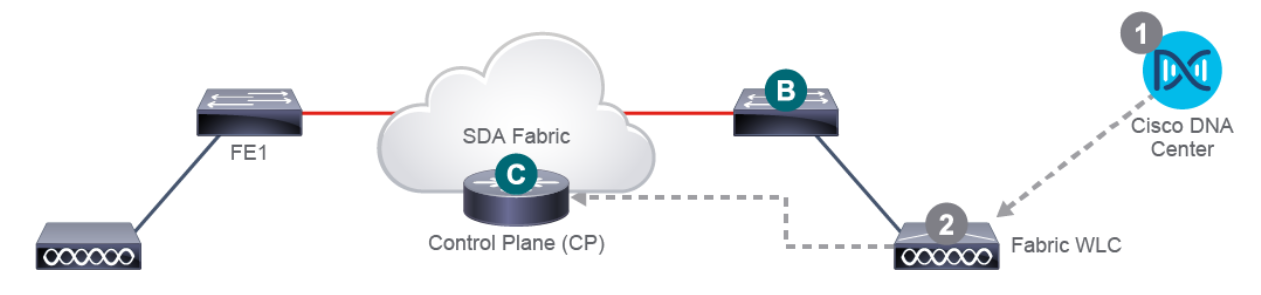
To add WLC to the fabric, perform the following steps:
- In Cisco DNA Center, provision the WLC and add it to the fabric site.
- The DNA Center pushes the fabric configuration to the WLC, which becomes fabric-aware. The WLC gets credentials to an established secure connection to the control plane.
Finally, the WLC is ready to participate in SD-Access wireless.
Adding AP to Fabric
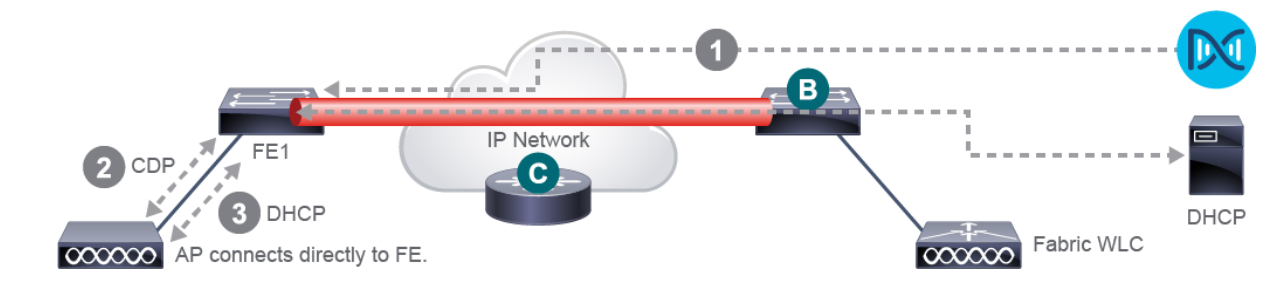
To add an AP to the fabric, perform the following steps:
- Configure the AP pool in Cisco DNA Center in INFRA_VN. Cisco DNA Center pre-provisions a configuration macro on all the fabric edges.
- The fabric edge discovers the AP via CDP when it is plugged in. The fabric edge applies the macro to put the switch port into proper VLAN.
- The AP receives an IP address via DHCP in the overlay.111
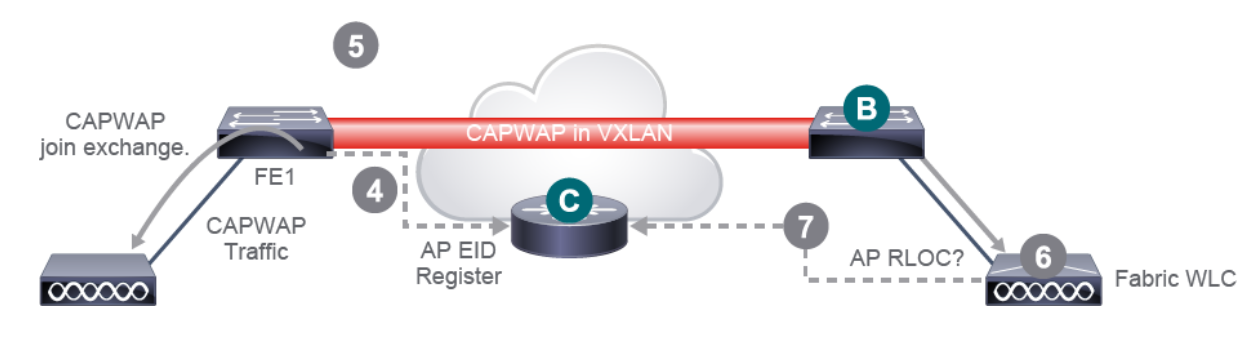
4. The fabric edge registers the IP and MAC (EID) address of the AP and updates the control plane.
5. The AP learns the IP address of the WLC and joins the WLC in local mode.
6. The WLC verifies that the AP is fabric-capable.
7. For a supported AP, the WLC queries the control plane to determine if the AP is connected to the fabric.
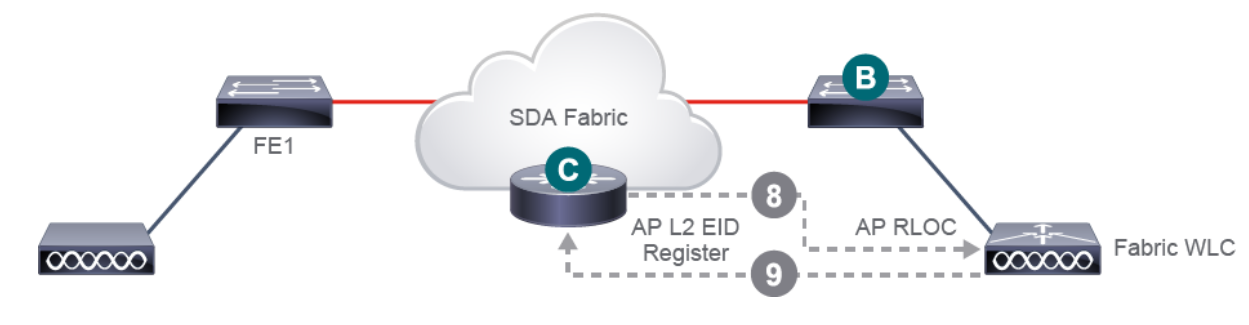
8. The control plane replies to the WLC with RLOC. This means that the AP is attached to the fabric and will be shown as fabric-enabled in Cisco DNA Center.
9. The WLC performs Layer 2 LISP registration for the AP in the control plane, also known as AP “special” secure client registration. This way the WLC can pass important metadata information to the fabric edge
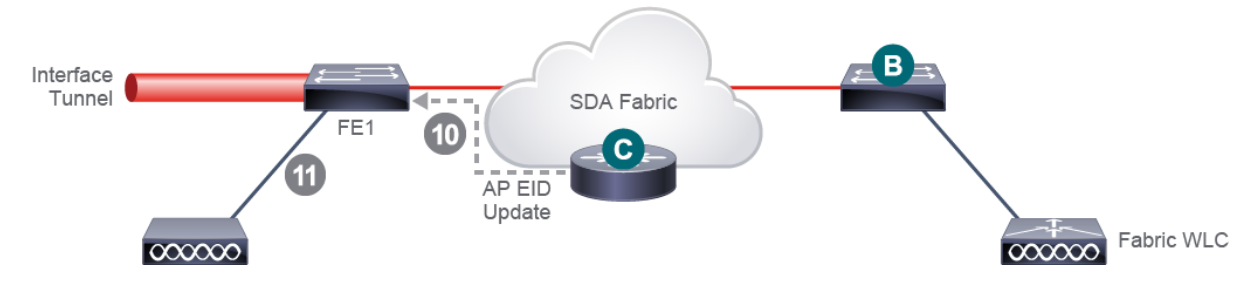
10. As a result of this proxy registration, the control plane updates the fabric edge with the metadata that is received from the WLC (sending a flag, which says that the endpoint is an AP, and the AP’s IP address).
11. The fabric edge processes the information, learns about the AP, and creates a VXLAN tunnel interface to the specified IP to optimize the switch side and make it ready for clients to join.
As a result, APs are now ready for provisioning on Cisco DNA Center.
Videos

Comment
TABLE OF CONTENTS
RECENT POSTS
- Exploring Cisco ISE Authorization Policy Elements
- Understanding Cisco ISE Authentication and Authorization Policies
- Installing Context-Aware Network Access Control using Cisco ISE Policies
- Designing Network Access Control that is Scalable using Cisco ISE Architecture
- Enterprise Network Access Control and Policy Enforcement using Cisco ISE
- Secure Device Administration and Network Access Using AAA Architecture
- Designing Enterprise-Class Hybrid Cloud Connectivity Using AWS Networking Services
- Exploring Core AWS Networking and Messaging Concepts for Modern Cloud Architectures
- Understanding Key AWS Services for Modern Cloud Architectures
- Building a Strong AWS Foundation with Amazon S3, EC2, and Virtual Private Cloud



LEAVE A COMMENT
Please login here to comment.