
EMAIL SUPPORT
dclessons@dclessons.comLOCATION
USVMware Networking Review
Stepwise Workflow
- Virtual Switch Deployment
- A VMM domain provisions a virtual switch (vSwitch) under the control of its associated VMM controllers.
- Cisco ACI policies are applied through the VMM controller’s components.
- Controller Association
- When a VMware vCenter is associated with the VMM domain:
- A VMware vSphere Distributed Virtual Switch (DVS) is automatically deployed.
- EPG Integration
- When the VMM domain is linked to a Cisco ACI Endpoint Group (EPG):
- A VMware port group is created on the vSphere DVS.
- This port group acts as the representation of the Cisco ACI EPG inside the VMware environment.
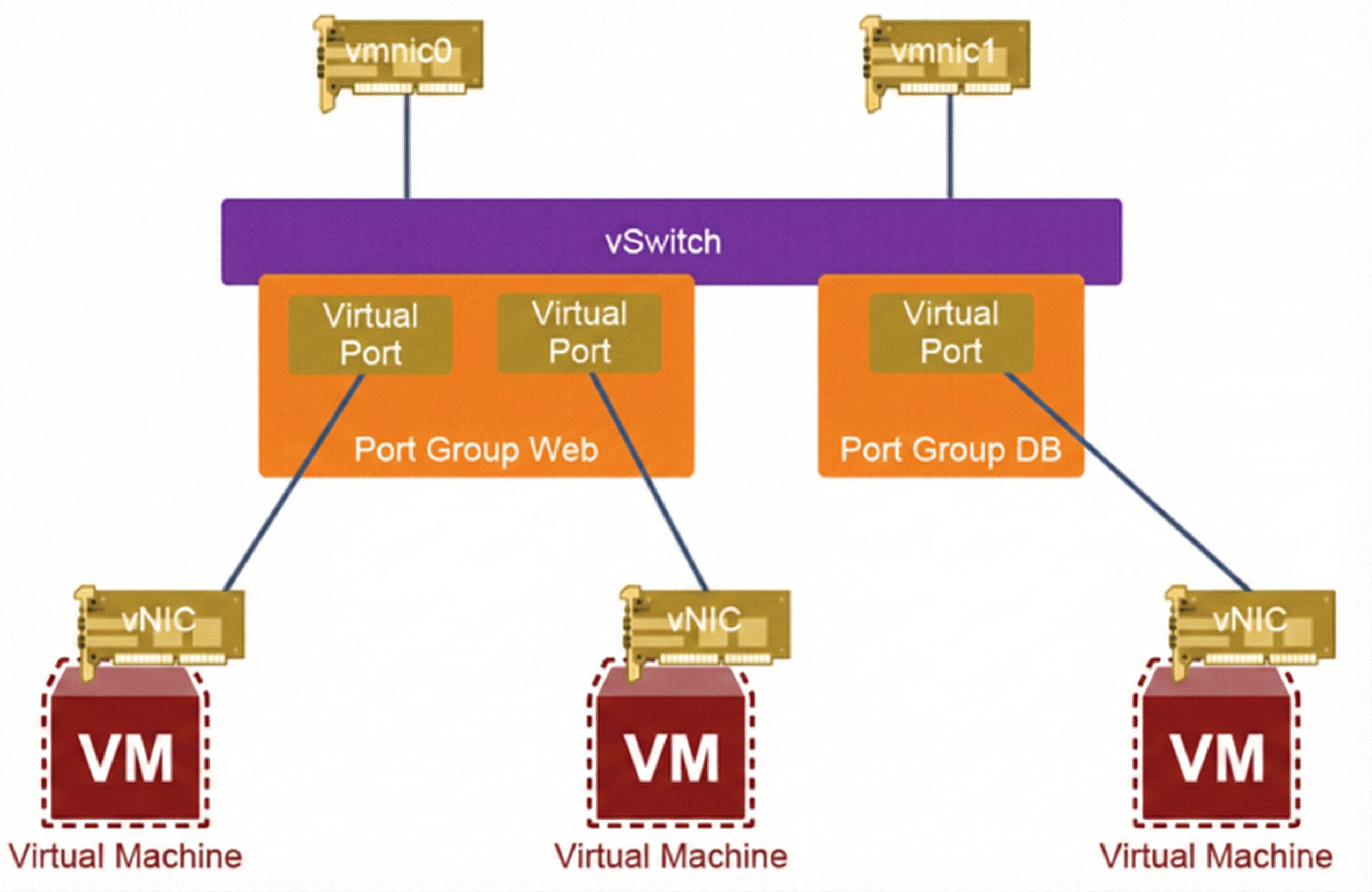
Within the VMware hypervisor, the port groups are created for each VLAN, which you want to present to your VMs. The vNIC of the VM is mapped to a virtual port on the vSwitch, part of a specific port group.
The uplinks that provide connectivity to the outside network are mapped to the physical NIC (pNIC, or also referred as VMNIC) of the VMware hypervisor host, while the vSwitch has exclusive use of these links.
VMM/Container Integration Review
Key Concepts
- Transparent Integration
Cisco ACI integrates seamlessly into virtual environments. - Delivers simplicity without sacrificing scale, performance, responsiveness, security, or visibility.
- Provides a common policy-based operating model across both physical and virtual infrastructures.
- VMM Domain Role
- Acts as the bridge between Cisco ACI policies and virtual switches.
- Managed by third-party Virtual Machine Manager (VMM) controllers such as:
- VMware vCenter
- Microsoft SCVMM
- Others (e.g., OpenStack, Kubernetes integrations)
How It Works (Stepwise)
- Policy Connection
- The VMM domain connects Cisco ACI policies directly to virtual switches managed by VMM controllers.
- Automatic Coordination
- ACI network policies are synchronized with the virtualization manager.
- This ensures policy consistency across physical and virtual workloads.
- Endpoint Detection
- Virtual endpoints (VMs) are automatically detected.
- Policies are dynamically placed and bound to the actual VMs.
Videos

Comment
You are will be the first.
TABLE OF CONTENTS
RECENT POSTS
- Exploring Cisco ISE Authorization Policy Elements
- Understanding Cisco ISE Authentication and Authorization Policies
- Installing Context-Aware Network Access Control using Cisco ISE Policies
- Designing Network Access Control that is Scalable using Cisco ISE Architecture
- Enterprise Network Access Control and Policy Enforcement using Cisco ISE
- Secure Device Administration and Network Access Using AAA Architecture
- Designing Enterprise-Class Hybrid Cloud Connectivity Using AWS Networking Services
- Exploring Core AWS Networking and Messaging Concepts for Modern Cloud Architectures
- Understanding Key AWS Services for Modern Cloud Architectures
- Building a Strong AWS Foundation with Amazon S3, EC2, and Virtual Private Cloud



LEAVE A COMMENT
Please login here to comment.