
EMAIL SUPPORT
dclessons@dclessons.comLOCATION
USControlling Endpoint Learning
The Cisco ACI endpoint learning capability provides efficient and scalable forwarding within the fabric. It also provides several functionalities that help to optimize and control the endpoint learning, and to avoid issues that can occur for non-deterministic endpoint behavior.
For example, with bounce entries and data-plane learning, no matter how many leaf switches the fabric contains, only few components need to be updated for endpoint move information.
Cisco ACI has three features to control endpoint learning, which looks similar and can help when an endpoint is moving too often between ports:
- Endpoint move dampening
- Endpoint loop protection
- Rogue endpoint control
In addition, you can utilize the IP aging option in Cisco ACI, which is useful to age individual IP addresses that may be associated with the same MAC address, use IP data-plane learning (per-VRF), and the enforce subnet check feature.
Control Plane and Forwarding Review
Endpoint tables in Cisco ACI are utilized to forward traffic. They are used to determine where the destination VTEP is. In Cisco ACI, when the bridge domain is in Layer 2 Unknown Unicast hardware-proxy mode, which is the default, the packet is forwarded to the spine proxy. Therefore, the spines determine a destination VTEP if currently unknown at the ingress node.
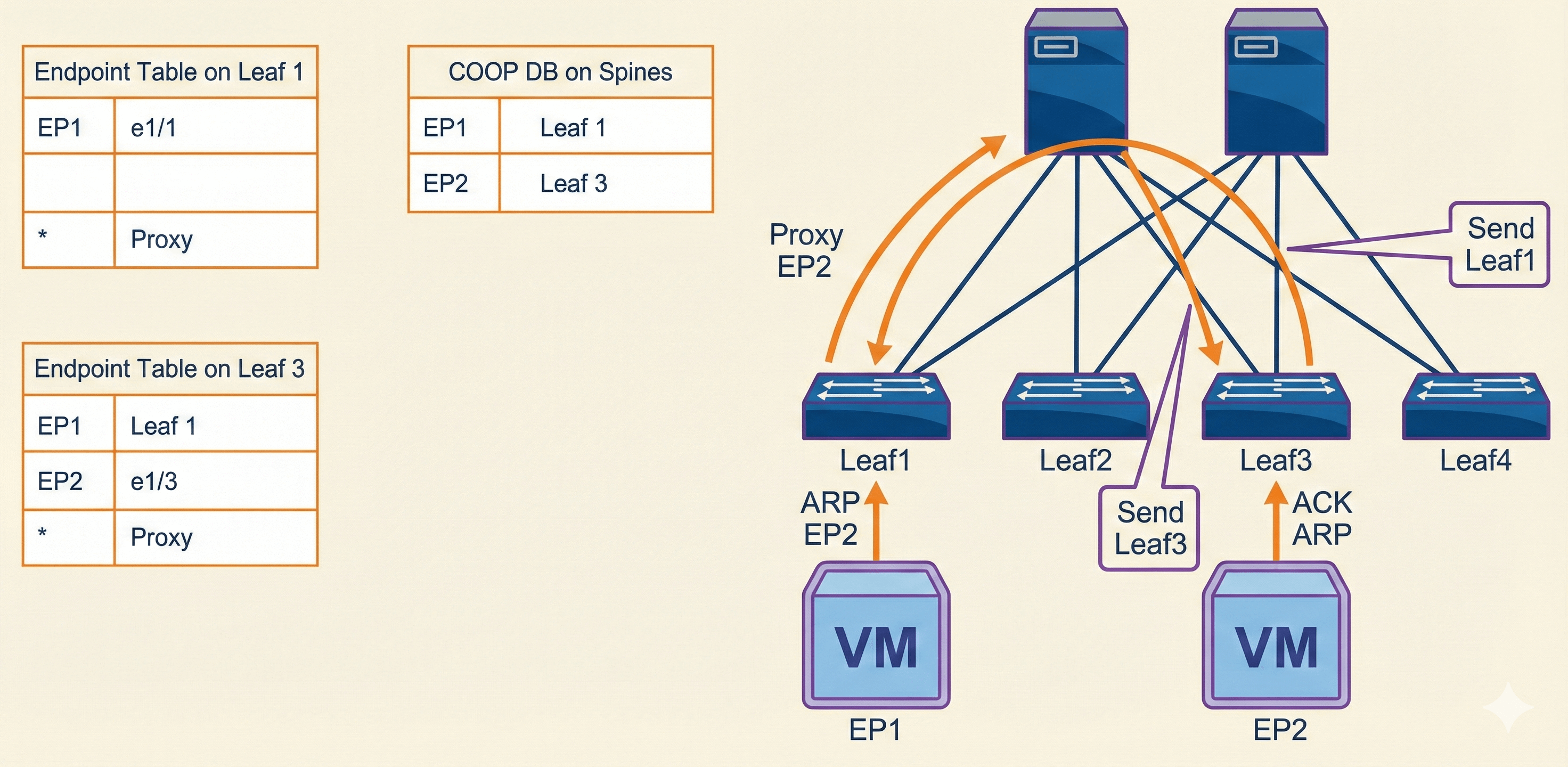
This example outlines the sequence that Cisco ACI invokes to learn the endpoint (identity and location) and how the COOP will ensure that all spines maintain a consistent copy of endpoint addresses and location information. More precisely:
- When a packet enters the leaf switch, the leaf searches the endpoint table and forwards the frame if there is an entry.
- If there is no entry, and the bridge domain is in Layer 2 Unknown Unicast hardware-proxy mode, the packet is forwarded to the spine, to perform a proxy lookup. The leaf will update later its endpoint table upon detecting returning traffic, and can then perform direct forwarding.
- If the COOP database on the spine has information on the destination endpoint, the spine forwards the packet to the remote leaf.
This example shows one possible scenario. More information on Cisco ACI Layer 2 Forwarding and troubleshooting is provided in the next section.
Cisco APIC provides several functions and constitutes the central point of management of the fabric. The controller is not in the path of the traffic; it is just a management entity that stores and distributes policies and allows you to configure the fabric. The controller can be disconnected, moved to a different port, and so on, without any impact on the fabric. The controller focuses on what should connect, rather than how things connect.
Distributed control plane is maintained for scale, with each node in the fabric running a full control plane. This control plane facilitates the routing and switching and implements the policies that the controller has communicated. You can log in to each device and see how the devices have been configured. You can issue show commands and view the endpoint tables, VRF instances, and so on, just as you can do on any Cisco NX-OS device.
VXLAN does not have a control plane. It is up to the data plane to perform address learning and understand what hosts are out there on the network. Each VXLAN speaker performs this function independently and does not share what it learns with its neighbors as that would be a function of a control plane, which is how Layer 2 switches behave now with MAC learning and building MAC tables—they do not share their MAC tables with neighboring switches.
Endpoint Move Scenarios
There are several scenarios in which an endpoint moves between two Cisco ACI leaf switches, such as during a failover event or a VM migration in a hypervisor environment. Cisco ACI data-plane endpoint learning detects these events quickly and updates the Cisco ACI endpoint database on a new leaf. In addition to data-plane learning, Cisco ACI uses bounce entries to manage the old endpoint information on the original leaf.
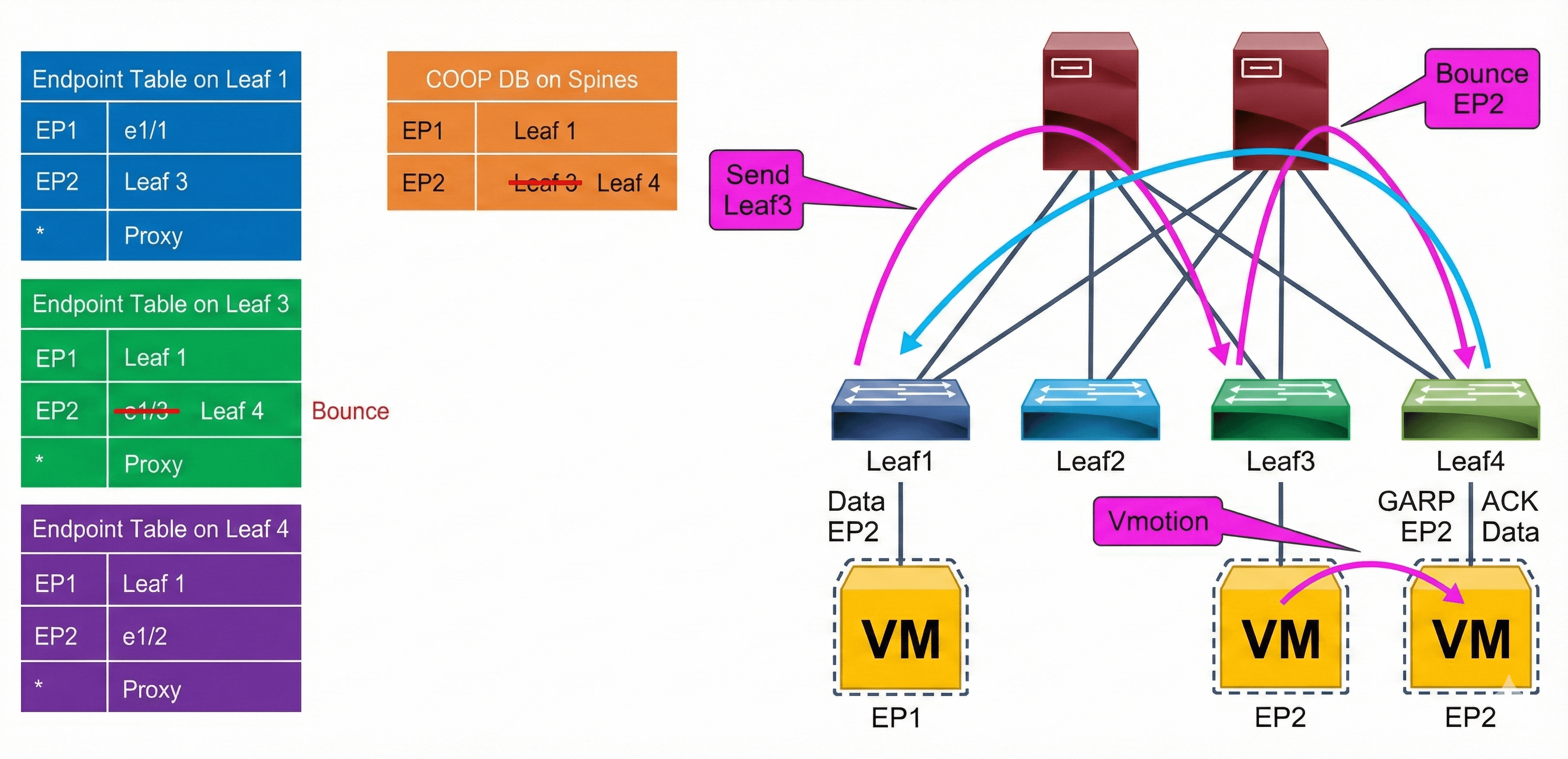
When a new local endpoint is detected on a leaf, the leaf updates the COOP database on the spine switches with its new local endpoint. If the COOP database has already learned the same endpoint from another leaf, COOP will recognize this event as an endpoint move and report this move to the original leaf that contained the old endpoint information. The old leaf that receives this notification will delete its old endpoint entry and create a bounce entry, which will point to the new leaf. A bounce entry is basically a remote endpoint created by COOP communication instead of data-plane learning.
The difference between a bounce entry and a remote endpoint is in whether the leaf rewrites the outer source IP address of the packet. When a packet uses a normal remote endpoint, the Cisco ACI leaf uses its own TEP address as the outer source IP address, so the remote leaf learns this packet with its own TEP. When a packet uses a bounce entry, the Cisco ACI leaf does not rewrite the outer source IP address, so the remote data-plane learning will behave as if the packet came from the originating leaf rather than the intermediate “bounce” leaf.
Endpoint Move Dampening
Endpoint move dampening feature mitigates the impact of an unreasonable amount of endpoint moves within a short time. It is configured under the bridge domain policy option in a specific tenant, using the Endpoint Retention Policy, which can be the default one or you can create your own policy. In this retention policy, it is defined Move Frequency (per sec). The frequency expresses the number of aggregate moves of endpoints in the bridge domain. When the frequency is exceeded, Cisco ACI stops learning on this bridge domain. Notice that a single endpoint moving may not cause this feature to intervene. The feature is effective when multiple endpoints move, as it is normally the case with a loop.
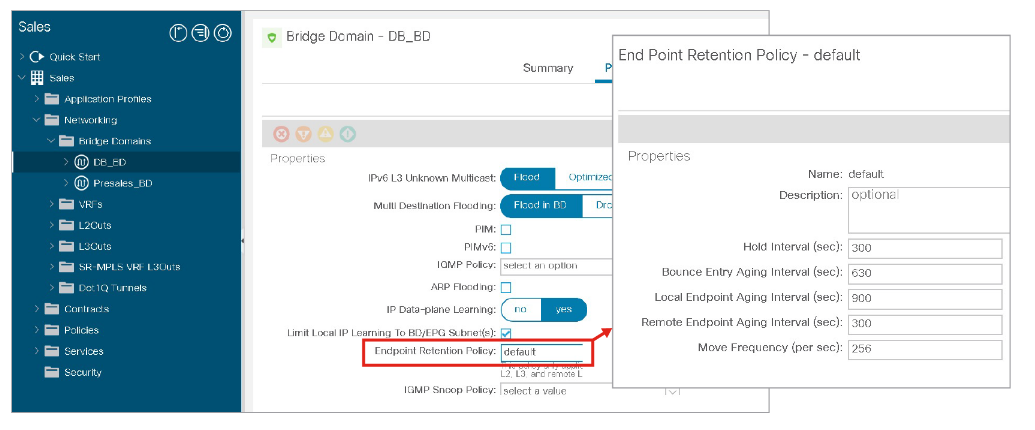
Endpoint move dampening counts the aggregate moves of endpoints, so if you have a single link failover with several endpoints whose count exceed the configured “move frequency” (the default is 256 moves), endpoint move dampening may also disable learning. When the failover is the result of the active link (or path) going down, it is not a problem because the link going down flushes the endpoint table of the previously active path. If instead the new link takes over without the previously active one going down, endpoint dampening will disable the learning after the configurable threshold (256 endpoints) is exceeded. If you use endpoint move dampening you should tune the move frequency to match the highest number of active endpoints associated with a single path (link, port-channel, or vPC). This scenario does not require special tuning for endpoint loop protection and rogue endpoint control because these two features count moves in a different way.
The Endpoint Retention Policy provides additional options next to Move Frequency, which you can use to specify the lifecycle of endpoints:
- Hold Interval: The amount of time in seconds that endpoint learning is disabled in a bridge domain due to endpoint loop protection or endpoint move dampening that is triggered based on the Move Frequency value. The default interval is 300 seconds.
- Bounce Entry Aging Interval: The amount of time in seconds until a bounce entry in the endpoint table on a leaf node expires. The default interval is 630 seconds.
- Local Endpoint Aging Interval: The amount of time in seconds that a leaf node can keep each local endpoint in its endpoint table without further updates. The default interval is 900 seconds. If 75 percent of the interval is reached, the leaf node sends three ARP requests to verify the presence of the endpoint. If no response is received, the endpoint is deleted.
- Remote Endpoint Aging Interval: The amount of time in seconds that a leaf node can keep each remote endpoint in its endpoint table without further updates. The default interval is 300 seconds.
Endpoint Loop Protection
The endpoint loop protection is a feature configured at the global level. The feature is turned on for all bridge domains, and when too many moves are detected you can choose whether Cisco ACI should suspend one of the links that cause the loop (you cannot control which one), or disable learning on the bridge domain. This option is located at System > System Settings > Endpoint Controls > Ep Loop Protection
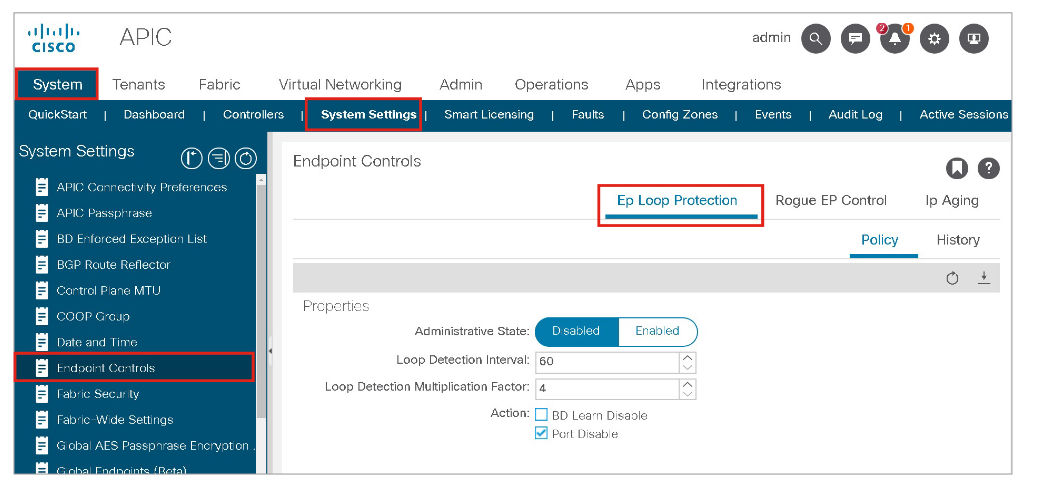
Ep Loop Protection takes action if the Cisco ACI fabric detects an endpoint moving between the same two ports more than a specified number of times during a given time interval. It can take one of two actions if the number of endpoint moves exceeds the configured threshold:
- It disables endpoint learning within the bridge domain.
- It disables the port to which the endpoint is connected.
In the Ep Loop Protection window, you can specify:
- Loop Detection Interval: Specifies the time to detect a loop. The default setting is 60 seconds.
- Loop Detection Multiplication Factor: Sets the number of times a single endpoint moves between ports within the loop detection interval. The default is 4.
- Action: When too many moves are detected within a loop detection interval you can choose whether Cisco ACI should disable one of the ports to which the endpoint is connected (Port Disable option), or disable learning within the bridge domain (BD Learn Disable option).
These default parameters state that, if an endpoint moves more than four times within a 60-second period, the endpoint loop-protection feature will take the specified action (disable the port).
If the action taken during an endpoint loop-protection event is to disable the port, you may need to configure automatic error disabled recovery; in other words, the Cisco ACI fabric will bring the disabled port back up after a specified period of time. This option is configured by choosing Fabric > Access Policies > Policies > Global > Error Disabled Recovery Policy and modify the Frequent EP Moves option to True.
A fault is raised regardless of which action is checked.
Rogue Endpoint Control
The rogue endpoint control feature, introduced in Cisco ACI 3.2, can help when MAC or IP addresses are moving too often between ports. With rogue endpoint control, only the misbehaving endpoint (MAC/IP) is quarantined, which means that Cisco ACI keeps its TEP and port fixed for a certain amount of time when learning is disabled for this endpoint. The feature also raises a fault to allow easy identification of the problematic endpoint. If rogue endpoint control is enabled, endpoint loop protection and endpoint move dampening will not take effect. The feature works within a site.
You can enable this option in the APIC GUI at System > System Settings > Endpoint Controls > Rogue EP Control.
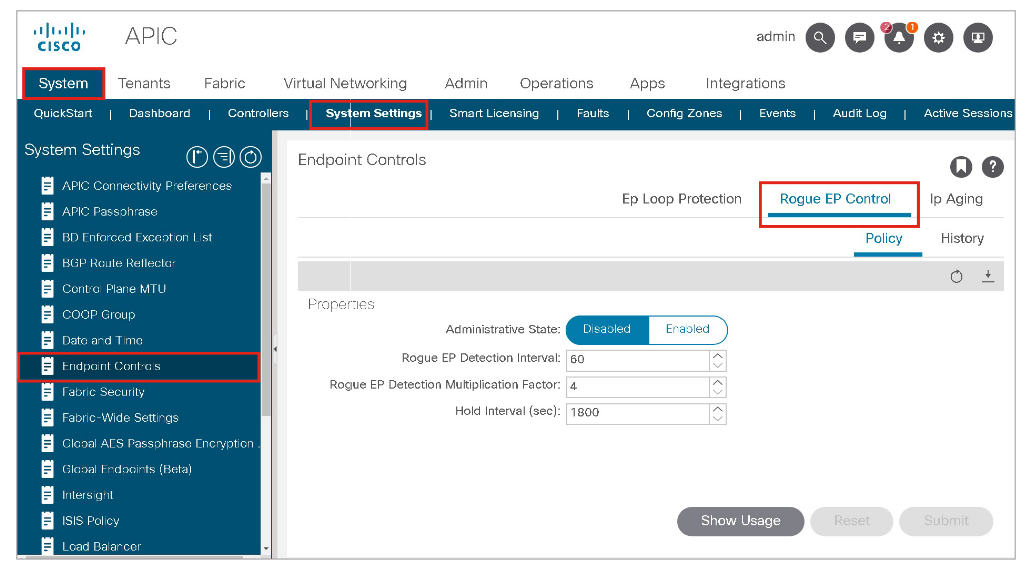
Rogue EP Control does not stop a Layer 2 loop, but it provides mitigation of the impact of a loop on the COOP control plane by quarantining the endpoints.
Rogue endpoint control also helps if server configurations are incorrect, which may cause endpoint flapping. Cisco ACI does not disable the server ports (as endpoint loop protection may do), instead it stops the learning for the endpoint that is moving too often, and provides a fault with the IP of the endpoint so that the administrator can verify its configuration.
It is recommended to enable rogue endpoint control, which is disabled by default.
Detection criteria can be configured by using the following values:
- Rogue EP Detection Interval: To specify the time in seconds to detect rogue endpoints. The default is 60 seconds. The supported range is 30 to 3600 seconds.
- Rogue EP Detection Multiplication Factor: The endpoint is declared rogue if the endpoint moves more than this number within the Rogue EP Detection interval. The default is 4. The supported range is 2 to 10.
- Hold Interval: The amount of time the endpoint is being handled as rogue and kept as the static endpoint. After this interval, the endpoint is deleted. The default is 1800 seconds. The supported range is 1800 to 3600.
For example, if the Rogue EP Control is enabled with the default configuration parameters above, the ACI fabric declares an endpoint rogue if the endpoint moves more than four times in 60 seconds and disables learning for the endpoint for 1800 seconds. The rogue endpoint will be static on the leaf node, interface, and VLAN where it was detected right before the declaration of rogue.
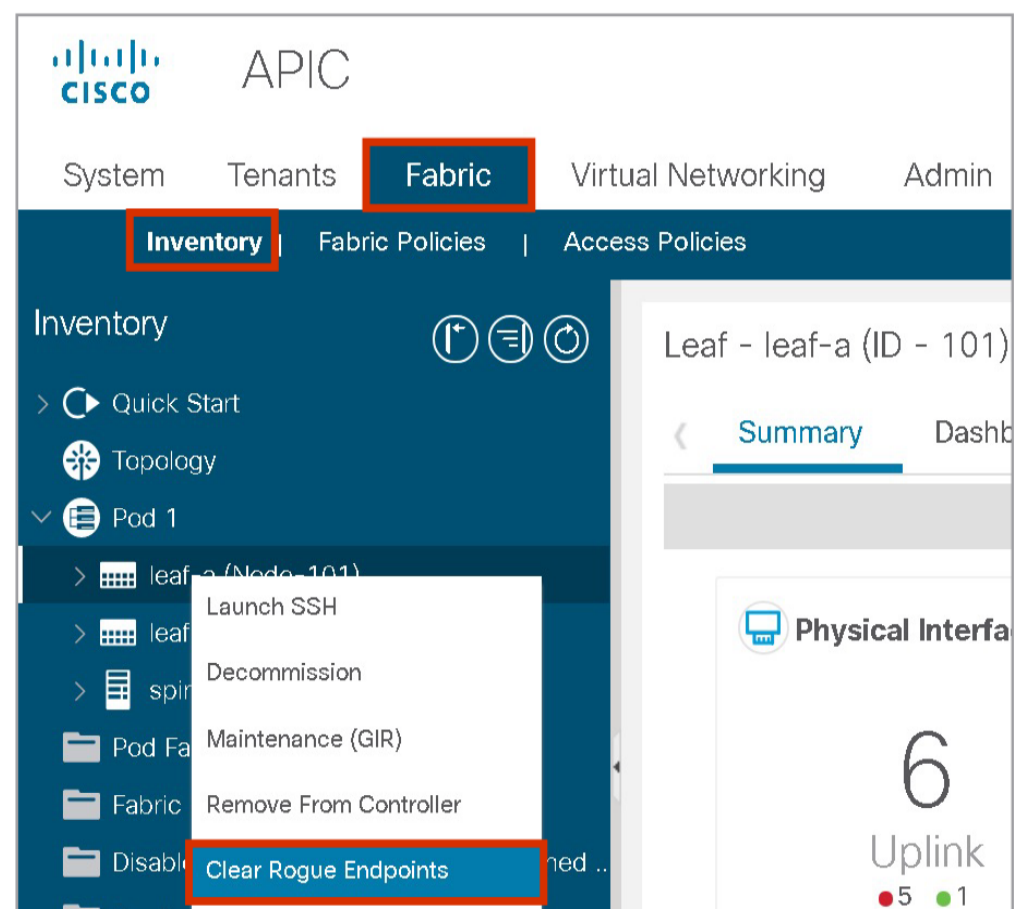
After the hold-interval, rogue endpoints will be deleted. Rogue endpoints can be deleted even before the hold interval at Fabric > Inventory > Pod_number > Leaf_name > Clear Rogue Endpoints
EP Loop Protection and Rogue EP Control Considerations
Endpoint loop protection and rogue endpoint control help either with misconfigured servers or with loops. However, you should either enable endpoint loop protection or rogue endpoint detection: These features limit the impact of a loop on the fabric by either disabling data-plane learning on a bridge domain where there is a loop or by quarantining the endpoints whose MAC and/or IP moves too often between ports.
The following example shows a common deployment scenario where a dual-attached hypervisor server with NIC teaming (for example, VMware ESXi host) is configured for better utilization of the uplinks toward the Cisco ACI fabric, so both uplinks are used by the VMs for better use of the available bandwidth. It can have a serious impact during misconfiguration, when the server is connected to non-vPC-paired leaves, which can be a result of lack-of-communication between the server and network administrators.
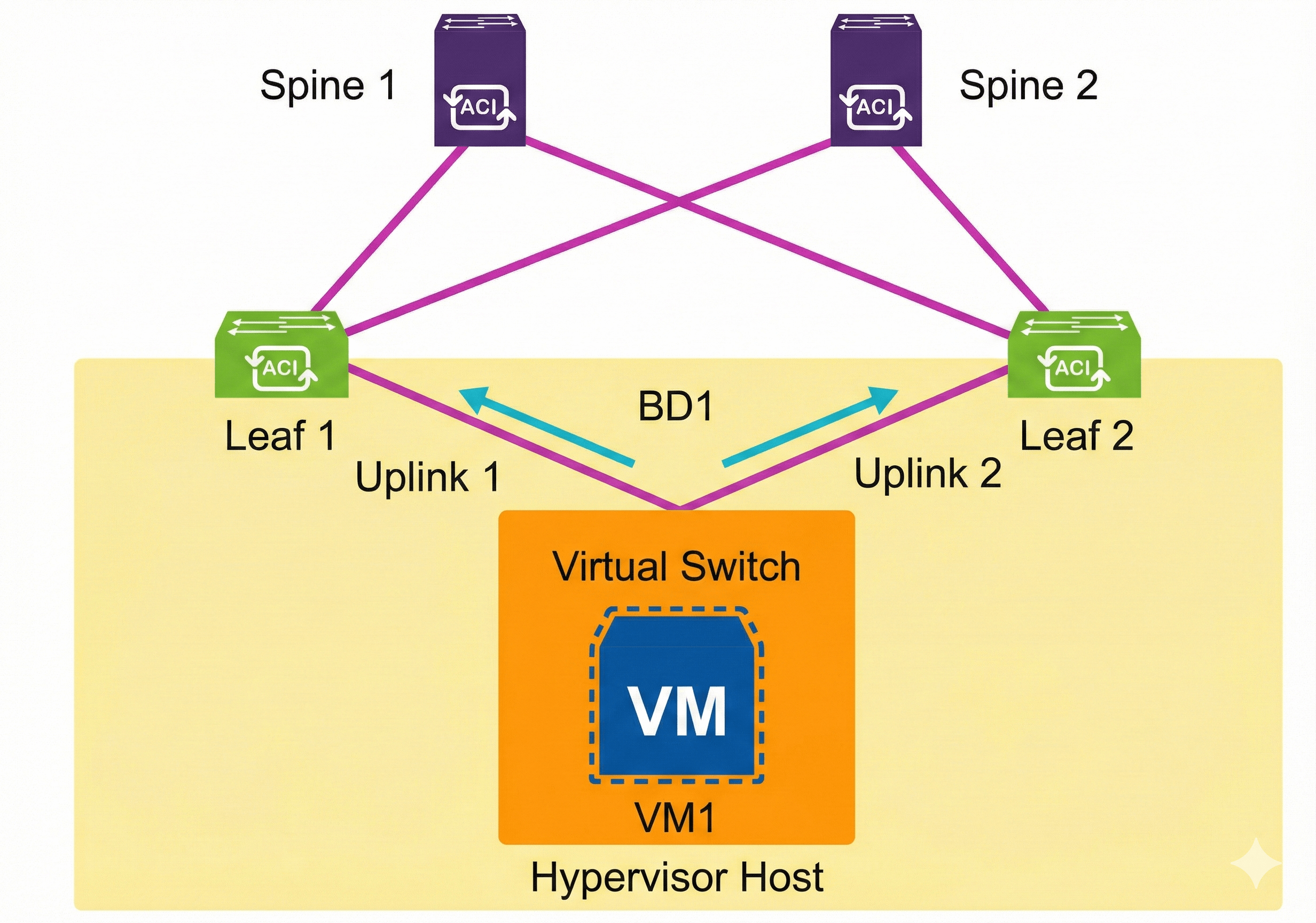
On the VMware ESXi host, when you change from Originating Port ID to IP Hash NIC load balancing on the vSphere standard and distributed vSwitches, instead of using only one VMNIC (physical NIC) per VM virtual NIC, the VM can use both VMNICs (physical uplinks). The load balancing based on IP Hash uses the source and destination IP addresses of the VM sessions to send each packet to a predetermined uplink, so the VM that communicates with multiple IP addresses can load balance across all physical uplinks in the team for optimal bandwidth usage.
The virtual machine (VM1) on a hypervisor connected to the network is sending traffic to different leaf switches in the ACI fabric, in this example Leaf1 and Leaf2, while one TCP session goes over uplink1 and another TCP session over uplink2. From the Cisco ACI perspective, the following is performed:
- During VM1 communication, where t0 is the begging of a specific time period:
- t0: VM1 sends traffic to Leaf1. Leaf1 has the Endpoint Attach event, and programs the COOP database.
- t1: VM1 sends traffic to Leaf2. Leaf2 has the Endpoint Attach event, and programs the COOP database. Leaf1 gets Bounce event (sometimes also endpoint detach).
- t2: VM1 sends traffic to Leaf1. Leaf1 has the Endpoint Attach event, and programs the COOP database, Leaf2 gets Bounce event.
- t3: ...and so on.
- During this sequence, COOP information is exchanged between the spine switches, and thus: Spine1 updates Spine2; Spine2 updates Spine1
- The result is COOP instability, with the added benefit of incorrect Bounce entries.
Endpoint loop protection provides a solution to the circumstances described in this example. However, it provides two possible actions, which are very limiting:
- Shut down bridge domain learning.
- Results in a condition where no new device can join (learning is disabled at the bridge domain). This is unchecked by default. Please have in mind that when in the bridge domain ARP flooding is on and Layer 2 unknown unicast traffic is set to flood, new devices can still communicate by flooding.
- Shut down one of the ports.
- Example: Leaf1 port-to-outside
- Stops new learning and endpoint entry flapping. This option is checked by default, when loop protection is enabled.
If you have Ep Loop Protection enabled with the default-action Port Disable turned on, the VMware ESXi host will lose one uplink, affecting all VMs, including ones attached to different vSwitches/DVSes (leading to congestions, drops, errors, red flags, and so on).
The Rogue EP Control feature attempts to mitigate this same problem, but more elegantly. For example, in the case where an endpoint has moved so many times in the last X seconds, Cisco ACI stops learning the given endpoint, but remembers the last entry.
In the same example, when VM1 sends traffic to Leaf 1 and Leaf 2, with Rogue EP Control enabled, the following occurs:
- t0: VM1 sends traffic to Leaf1. Leaf1 has the Endpoint Attach event, and programs the COOP database.
- t1: VM1 sends traffic to Leaf2. Leaf2 has the Endpoint Attach event, and programs the COOP database. Leaf1 gets Bounce event.
- t2: VM1 sends traffic to Leaf1. Leaf1 has the Endpoint Attach event, and programs the COOP database. Leaf2 gets Bounce event.
- t3: VM1 sends traffic to Leaf2. Leaf2 has the Endpoint Attach event, and programs the COOP database. Leaf1 gets Bounce event.
- t4: VM1 sends traffic to Leaf1. Leaf1 has the Endpoint Attach event, and programs the COOP database. Leaf2 gets Bounce event.
- t5: VM1 sends traffic to Leaf2. Rouge endpoint detection disables learning for this endpoint. No COOP update will occur and VM1 will be remembered on Leaf1.
- t5+hold interval: Cisco ACI starts learning VM1 again.
- If the VM1 starts flapping again, the Cisco ACI will react (again).
In this case, the affected VM1 is still accessible via Leaf1, while other VMs on the same hypervisor might be still accessible through Leaf2 as well. From the VMware ESXi host point of view, the VM1 will still use both uplinks towards Leaf1 and Leaf 2, but traffic will be returning only through the uplink to Leaf1. Hence, the network administrator will notice the fault and resolve this issue while configuring the network according to the behavior on the ESXi host, and can inform the server administrator to verify that the VM is working properly.
The following example shows an environment with two physical servers and different NIC teaming configurations. The server with IP1 is mistakenly configured as active-active NIC teaming, which sends packets with the same source IP from multiple NICs with different MAC addresses. This causes the endpoint flaps between leaf nodes. Without the Rogue EP Control (although Endpoint Move Dampening via Endpoint Retention Policy might be able to detect such frequent endpoint moves), it will disable learning on the entire bridge domain (similarly EP Loop Protection will do), which affects other endpoints in the same bridge domain.
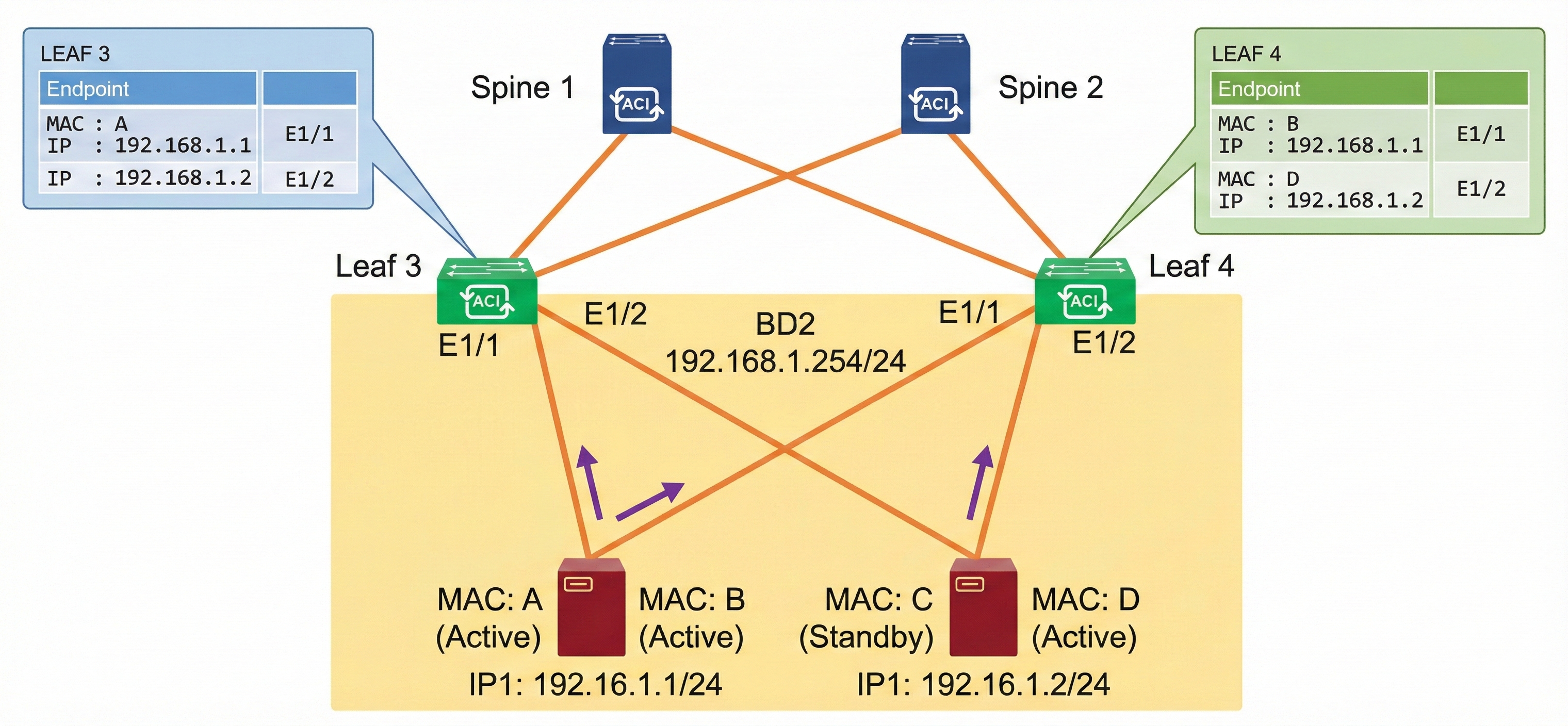
With the Rogue EP Control enabled, once the endpoint is marked as rogue, a fault is raised and learning is disabled for the endpoint only, which allows other endpoints in the same bridge domain to function as usual as shown in the figure below. After the administrator identifies the issue based on the fault, the design that caused this issue can be corrected, for example, by changing the NIC teaming configuration or disabling IP Data-plane Learning on the VRF.
Considerations for enabling Rogue EP Control are as follows:
- If the Rogue EP Control is enabled, Ep Loop Protection and Endpoint Move Dampening via Endpoint Retention Policy will not take effect.
- It does not distinguish between local or remote moves; any type of interface change is considered an endpoint move.
- The endpoint moves for Rogue EP Control are counted for MAC and IP addresses separately, even though an endpoint in ACI contains both MAC and IP addresses. This is because IP addresses may move around, and be learned on multiple MAC addresses while the MAC addresses themselves did not move. When the move count of an IP address exceeds the threshold, only the IP address is marked as rogue. When the move count of a MAC address exceeds the threshold, the MAC and any IP addresses associated to the MAC at that time are marked as rogue
- Changing the Hold Interval will not affect existing rogue endpoints’ hold timer.
- This feature works within a site. This feature is not designed for detecting endpoint moves between sites or between the main location and the remote leaf location.
- Disabling the Rogue EP Control will clear all existing rogue endpoints.
IP Aging Policy
When enabled, the IP aging policy ages unused IPs on an endpoint. When the administrative state is enabled, tracking is performed by using the endpoint retention policy, which is configured for the bridge domain to send ARP requests (for IPv4) and neighbor solicitations (for IPv6) to track IPs on endpoints. If no response is given, the policy ages the unused IPs.
Videos

Comment
TABLE OF CONTENTS
RECENT POSTS
- Exploring Cisco ISE Authorization Policy Elements
- Understanding Cisco ISE Authentication and Authorization Policies
- Installing Context-Aware Network Access Control using Cisco ISE Policies
- Designing Network Access Control that is Scalable using Cisco ISE Architecture
- Enterprise Network Access Control and Policy Enforcement using Cisco ISE
- Secure Device Administration and Network Access Using AAA Architecture
- Designing Enterprise-Class Hybrid Cloud Connectivity Using AWS Networking Services
- Exploring Core AWS Networking and Messaging Concepts for Modern Cloud Architectures
- Understanding Key AWS Services for Modern Cloud Architectures
- Building a Strong AWS Foundation with Amazon S3, EC2, and Virtual Private Cloud



LEAVE A COMMENT
Please login here to comment.