
EMAIL SUPPORT
dclessons@dclessons.comLOCATION
USVerifying VLANs and Endpoints
During troubleshooting, you should know how to verify the VLANs in the Cisco ACI fabric, inspect the different VLAN classes, and track and verify the connected endpoints. You can utilize the Cisco APIC GUI and CLI interface.
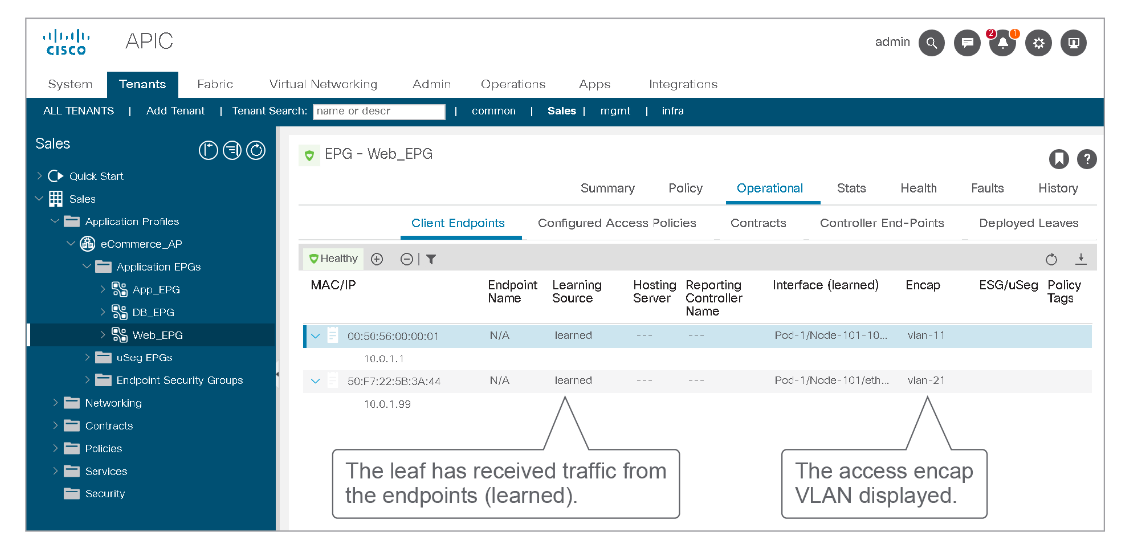
When you expand a specific EPG while navigation to Tenants > Tenant_name > Application Profiles > Application_profile_name > Application EPGs > EPG_name in the Cisco APIC GUI, you can click on the Operational tab in the work pane, to access the Client Endpoints tab underneath. It will display all endpoints that belong to the base EPG, including the access encapsulation VLAN information, as in this figure:
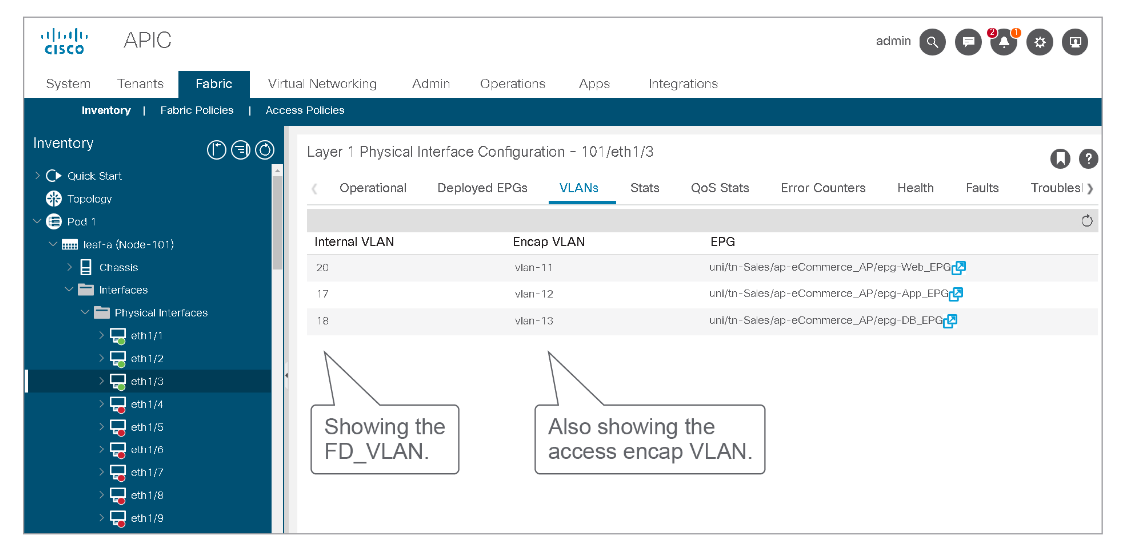
If you want to see the connection between the access encapsulation VLAN and the FD_VLAN, you should access the interface information using Fabric > Inventory > Pod > Leaf_switch > Interfaces > Physical Interfaces > Interface, and can click on the VLAN tab in the work pane.
You can obtain similar information and display the endpoints learned on a leaf switch using the show endpoint detail [vrf <name> | ip | mac | int | vlan | detail] command. It will also display the access encapsulation VLAN and FD_VLAN. The following example shows the output:
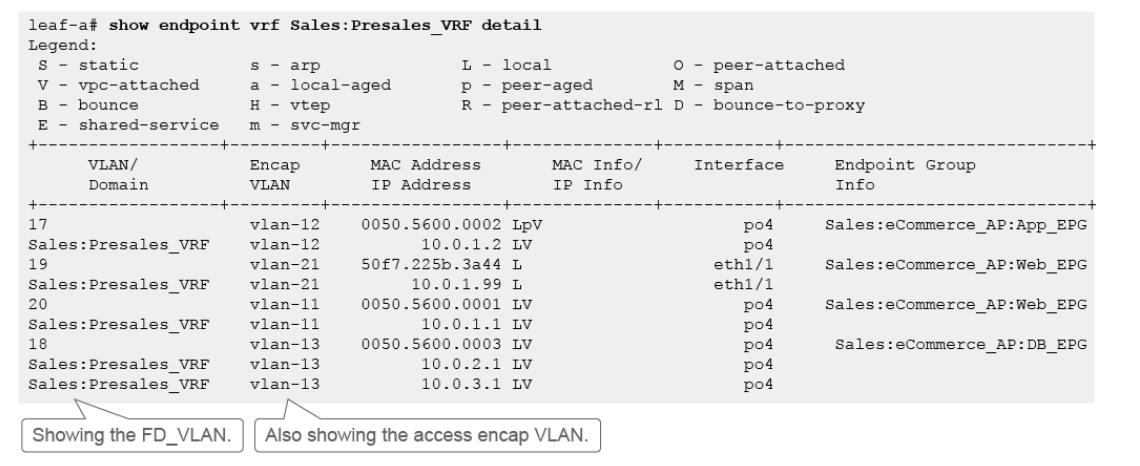
Using the CLI on the leaf switch you can see which VLANs are provisioned on the switch, and Platform Independent (PI) VLANs and their mapping to the access encapsulation VLANs. Still, if you use the show vlan brief command on the leaf switch, only FD and BD VLANs (PI VLANs) will be displayed, and not the access encapsulation VLANs.
Videos

Comment
TABLE OF CONTENTS
RECENT POSTS
- Exploring Cisco ISE Authorization Policy Elements
- Understanding Cisco ISE Authentication and Authorization Policies
- Installing Context-Aware Network Access Control using Cisco ISE Policies
- Designing Network Access Control that is Scalable using Cisco ISE Architecture
- Enterprise Network Access Control and Policy Enforcement using Cisco ISE
- Secure Device Administration and Network Access Using AAA Architecture
- Designing Enterprise-Class Hybrid Cloud Connectivity Using AWS Networking Services
- Exploring Core AWS Networking and Messaging Concepts for Modern Cloud Architectures
- Understanding Key AWS Services for Modern Cloud Architectures
- Building a Strong AWS Foundation with Amazon S3, EC2, and Virtual Private Cloud



LEAVE A COMMENT
Please login here to comment.