
EMAIL SUPPORT
dclessons@dclessons.comLOCATION
USConfiguring Application Aware Routing
Application-aware routing policy affects traffic which flows from Service Side VPN to Tunnel WAN side of vEdge Router.
This policy matches the application with SLA, which is data plane tunnel performance characteristic which is necessary to transfer that application data traffic and which helps to optimize the path for data traffic being transmitted by vEdge Router.
An AAR policy is a type of centralized data policy, consisting of a series of numbered (ordered) sequences of match-action pairs that are evaluated in order, from lowest sequence number to highest sequence number. When a data packet matches one of the match conditions, an SLA action is applied to determine the data plane tunnel that is used to transmit the packet. If a packet matches no parameters in any of the policy sequences, and if no default SLA class is configured, the packet is accepted and forwarded without consideration of SLA. Because the AAR policy accepts nonmatching traffic by default, it is considered a positive policy. Other types of policies in the Cisco SD-WAN software are negative policies because they drop nonmatching traffic by default.
The Cisco WAN Edge device has an integrated DPI engine to identify and classify applications, including voice and video, email, file sharing, gaming, peer-to-peer, and cloud-based applications. Cisco IOS XE SD-WAN Edge routers use Network-Based Application Recognition 2 (NBAR2) to identify various applications from the network traffic flows using Layer 3 to Layer 7 data. Cisco IOS XE SD-WAN Edge routers can incorporate Software-Defined Application Visibility and Control (SD-AVC) along with the NBAR2 DPI engine providing the capability to inspect and classify the flows on the first packet. Once the applications are classified, policies can use this information to match the application or application list, or both, and influence the traffic.
The AAR policy is used to set the SLA. The SLA specifics the network path characteristics (loss, latency, and jitter) that the application can handle for optimized performance. The Cisco vManage GUI centralized policy wizard provides network administrator options to define custom SLAs or use the predefined SLAs:
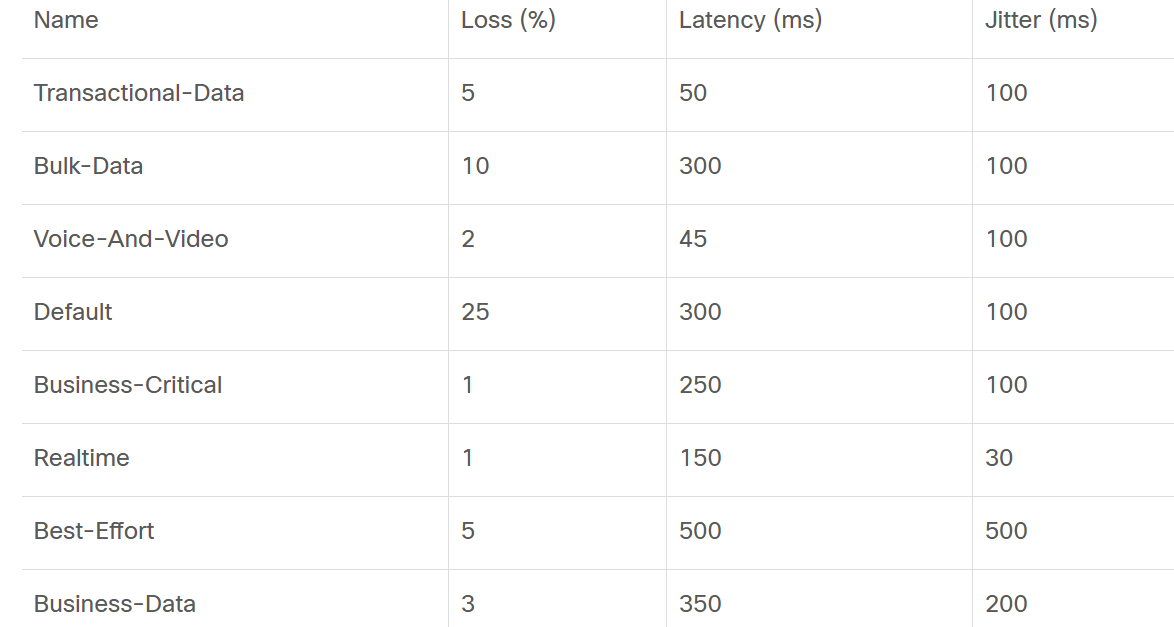
The predefined SLA values (loss, latency, and jitter) are round-trip measurements and are specific to the WAN transport characteristics. The predefined SLA class values, shown in the table, might or might not fit all deployment needs. The Cisco vManage GUI provides the flexibility to define the custom SLA class instead of using the predefined SLA class.
Careful consideration should be taken when choosing the SLA values. Choosing a more aggressive value might cause an undesired result with too many SLA violations, while choosing a more relaxed value might not yield the desired result for the enterprise.
To configure an AAR policy, use the Cisco vManage GUI policy configuration wizard.

The wizard consists of four sequential screens that guide you through the process of creating and editing policy components:
-
Create Applications or Groups of Interest: Create lists that group the related items and that you call in the match or action components of a policy.
-
Configure Topology: Create the network structure to which the policy applies.
-
Configure Traffic Rules: Create the match and action conditions of a policy.
-
Apply Policies to Sites and VPNs: Associate policy with sites and VPNs in the overlay network.
CLI Configure Procedure:
Create a list of SDWAN Viptela overlay sties on which the application-aware routing policy is to be applied (in the apply-policy command):
vSmart(config)# policy
vSmart(config-policy)# lists site-list list-name
vSmart(config-site-list)# site-id site-id
Create SLA classes and traffic characteristics which will be used by application data traffic to match:
vSmart(config)# policy sla-class sla-class-name
vSmart(config-sla-class)# jitter milliseconds
vSmart(config-sla-class)# latency milliseconds
vSmart(config-sla-class)# loss percentage
For identification of application traffic of interest create lists of applications, IP prefixes, and VPNs
vSmart(config)# policy lists
vSmart(config-lists)# app-list list-name
vSmart(config-app-list)# (app application-name | app-family family-name)
vSmart(config-lists)# prefix-list list-name
vSmart(config-prefix-list)# ip-prefix prefix/length
vSmart(config-lists)# vpn-list list-name
vSmart(config-vpn-list)# vpn vpn-id
Create instance of an application-aware routing policy and associate it with a list of VPNs:
vSmart(config)# policy app-route-policy policy-name
vSmart(config-app-route-policy)# vpn-list list-name
Within the policy, create one or more numbered sequences of match–action pairs, where the match parameters define the data traffic and applications of interest and the action parameters specify the SLA class to apply if a match occurs.
Create a sequence
vSmart(config-app-route-policy)# sequence number
Define match parameters for data packets:
vSmart(config-sequence)# match parameters
Define the action to take if a match occurs with any combinations:
- (Option 1) Define SLA class. If no available tunnels meet the SLA criteria, drop traffic:
vSmart(config-sequence)# action sla-class sla-class-name strict
- (Option 2) Define SLA class. If no available tunnels meet the SLA criteria, use the tunnel color specified as backup:
vSmart(config-sequence)# action sla-class sla-class-name
vSmart(config-sequence)# action backup-sla-preferred-color colors
- (Option 3) Define SLA class and preferred tunnel color. If no available tunnels meet the SLA criteria, drop traffic:
vSmart(config-sequence)# action sla-class sla-class-name preferred-color colors strict
- (Option 4) Define SLA class and preferred tunnel color. If no available tunnels meet the primary SLA criteria, use the tunnel color specified as backup:
vSmart(config-sequence)# action sla-class sla-class-name preferred-color colors
vSmart(config-sequence)# action backup-sla-preferred-color colors
The Preferred-color identify to use the specific tunnel when data traffic matches SLA class. If more than one tunnel match the SLA, traffic is sent to preferred tunnel and if preferred color tunnel is not available, traffic is sent to any available tunnel
Strict or backup-sla-preferred-color is used to determine how to handle data traffic if no tunnel matches SLA. Use strict keyword to drop traffic if no tunnel match SLA.
If a data packet does not match any condition, a default action is taken which will accept all non-matching traffic and forward it with no SLA consideration by following configuration.
vSmart(config-policy-name)# default-action sla-class sla-class-name
Apply the policy to a site list:
vSmart(config)# apply-policy site-list list-name app-route-policy policy-name
SLA Class:
SLA class is set of parameter which defines maximum jitter, maximum latency, maximum packet loss which is application aware routing policy uses to select best path. Following are the parameters used:
- Jitter milliseconds (1 through 1000 milliseconds)
- Latency Milliseconds (1 through 1000 milliseconds)
- Loss percentage ( o through 100 percent )
Match Parameter:
Following are the match parameter which Application-aware routing policy matches IP Prefixes, and fields in IP header.
- Match all packets: Omit match command
- Application or Application families: app-list listname
- Group of destination prefixes: destinationdata- prefixlist listname
- Destination port number: destinationport number 0 through 65535.
- DSCP value: dscp number 0 through 63
- Internet Protocol number: protocol number 0 through 255
- Packet loss priority (PLP): plp (high | low) By default, packets have a PLP value of low.
How Application Aware Routing policy is applied with combination with other Data policies:

Comment
-
GP
This course is ideal for those who want to learn the best practices for configuring routing protocols in the data center and the branch. In addition to this, it will help them implement advanced control, data, and application-aware policies.
-
OK
The course content is good. After completing this I am more confident to learn the best practices for configuring routing protocols in the data center and the branch. I'm really loving the information, everything is explained in detail and with examples. This is one of the best courses available in the market on application-aware routing. It helped me a lot in changing my career into routing.
TABLE OF CONTENTS
- Onboarding & Provisioning Configuring Templates
- Authentication between vSmart & vBond
- Authentication between vSmart Controller
- Authentication between vBond & vEdge Router
- Authentication between vEdge Router & vManage NMS
- Authentication between vSmart Controller & vEdge Router
- Viptela Specific Port Terminology
- Deploy & Configure vManage & Generate Certificate
- Deploy & Configure vBond & Generate Certificate
- Deploy & Configure vSmart & Generate Certificate
- Configure vEdge & Generate Certificate
- SDWAN & NAT
- Secure DataPlane Bringup
- Enterprise CA for SDWAN Instances
- ZTP Process & PnP Overview
- Control Plane & Data Plane Operation - Unicast Routing Overview
- Configuring OMP & Its attributes
- Configure Unicast Overlay Routing
- Routing Configuration Example
- Segmentation Overview
- Configuring Segmentation
- Segmentation Configuration Example
- Data Traffic across Private WANs
- NAT in SDWAN & Data Encryption
- SD-WAN Viptela Policy Overview
- SD-WAN Centralized & Localized Control Policy Overview
- SD-WAN Centralized & Localized Data Policy
- Service Chaining
- Traffic Flow Monitoring
- vEdge Router as NAT Device
- Zone Based Firewalls
- Configure Centralized Control Policy
- Configuring Centralized Data Policy
- Configuring Cflowd Traffic Monitoring
- Configuring Zone based Firewall
- Service Chaining Configuration Example
- Configuring Service Side NAT
- Configuring Transport side NAT
- Control Policy Example 1: Hierarchical Topology
- Multi-Region Fabric
- Control Policy Example 2: Implementing Traffic Engineering
- Control Policy Example 2: Dynamic On-Demand Tunnels
- LAB Deploy Cisco SD-WAN Edge Routers
- LAB Deploy SDWAN Controllers
- LAB Deploy Cisco SD-WAN Devices Using Configuration Group
- LAB Implement Service-Side Routing Protocols
- LAB Implement TLOC Extensions
- LAB Implement Control Policies
- LAB Implement Data Policies
- LAB Implement Application-Aware Routing
- LAB Implement Branch and Regional Internet Breakouts
- LAB Migrate Branch Sites
RECENT POSTS
- Installing Context-Aware Network Access Control using Cisco ISE Policies
- Designing Network Access Control that is Scalable using Cisco ISE Architecture
- Enterprise Network Access Control and Policy Enforcement using Cisco ISE
- Secure Device Administration and Network Access Using AAA Architecture
- Designing Enterprise-Class Hybrid Cloud Connectivity Using AWS Networking Services
- Exploring Core AWS Networking and Messaging Concepts for Modern Cloud Architectures
- Understanding Key AWS Services for Modern Cloud Architectures
- Building a Strong AWS Foundation with Amazon S3, EC2, and Virtual Private Cloud
- Understanding the ENSDWI Course: Advanced Cisco SD-WAN (Viptela) Concepts
- A Complete Guide to the DCACI-A Course: Mastering Advanced Cisco ACI Concepts



LEAVE A COMMENT
Please login here to comment.