
EMAIL SUPPORT
dclessons@dclessons.comLOCATION
USZTDA SAML Authentication
After understanding identity integration in Zscaler’s Zero Trust Exchange, the next step is learning SAML (Security Assertion Markup Language)—a key technology that enables secure, seamless access to applications through identity federation.
SAML works like a shared language between systems, allowing users to authenticate once and access multiple applications without repeated logins. It relies on three core components:
- Service Provider (SP)
The application or service the user wants to access. It acts as the gatekeeper and requests authentication. In this context, Zscaler serves as an SP. - Identity Provider (IdP)
The trusted system that verifies the user’s identity (e.g., corporate login portal). It confirms who the user is and communicates this to the SP. - Security Assertion
A digital proof issued by the IdP after successful authentication. It contains user attributes and is used by the SP to grant access.
Together, these components ensure secure, streamlined access across services—forming the backbone of the SAML-based single sign-on (SSO) experience.
SAML Authentication Workflow
When a user attempts to access an application—whether a public SaaS app like Salesforce or a private app delivered through Zscaler Private Access—the SAML authentication process begins automatically if the user is not already authenticated.
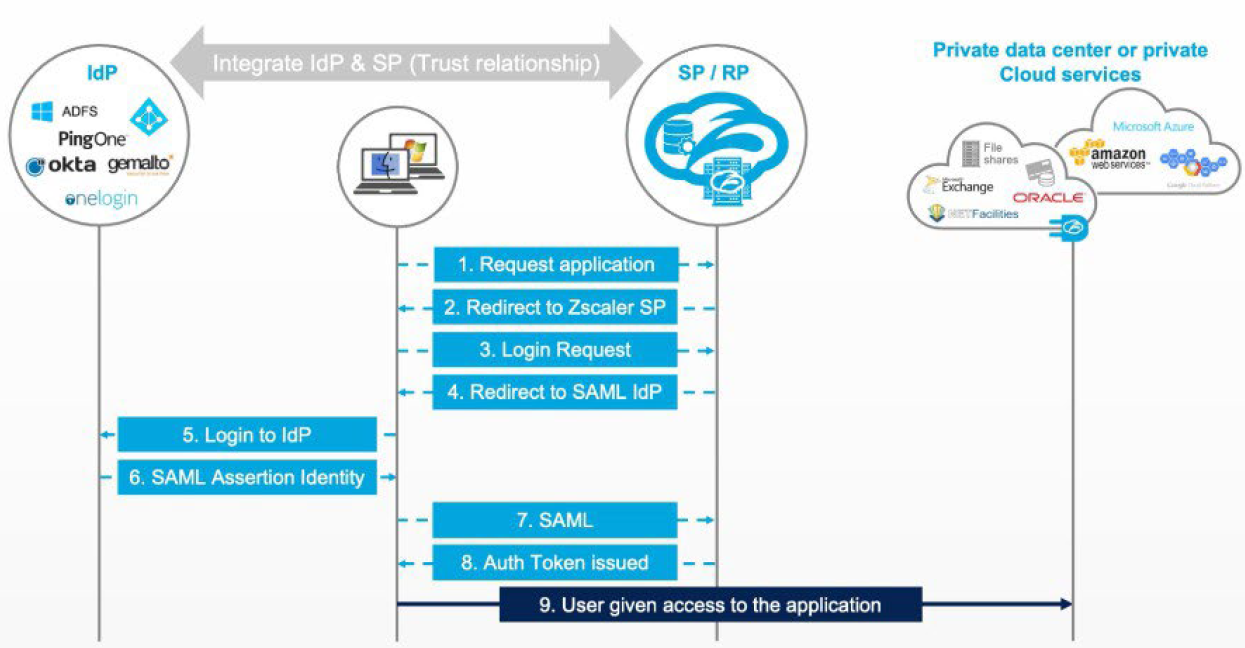
- Application Request Triggers Authentication
- The user requests an application.
- Because they are not authenticated, Zscaler Internet Access (ZIA) or Zscaler Private Access (ZPA) redirects them for authentication.
- Zscaler Sends a SAML Authentication Request
- Zscaler sends a SAML authentication request to the configured Identity Provider (IdP).
- The IdP must trust Zscaler as a Service Provider (SP) for the request to be honored.
- Identity Provider Authenticates the User
- The IdP challenges the user based on its authentication policy—this could be:
- Username/password
- Kerberos
- Multi‑factor authentication (MFA)
- The IdP may also collect additional user attributes or group memberships to include in the SAML assertion.
- IdP Issues a Cryptographically Signed SAML Assertion
- The IdP builds a SAML assertion, secures it with a digital signature, and returns it to the user’s browser.
- The browser uses an automatic form POST (JavaScript‑submitted) to deliver the assertion to Zscaler, appearing seamless to the user.
- Zscaler Validates the Assertion
- Zscaler checks the digital signature to confirm authenticity and ensure the assertion wasn’t tampered with.
- Once validated, Zscaler:
- Issues an authentication token (for Zscaler Client Connector), or
- Issues a cookie (for browser‑based access).
- Access Resumes Through the Zero Trust Exchange
- With authentication complete, the original application request continues securely through the Zscaler Zero Trust Exchange.
Quick Recap
- What starts the process?
A user tries to access an application and gets redirected to ZIA or ZPA because they aren’t authenticated. - What does the IdP do?
Authenticates the user based on policy, gathers user attributes, creates and signs a SAML assertion. - What does Zscaler do with the assertion?
Verifies it, issues an authentication token or cookie, and allows the user to proceed through the Zero Trust Exchange.
SAML enhances both security and user experience by allowing users to access multiple services using a single set of credentials, reducing repeated logins and enabling smoother workflows. At its core, SAML relies on three main components:
- Service Provider (SP) – The application or service the user wants to access. It relies on a trusted identity provider to authenticate users.
- Identity Provider (IdP) – The system that verifies user identity and sends authentication information to the SP.
- Security Assertions – Cryptographically signed messages sent by the IdP to the SP, containing verified identity details and authorization attributes.
SAML enables Single Sign-On (SSO) and identity federation, allowing users to authenticate once and access many applications seamlessly.
The authentication flow works by having the SP initiate an authentication request, which the IdP processes. After validating the user, the IdP issues a secure SAML assertion to the SP. The SP then uses this assertion to grant access, completing the SSO process.
Now that you have an understanding of SAML authentication and its workflow, let’s take
a look at the next identity integration, SCIM, which works to provide authorization and
revoke access for disabled users.
SCIM Authorization
While SAML focuses on securely exchanging authentication and authorization information between an Identity Provider (IdP) and a Service Provider (SP) to enable Single Sign‑On (SSO), SCIM (System for Cross‑Domain Identity Management) extends identity management further. SCIM provides a standardized, automated method for creating, updating, and synchronizing user identities across multiple applications and systems.

Comment
TABLE OF CONTENTS
RECENT POSTS
- Understanding Cisco ISE Authentication and Authorization Policies
- Installing Context-Aware Network Access Control using Cisco ISE Policies
- Designing Network Access Control that is Scalable using Cisco ISE Architecture
- Enterprise Network Access Control and Policy Enforcement using Cisco ISE
- Secure Device Administration and Network Access Using AAA Architecture
- Designing Enterprise-Class Hybrid Cloud Connectivity Using AWS Networking Services
- Exploring Core AWS Networking and Messaging Concepts for Modern Cloud Architectures
- Understanding Key AWS Services for Modern Cloud Architectures
- Building a Strong AWS Foundation with Amazon S3, EC2, and Virtual Private Cloud
- Understanding the ENSDWI Course: Advanced Cisco SD-WAN (Viptela) Concepts



LEAVE A COMMENT
Please login here to comment.