
EMAIL SUPPORT
dclessons@dclessons.comLOCATION
USLAB Implement VRF Route Leaking
Topology:
Task:
You will configure two VRF route leaking scenarios:
-
A service to be shared across VRFs is in the provider EPG. This configuration fits best in situations when a shared service is located in an EPG associated with a dedicated VRF and multiple consumer EPGs access the shared service. This scenario is implemented with an EPG subnet and one-way contract (provided in the shared service EPG and consumed by all client EPGs)
-
Two-way consumer/provider relationship. This configuration is best suited when two EPGs, associated with different VRFs, act as both consumers and providers for one another. This scenario is implemented with BD subnets and two-way contracts.
Solution
Configure VRF Route Leaking in Shared Services Scenario
To implement the shared services scenario, you will configure new objects on the provider side: VRF, bridge domain, EPG, and EPG subnet (10.0.4.254/24). You will modify the consumer BD subnet (10.0.1.254/24) in the Presales_BD to be shared between VRFs. Finally, a contract (WebServices_Ct) will enable traffic between the provider EPG (SharedServices_EPG) and the consumer EPG (Web_EPG), as shown in the following
Fig
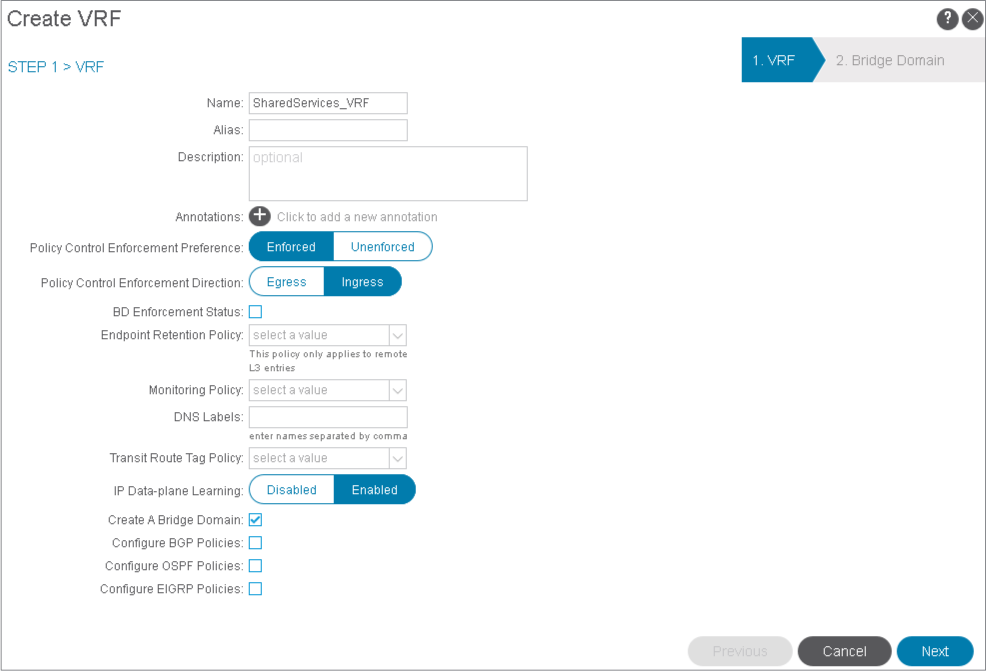
Go to Tenants > Sales > Networking, right-click VRFs, and choose Create VRF. You will create a new VRF (SharedServices_VRF) that will include the shared services EPG (provider EPG).
Name the VRF SharedServices_VRF and click Next.
Create a bridge domain SharedServices_BD and click Finish to complete the configuration.
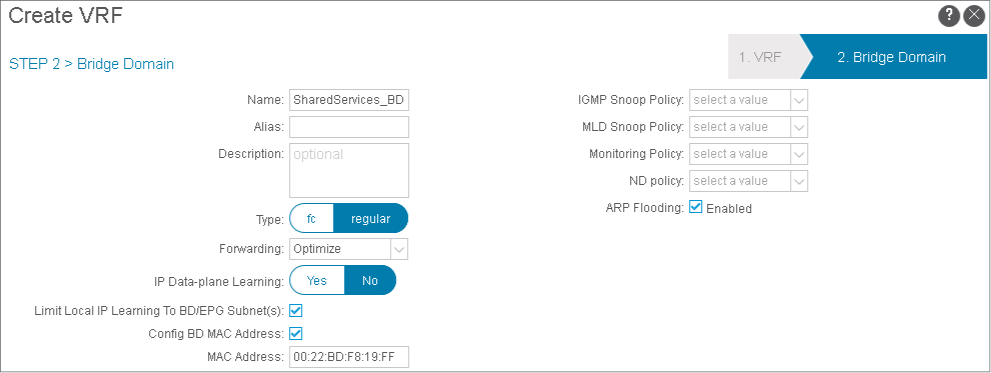
In the Shared Services VRF route leaking scenario, you will not configure a subnet for the SharedServices_BD. You will configure a subnet within the provider EPG instead.
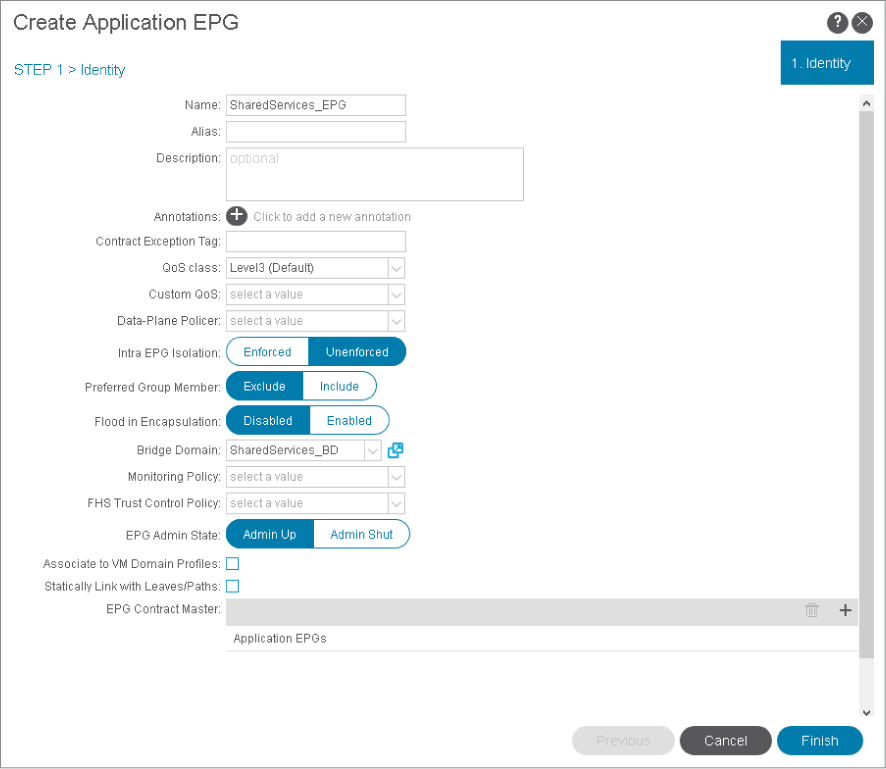
Go to Application Profiles > eCommerce_AP, right-click Application EPGs, and choose Create Application EPG.
You will create SharedServices_EPG and associate it with the SharedServices_BD. Create the EPG SharedServices_EPG, associate it with SharedServices_BD, and click Finish.
Right-click SharedServices_EPG, choose Add Physical Domain Association, click Sales_PhyDom, and click Submit.
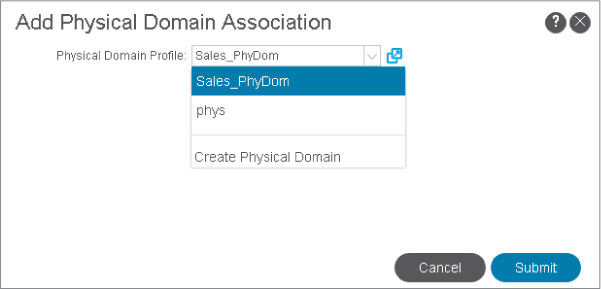
The EPG association with the physical domain Sales_PhyDom specifies the physical resources that the EPG can use.
Expand SharedServices_EPG, right-click Subnets, and choose Create EPG Subnet.
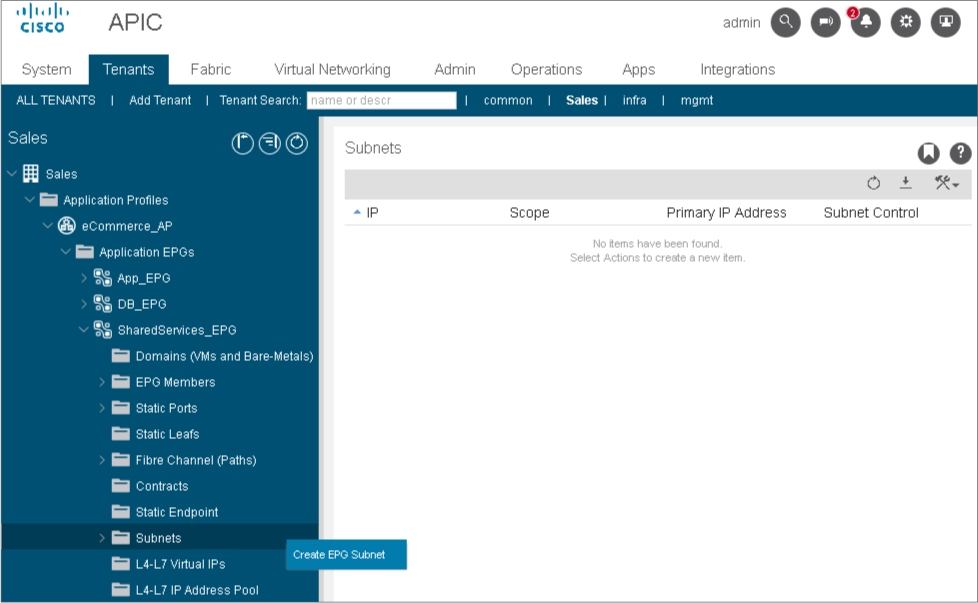
Create EPG subnet 10.0.4.254/24, set the scope to Shared between VRFs and click Submit.
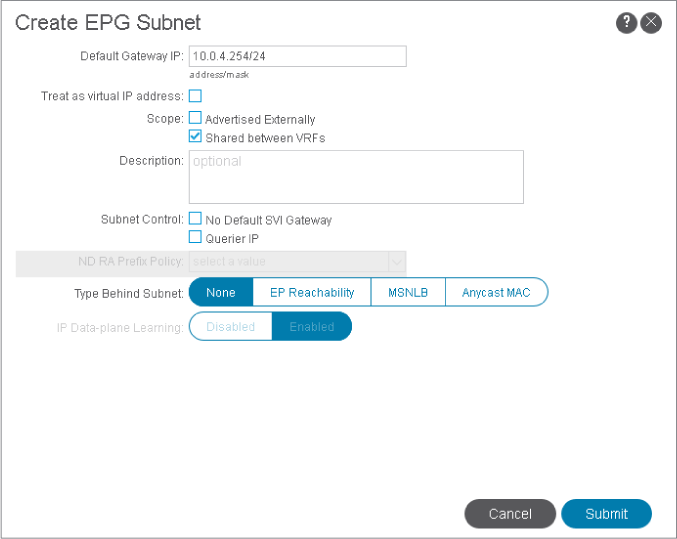
The EPG subnet will work as a pervasive gateway for all other EPGs in the same BD just like a normal BD subnet.
The Shared between VRFs scope allows the subnet can be shared with and exported to multiple VRFs in the same tenant or across tenants as part of a shared service. An EPG that provides a shared service to other VRFs must have its subnet configured under that EPG (not under a bridge domain).
Go to the bridge domain Presales_BD and expand its Subnets. Choose 10.0.1.254/24, set the scope to Shared between VRFs, click Submit and Submit Changes.
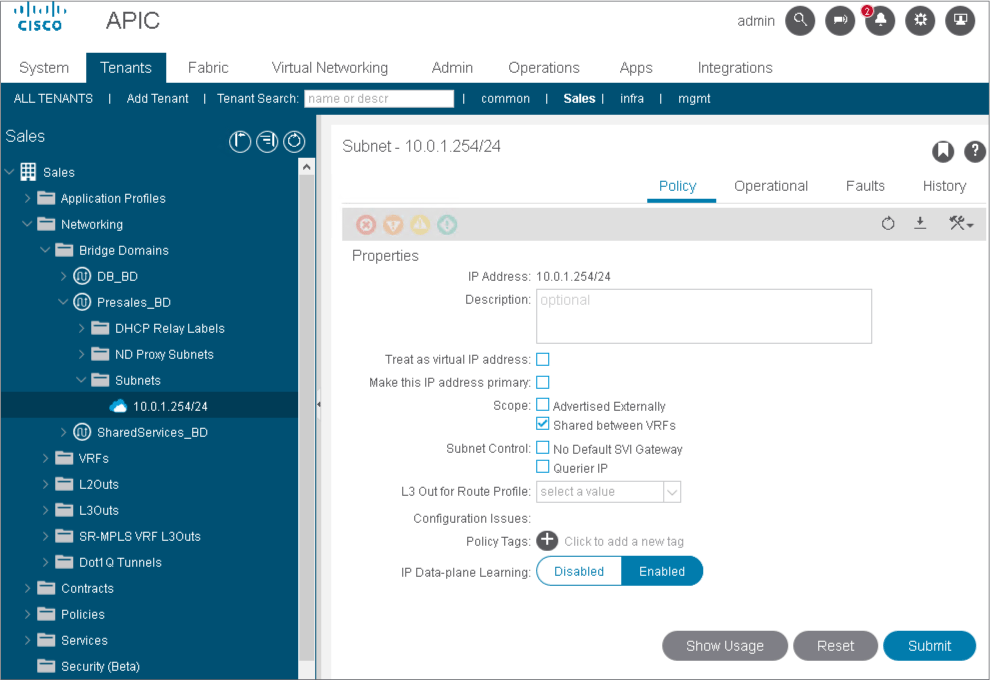
On the consumer side, the BD subnet must be shared (leaked) to other VRFs within the same tenant or across tenants as part of a shared service.
Use PuTTY to connect to leaf-a and leaf-b.
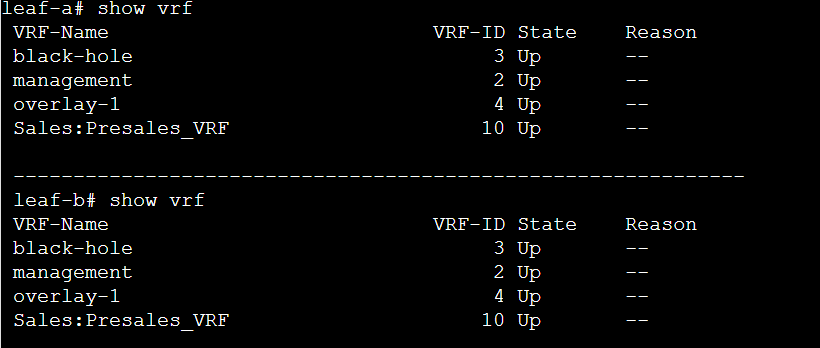
The new VRF does not appear on either leaf, because the new VRF, BD and EPG do not yet specify on which leaf they should be deployed. They will show up after defining VLANs and leaf interfaces for the EPG, known as path bindings. There are two types of path bindings, static and dynamic. The dynamic path bindings occur via VMM domain integration.
In the APIC user interface, right-click the SharedServices_EPG, choose Deploy Static EPG on PC, vPC or Interface, configure a static path binding with the following parameters, click Next, and Submit.
-
Path Type: Port
-
Node: leaf-b
-
Path: eth1/3 (interface that is attached to ESXi)
-
Port Encap (or Secondary VLAN for Micro-Seg): VLAN 13
-
PTP State: Disabled
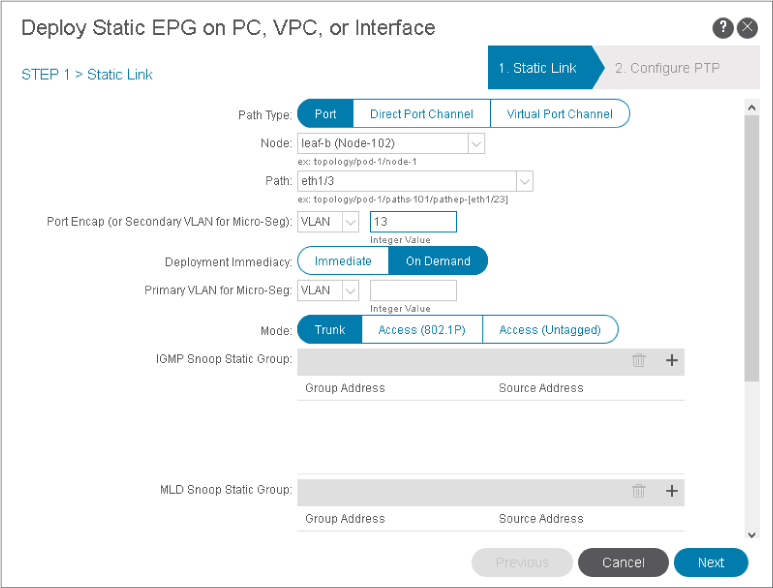
Having configured a static path binding on leaf-b, you will re-examine the VRFs on both leafs.
On leaf-a and leaf-b, re-examine the VRFs.The new VRF appears only on leaf-b, where a physical resource has been allocated.

Comment
TABLE OF CONTENTS
RECENT POSTS
- Exploring Cisco ISE Authorization Policy Elements
- Understanding Cisco ISE Authentication and Authorization Policies
- Installing Context-Aware Network Access Control using Cisco ISE Policies
- Designing Network Access Control that is Scalable using Cisco ISE Architecture
- Enterprise Network Access Control and Policy Enforcement using Cisco ISE
- Secure Device Administration and Network Access Using AAA Architecture
- Designing Enterprise-Class Hybrid Cloud Connectivity Using AWS Networking Services
- Exploring Core AWS Networking and Messaging Concepts for Modern Cloud Architectures
- Understanding Key AWS Services for Modern Cloud Architectures
- Building a Strong AWS Foundation with Amazon S3, EC2, and Virtual Private Cloud



LEAVE A COMMENT
Please login here to comment.