
EMAIL SUPPORT
dclessons@dclessons.comLOCATION
USLAB Configure Transit Routing
Topology:
Task:
- Configure a L3Out to an external Cisco Nexus Switch running in Cisco Nexus Operating System (Cisco NX-OS) mode.
- The peering between the Cisco ACI and the external Cisco Nexus Switch will be established using Border Gateway Protocol (BGP).
- Enable contract-defined connectivity between the two L3Outs
Solution:
In this lab we have already configured the OSPF_L3Out , Which enables an Open Shortest Path First (OSPF) exchange between leaf-b and an external Cisco Catalyst Switch.
Configure Access Policies for the BGP_L3Out
Go to Fabric > Access Policies > Interfaces > Leaf Interfaces > Policy Groups > Leaf Access Port. Examine the interface policy group ExtL3_IPG that you will use for the BGP_L3Out.
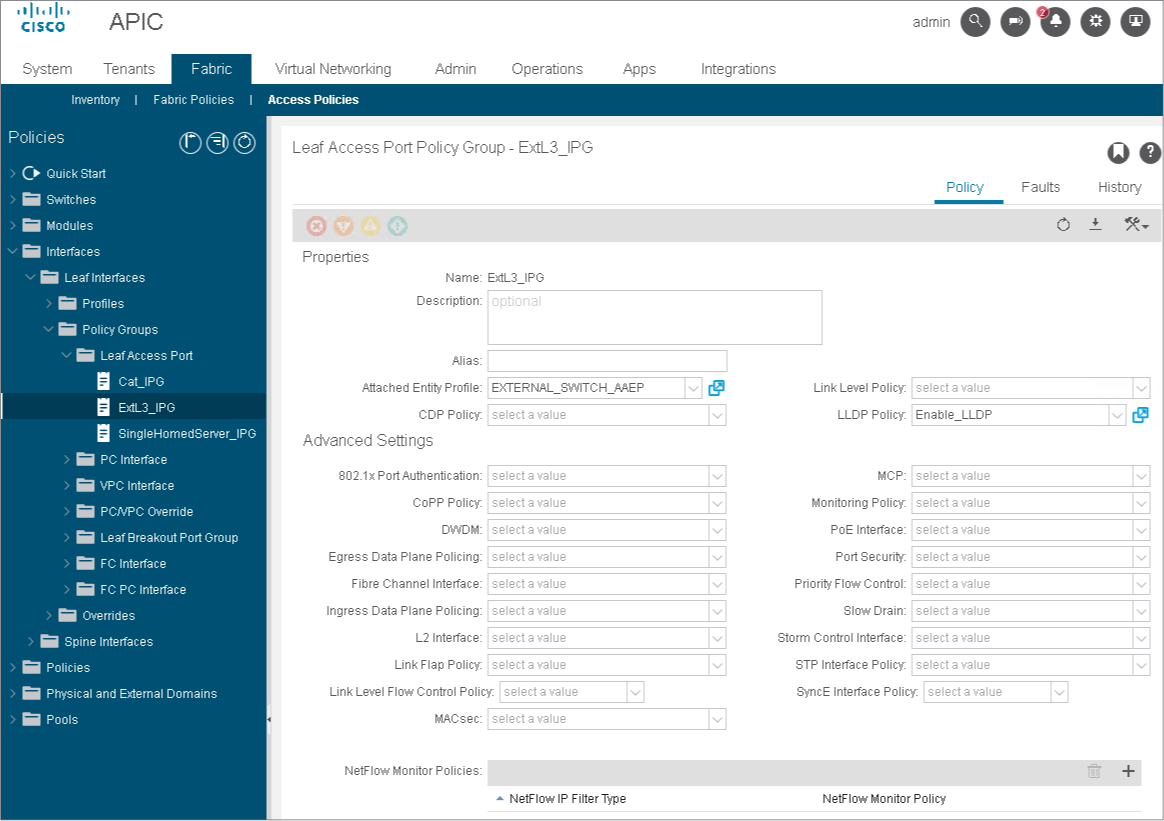 The interface policy group ExtL3_IPG references the EXTERNAL_SWITCH_AAEP, associated with the Layer 3 domain ExtL3Dom.
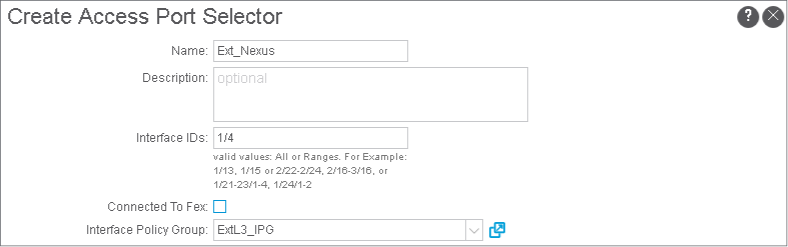
In Fabric > Access Policies > Interfaces > Leaf Interfaces > Profiles, choose LEAF101_IFP, and click + and Continue to configure an interface selector. Add the interface selector Ext_Nexus with the interface ID 1/4 and associate it with the interface policy group ExtL3_IPG. Click Submit.
The interface profile should have three interface selectors:
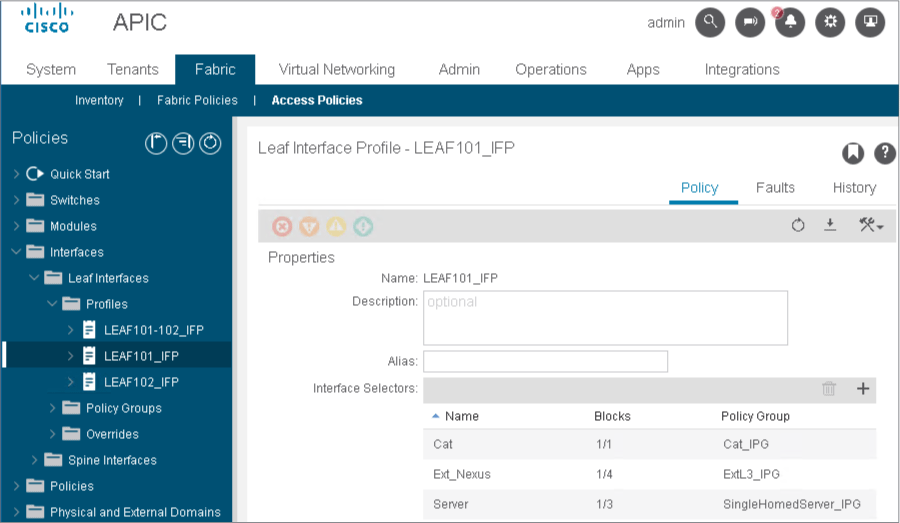
The interface profile LEAF101_IFP has been configured as a container for all access connections on leaf-a. You use it also for the L3Out connection to the external Cisco Nexus Switch Inter-Pod Network (IPN).
Configure BGP_L3Out and Establish EBGP Session
The external Cisco Nexus Switch has been preconfigured with AS 65002 and the border leaf should act as a peer in AS 65003.
Within your tenant Sales, expand Networking, right-click L3Outs, choose Create L3Out.
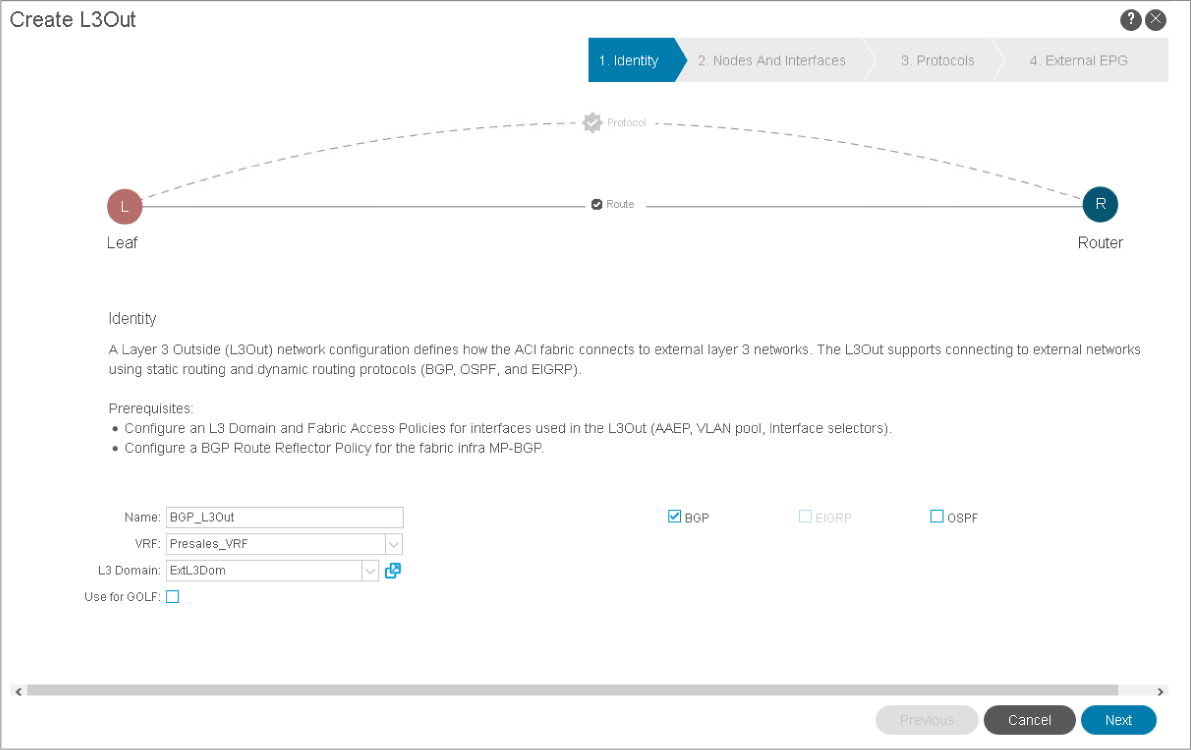
Start the configuration of a L3Out with these settings:
-
Name: BGP_L3Out
-
VRF: Presales_VRF
-
L3 Domain: ExtL3Dom
-
Routing protocol: BGP And then click Next.
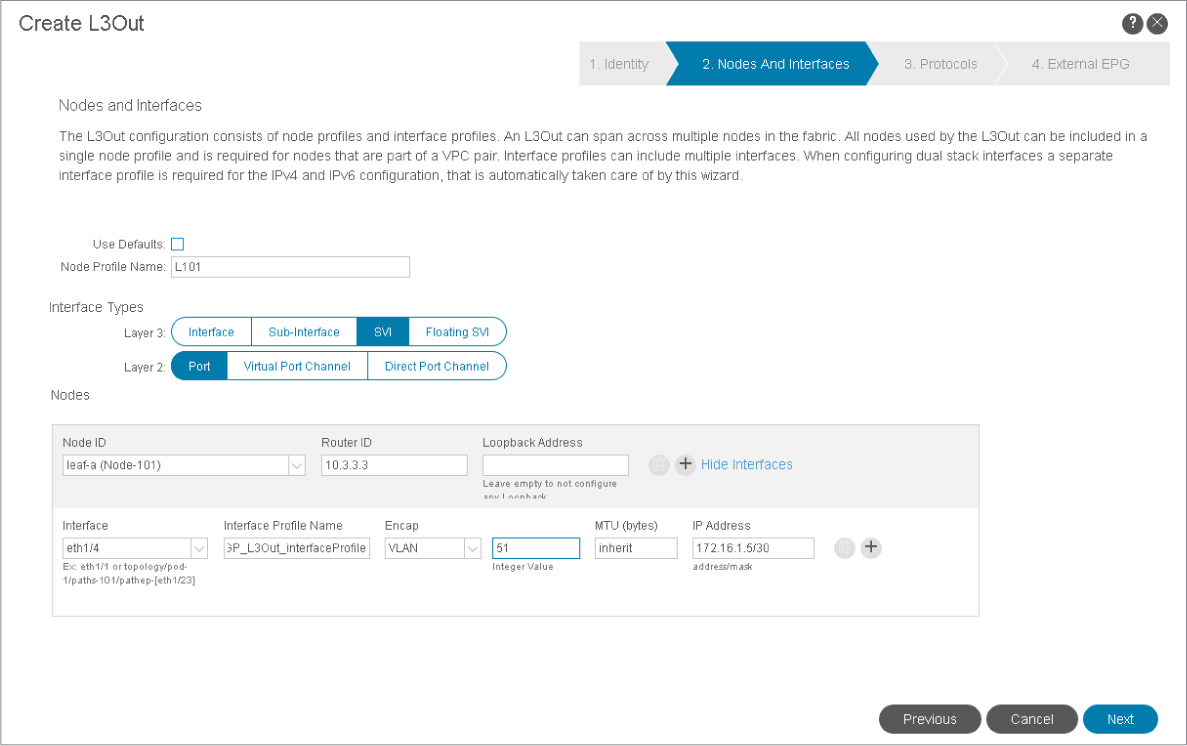
Navigate to the Nodes and Interface page.
Enter these settings:
-
Clear the Use Defaults check box, allowing you to enter a custom node profile name.
-
Node Profile Name: L101
-
Layer 3 Interface Type: SVI.Recall the interface types for external Layer 3 connections: routed interfaces, routed subinterfaces, SVIs, and floating SVIs. You will implement the SVIs, which allow multiple connections over a single physical link.
-
Layer 2 Interface Type: Port
-
Node ID: leaf-a (Node-101)
-
Router ID: 10.3.3.3
-
Delete the Loopback Address. You do not need to configure a loopback on the border leaf. Only the router ID is mandatory. You would use this option if the BGP peering should be sourced from a loopback.
-
Interface: eth1/4
-
Interface Profile Name: BGP_L3Out_interfaceProfile (keep the default value).
-
Encap: VLAN
-
VLAN ID: 51. 802.1Q tagging supports multiple logical connections over the physical link. The subinterface with the tag 51 is used for L3Out connectivity. This VLAN ID must belong to the static VLAN pool associated with the Layer 3 domain (51-60) that you assigned to the L3Out.
-
MTU: inherit. The default value on the ACI switches is 9216.
-
IP Address: 172.16.1.5/30. It will be applied the IP address on the SVI on the border leaf.
-
And then click Next.
Navigate to the Protocols page.
Under Interface Policies for eth1/4, enter these settings:
-
Peer Address: 172.16.1.6
-
Remote ASN: 65002 Then click Next.
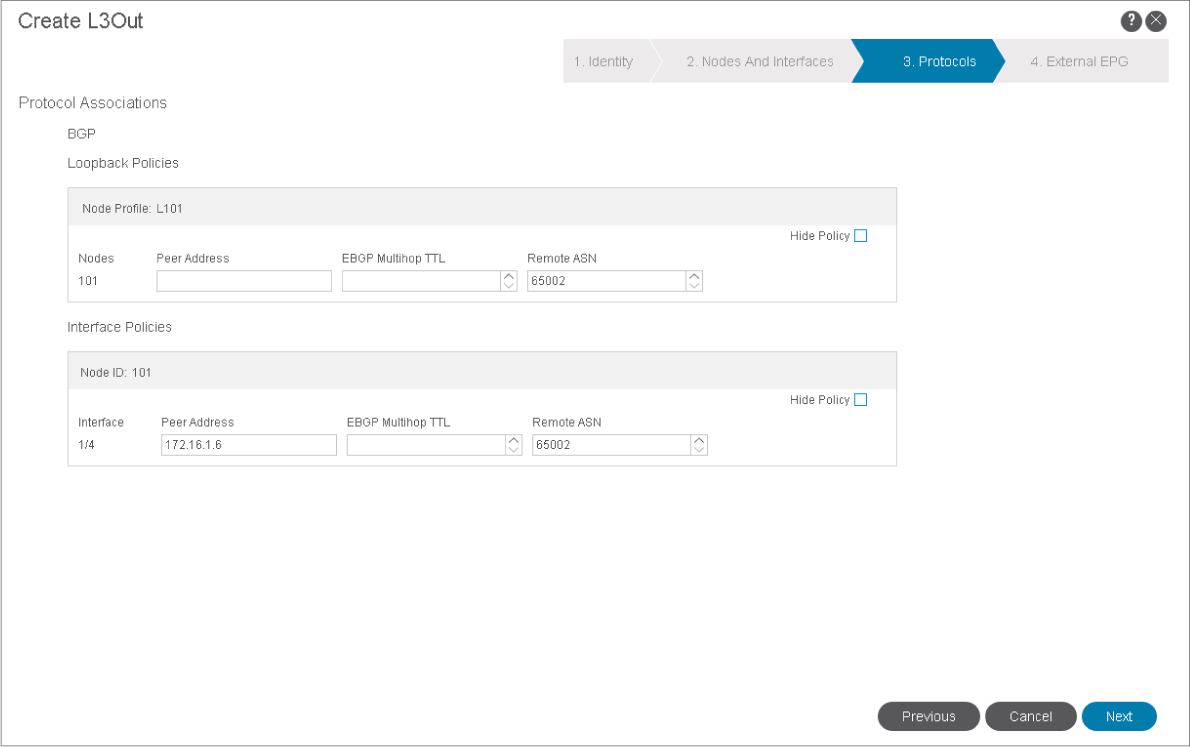
Loopback Policies are used when establishing peering from a loopback interface. External Border Gateway Protocol (EBGP) Multihop Time to Live (TTL) is set when the peer is further than 1 hop away.
Navigate to the External EPG page. In the page, enter the external EPG name Nexus_ExtNet, clear the Default EPG for all external networks check box, and click + in the Subnets table.
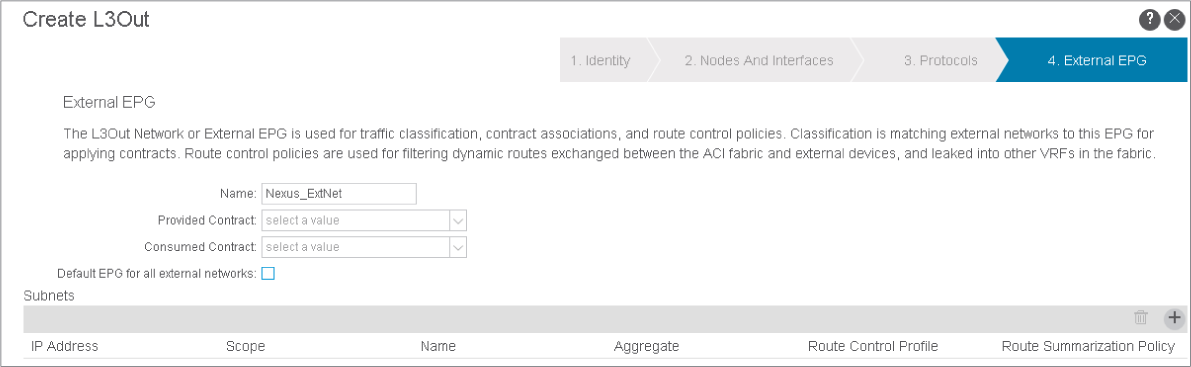
You will apply the contracts later. If you kept the Default EPG for all external networks check box checked, all external networks (0.0.0.0/0) would be classified into this EPG.

Comment
TABLE OF CONTENTS
RECENT POSTS
- Exploring Cisco ISE Authorization Policy Elements
- Understanding Cisco ISE Authentication and Authorization Policies
- Installing Context-Aware Network Access Control using Cisco ISE Policies
- Designing Network Access Control that is Scalable using Cisco ISE Architecture
- Enterprise Network Access Control and Policy Enforcement using Cisco ISE
- Secure Device Administration and Network Access Using AAA Architecture
- Designing Enterprise-Class Hybrid Cloud Connectivity Using AWS Networking Services
- Exploring Core AWS Networking and Messaging Concepts for Modern Cloud Architectures
- Understanding Key AWS Services for Modern Cloud Architectures
- Building a Strong AWS Foundation with Amazon S3, EC2, and Virtual Private Cloud



LEAVE A COMMENT
Please login here to comment.