
EMAIL SUPPORT
dclessons@dclessons.comLOCATION
USZscaler Client Connector
Zscaler Client Connector is an endpoint application that secures your internet traffic and provides protected access to your organization’s internal applications—no matter where you are working. Even when you’re outside the corporate network, the Client Connector ensures your traffic is routed through and safeguarded by Zscaler Internet Access (ZIA). When Zscaler Private Access (ZPA) is enabled, you can securely reach internal resources from any location.
With Zscaler Digital Experience (ZDX), the Client Connector performs synthetic tests to SaaS applications and internet services, helping identify and isolate the source of performance issues. Additionally, Zscaler Endpoint Data Loss Prevention (endpoint DLP) protects against sensitive data leaving your device.
Designed for a seamless user experience, the Client Connector automatically detects when you’re on a trusted network. Based on your organization’s configuration, it can automatically enable or disable services such as ZIA, ZPA, ZDX, and endpoint DLP. It also recognizes captive portals, such as public Wi-Fi networks that require payment or policy acceptance. During this time, the app temporarily disables its services and reactivates them once you are fully connected.
After logging in and completing a quick device enrollment, you can securely access the internet and your organization’s internal applications through Zscaler Client Connector.
What It Is
- An endpoint application that ensures all traffic is securely routed through Zscaler services, even when working off the corporate network.
Key Capabilities
-
ZIA (Zscaler Internet Access): Routes user traffic through ZIA to ensure secure, compliant browsing and SaaS access.
-
ZPA (Zscaler Private Access): Delivers zero‑trust–based secure access to internal applications from any location.
-
ZDX (Zscaler Digital Experience): Uses synthetic probes to detect, isolate, and troubleshoot performance and user‑experience issues.
-
Endpoint DLP:
Protects sensitive information by monitoring data activities and preventing data loss on endpoints.
Seamless User Experience
- Automatically identifies whether a network is trusted or untrusted and enables or disables services (ZIA, ZPA, ZDX, DLP) accordingly.
- Temporarily pauses services when users connect to captive portals (e.g., networks requiring payment or policy acceptance), then restores service once access is granted.
Setup & Operation
- Users log in and complete a simple one‑step enrollment process.
- Once enrolled, they can securely access internet services and organizational internal applications.
- Supported across multiple operating systems (e.g., Windows).
Navigation Highlights
-
Internet Security Tab:Displays service status, network type, and connection details.
-
Private Access Tab:Provides partner‑tenant configuration options along with connectivity and analytics information.
-
ZDX Tab:Shows ZDX status and performance metrics for experience monitoring.
-
Notifications:Lists recent connection and disconnection events to support quick troubleshooting.
-
More Tab:Offers access to additional settings, diagnostic tools, and version information.
Zscaler Client Connector Key Features
Authentication
- Supports all Zscaler-supported authentication methods except Kerberos.
- Enables seamless user login and enrollment with existing credentials.
- Supports SAML with two‑factor authentication; SAML is required when using ZPA.
Enforcement
- Admins can configure profiles that prevent users from logging out, disabling, or uninstalling the Client Connector without an administrator password.
Trusted Network Detection
- Automatically identifies when a user is on a trusted (e.g., corporate) network.
- Disables internet security services so traffic is forwarded based on the network’s configured forwarding method.
Captive Portal Detection
- Detects networks that require payment or policy acceptance (e.g., airport or hotel Wi‑Fi).
- Temporarily disables services to allow the user to complete portal requirements, then re‑enables them automatically.
SSL Inspection
- Automatically installs the Zscaler SSL certificate during enrollment to enable SSL inspection for internet traffic.
- Requires SSL inspection to be enabled for mobile traffic in the ZIA Admin Portal.
- (Note: SSL inspection is not supported for ZPA.)
Rapid, Frictionless Deployment
- Easily deployable through modern MDM/UEM solutions.
- Supports auto-updates or admin-controlled rollout of new versions via the Client Connector Portal.
Easy Administration
- Centralized management through the Zscaler Client Connector Portal.
- The app regularly checks for updated profiles and settings and applies changes automatically.
In-App Access to Support
- Users can send support requests directly from the app—either to the organization’s support team or to Zscaler Support.
Strict Enforcement
- Ensures only enrolled devices can access required applications.
- Prevents users from disabling the Client Connector, maintaining consistent security.
3rd-Party Integrations
- Integrates with popular endpoint security platforms such as CrowdStrike, Microsoft, and VMware Carbon Black.
- Compatible with MDM/UEM solutions including JAMF and SCCM.
Localization
- Automatically adjusts the app interface language based on the device’s system language.
Remote Employee Access with Zscaler Client Connector
Zscaler Client Connector is a lightweight endpoint application included with ZIA, ZPA, and ZDX. It enforces security policies, controls access, and protects user traffic across all devices, locations, and applications—making it ideal for remote employees.
Key Capabilities
-
Initiates Secure User & Device Connections: Acts as the starting point for secure communication between users, devices, and applications within the Zero Trust Exchange.
-
Endpoint Client Application: Runs on user devices to ensure traffic consistently flows through Zscaler’s Zero Trust platform.
-
Consolidates User Services: Brings multiple user‑related services into a single platform to simplify access and enhance protection.
-
Simplified User Processes: Streamlines authentication, enrollment, and provisioning, reducing complexity for both users and IT teams.
-
Centralized Administration: Provides a unified interface for managing user policies, security controls, and overall service settings.
-
Flexible Security Management: Administrators can tailor security policies per service, ensuring the right level of protection for every user scenario.
Forwarding Modes (Zscaler Client Connector → ZIA)
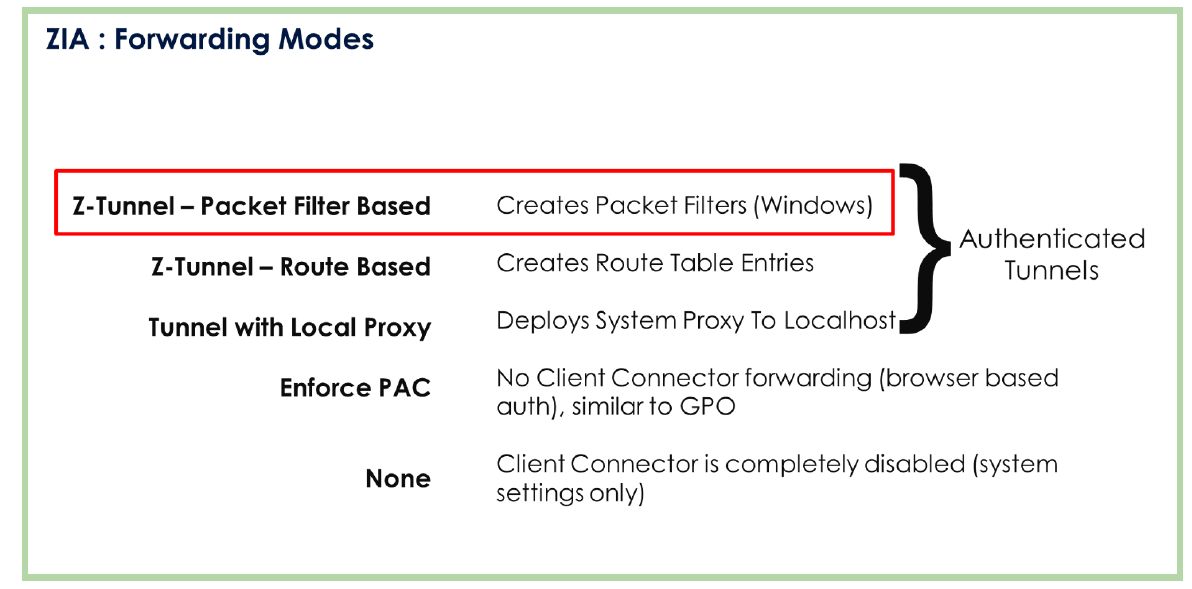
Zscaler Client Connector supports multiple traffic‑forwarding modes to Zscaler Internet Access (ZIA). These are tunnel‑based approaches that create authenticated paths so user‑based policies can be applied consistently and securely.
Recommended: Zscaler Tunnel
A network‑level tunnel intercepts device traffic and forwards it through an encapsulated, authenticated tunnel to the Zscaler cloud. Within this approach, there are two common mechanisms:
-
Packet‑Filter–Based Tunneling (Windows packet filter): A packet filter captures outbound traffic and steers it to the Client Connector process, which then decides—per policy—what to send through the Zscaler tunnel.
-
Route‑Based Mode: Installs an additional virtual network adapter and programs routes so client‑application traffic egresses via that adapter, which then forwards it through the Zscaler tunnel.
-
Tunnel with Local Proxy: Creates a loopback HTTP/HTTPS proxy on the endpoint and points the system proxy settings to it. The browser (and other proxy‑aware apps) send traffic to the local proxy, which then tunnels the traffic to the Zscaler cloud.
When to Use Which Mode?
-
Packet‑Filter–Based Tunneling: Best for broad coverage (both proxy‑aware and non‑proxy‑aware apps) without relying on system proxy settings.
-
Route‑Based Mode: Useful when you want deterministic routing via a dedicated adapter and clean separation of tunneled flows.
-
Tunnel with Local Proxy: Ideal when your environment is already proxy‑centric and you want simple browser integration with minimal network re‑plumbing.
Zscaler Client Connector supports multiple ways to forward traffic to Zscaler Internet Access (ZIA). The recommended approach is to use an authenticated Zscaler tunnel, ensuring that once a user enrolls in Client Connector, a secure tunnel is established to the Zscaler cloud. All traffic inside the tunnel is attributed to the user, and user‑based policies are enforced.
Tunnel-Based Modes (Recommended)
-
Packet-Filter–Based Tunneling (Windows): A packet filter intercepts outbound traffic at the network layer and steers it to the Client Connector, which then decides—per policy—what to forward through the encrypted tunnel to the Zscaler platform.
-
Route-Based Mode: Installs a virtual network adapter and programs routes so client application traffic egresses via that adapter and into the Zscaler tunnel—useful for deterministic pathing and clean separation of flows.
-
Tunnel with Local Proxy: Creates a loopback HTTP/HTTPS proxy and points system proxy settings to it. Proxy‑aware apps (e.g., browsers) send traffic to the local proxy, which then tunnels it to the Zscaler cloud.
-
Note: All three tunnel mechanisms create authenticated tunnels tied to the enrolled user, enabling precise user identity and policy application.
Additional (Legacy-Friendly) Options
-
Enforced PAC Mode: Forces the browser to use a PAC file (similar to a Group Policy–driven configuration) so web traffic goes to ZIA as a proxy—or to a legacy proxy if required.
-
None: Client Connector does not configure proxy or tunneling. Traffic handling relies on existing Group Policy settings or the browser’s default configuration.
ZIA Forwarding Profiles and Proxy
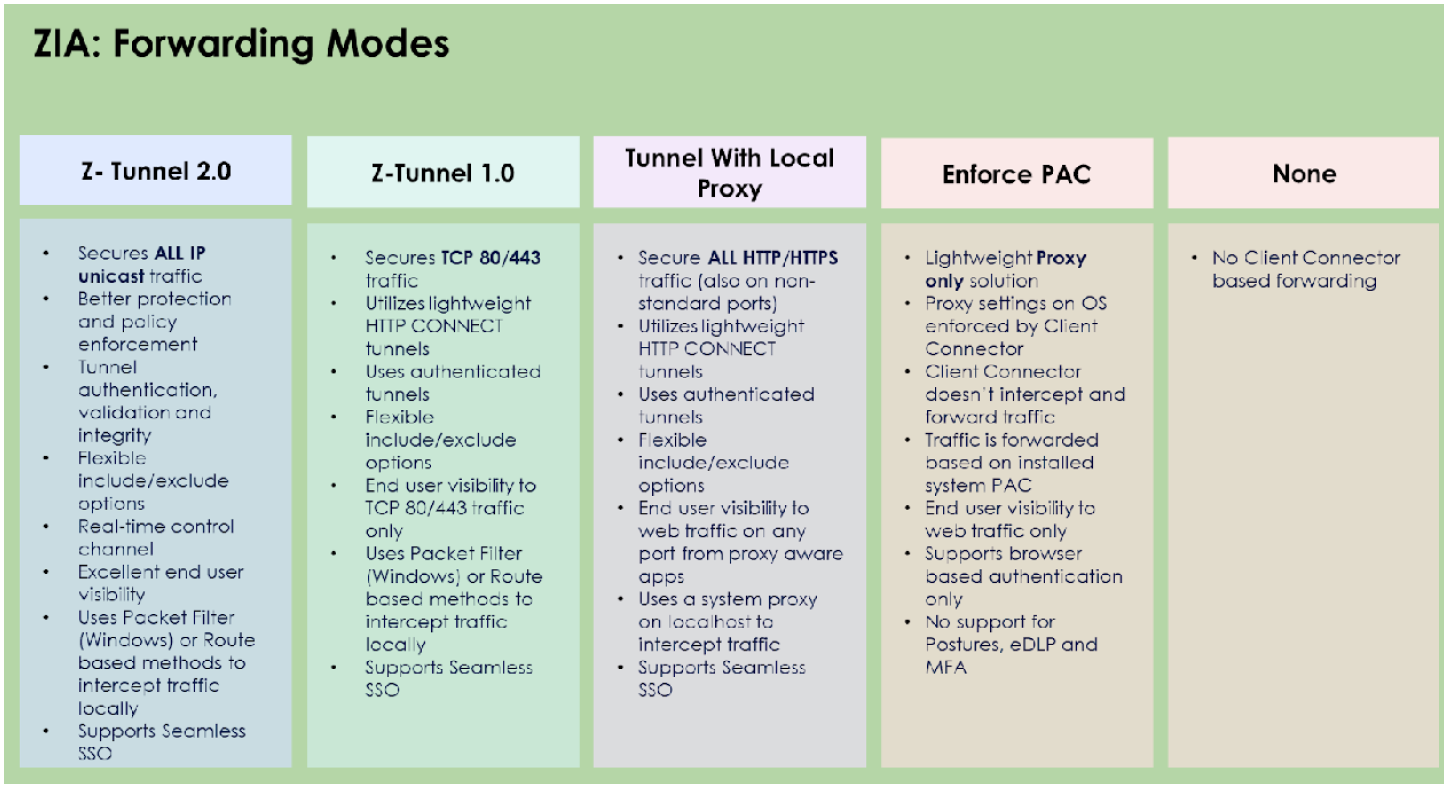
Zscaler offers multiple tunnel modes for forwarding traffic through Zscaler Internet Access (ZIA).
Legacy Z‑Tunnel 1.0 supports only HTTP CONNECT traffic, while the modern Z‑Tunnel 2.0 supports a wide range of protocols, enabling full traffic inspection and stronger security. Migrating to Z‑Tunnel 2.0 consolidates traffic into a single tunnel, improving real‑time updates, notifications, and overall manageability.

Comment
TABLE OF CONTENTS
RECENT POSTS
- Understanding Cisco ISE Authentication and Authorization Policies
- Installing Context-Aware Network Access Control using Cisco ISE Policies
- Designing Network Access Control that is Scalable using Cisco ISE Architecture
- Enterprise Network Access Control and Policy Enforcement using Cisco ISE
- Secure Device Administration and Network Access Using AAA Architecture
- Designing Enterprise-Class Hybrid Cloud Connectivity Using AWS Networking Services
- Exploring Core AWS Networking and Messaging Concepts for Modern Cloud Architectures
- Understanding Key AWS Services for Modern Cloud Architectures
- Building a Strong AWS Foundation with Amazon S3, EC2, and Virtual Private Cloud
- Understanding the ENSDWI Course: Advanced Cisco SD-WAN (Viptela) Concepts



LEAVE A COMMENT
Please login here to comment.