
EMAIL SUPPORT
dclessons@dclessons.comLOCATION
USLAB NSX Logical Switching Configuration
Task:
- Confirm so that host configuration are ready so that they are ready to install logical switch and confirm logical network preparation.
- Create a new logical switch and attach the logical switch to the NSX Edge Services Gateway.
- Add VMs to the logical switch and Test connectivity between VMs.
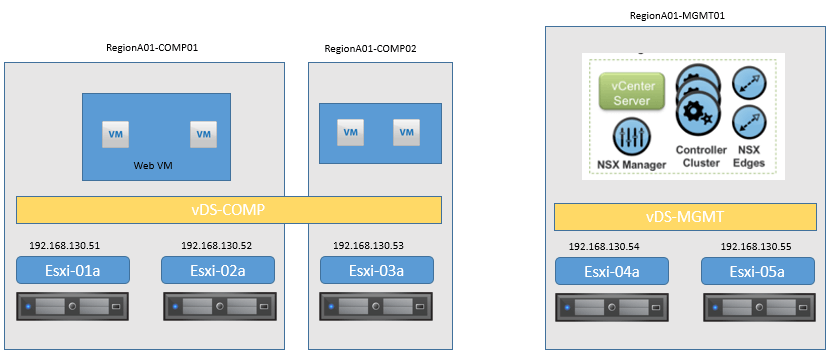
Topology:
Confirm the configuration readiness of the hosts.
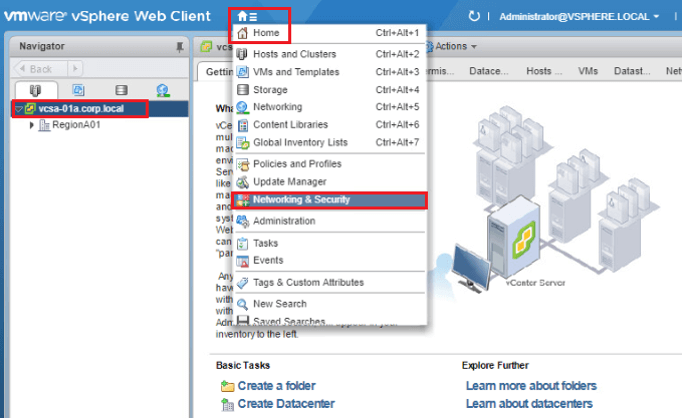
Login to Vcenter WEB client and Click Home | Networking & Security.
- Click on Installation and Upgrade tab and Click on Host Preparation.
- To view the information about NSX state of host in cluster t you can select Select a cluster from the list RegionA01-COMP01
Here you will find the following Hypervisor level kernel modules for Port Security, VXLAN, and Distributed Firewall and Distributed Routing component are properly installed on the host in each cluster.
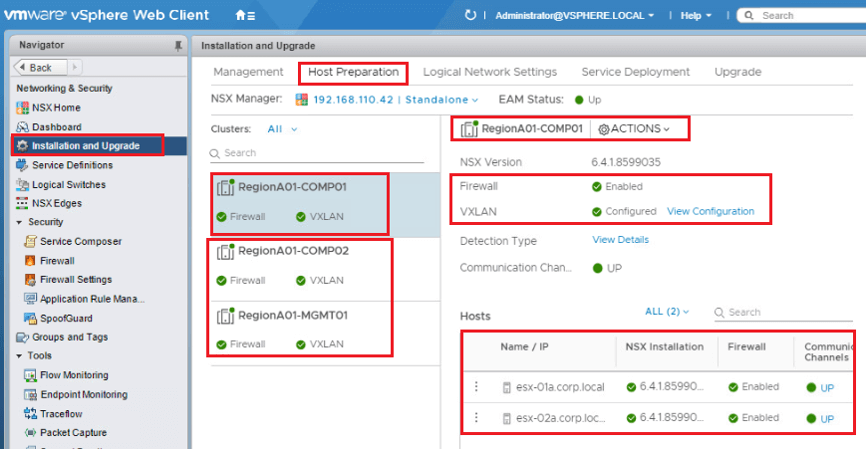
In the host list you should scroll it right and Click VIEW DETAILS to view information about that host's VTEP kernel port and IP address.
Following steps are requited for VXLAN configuration:
- Configure VXLAN Tunnel End Point (VTEP) on each host.
- You should Configure Segment ID range to create a pool of logical networks. With Repletion mode (Unicast / Multicast / Hybrid)
- Configure the Transport Zone to define the span of the logical network.
The hosts have been configured with VXLAN Tunnel End Point (VTEP) interfaces and it uses 192.168.130.0/24 subnet for the VTEP pool.
VIEW SEGMENT ID CONFIGURATION
- Click on Logical Network Settings.
- Note the Segment ID Pool assigned to the environment which we have provided on LAB 1. As soon as any new logical switches are created in NSX, the next unused Segment ID is allocated and assigned.

Comment
You are will be the first.
TABLE OF CONTENTS
- LAB NSX Manager Installation
- LAB NSX Logical Switching Configuration
- LAB NSX Logical Router Configuration
- LAB NSX EDGE SERVICES GATEWAY
- Gateway
- LAB NSX Edge Service Gateway as DHCP Relay
- LAB NSX Configuring L2VPN
- LAB NSX DFW Configuration
- LAB NSX Dynamic Security Group Configuration
- LAB NSX Micro-Segmentation
RECENT POSTS
- Understanding Cisco ISE Authentication and Authorization Policies
- Installing Context-Aware Network Access Control using Cisco ISE Policies
- Designing Network Access Control that is Scalable using Cisco ISE Architecture
- Enterprise Network Access Control and Policy Enforcement using Cisco ISE
- Secure Device Administration and Network Access Using AAA Architecture
- Designing Enterprise-Class Hybrid Cloud Connectivity Using AWS Networking Services
- Exploring Core AWS Networking and Messaging Concepts for Modern Cloud Architectures
- Understanding Key AWS Services for Modern Cloud Architectures
- Building a Strong AWS Foundation with Amazon S3, EC2, and Virtual Private Cloud
- Understanding the ENSDWI Course: Advanced Cisco SD-WAN (Viptela) Concepts



LEAVE A COMMENT
Please login here to comment.