
EMAIL SUPPORT
dclessons@dclessons.comLOCATION
USTroubleshooting VMware
When troubleshooting Cisco ACI and VMware integration, you should verify the individual components on each side, and test virtual endpoints connectivity through the fabric. Hence, you can start from the virtualization environment and inspect the hypervisor host to verify VM configuration and connectivity, the vSwitch, as well as port groups and uplinks to the network infrastructure and Cisco ACI fabric.
This figure depicts the hypervisor host relation to the ACI fabric, starting from the Cisco UCS blade server chassis that can be utilized as hypervisor, the ACI leaf switches, and further connection to the ACI concrete and logical models.
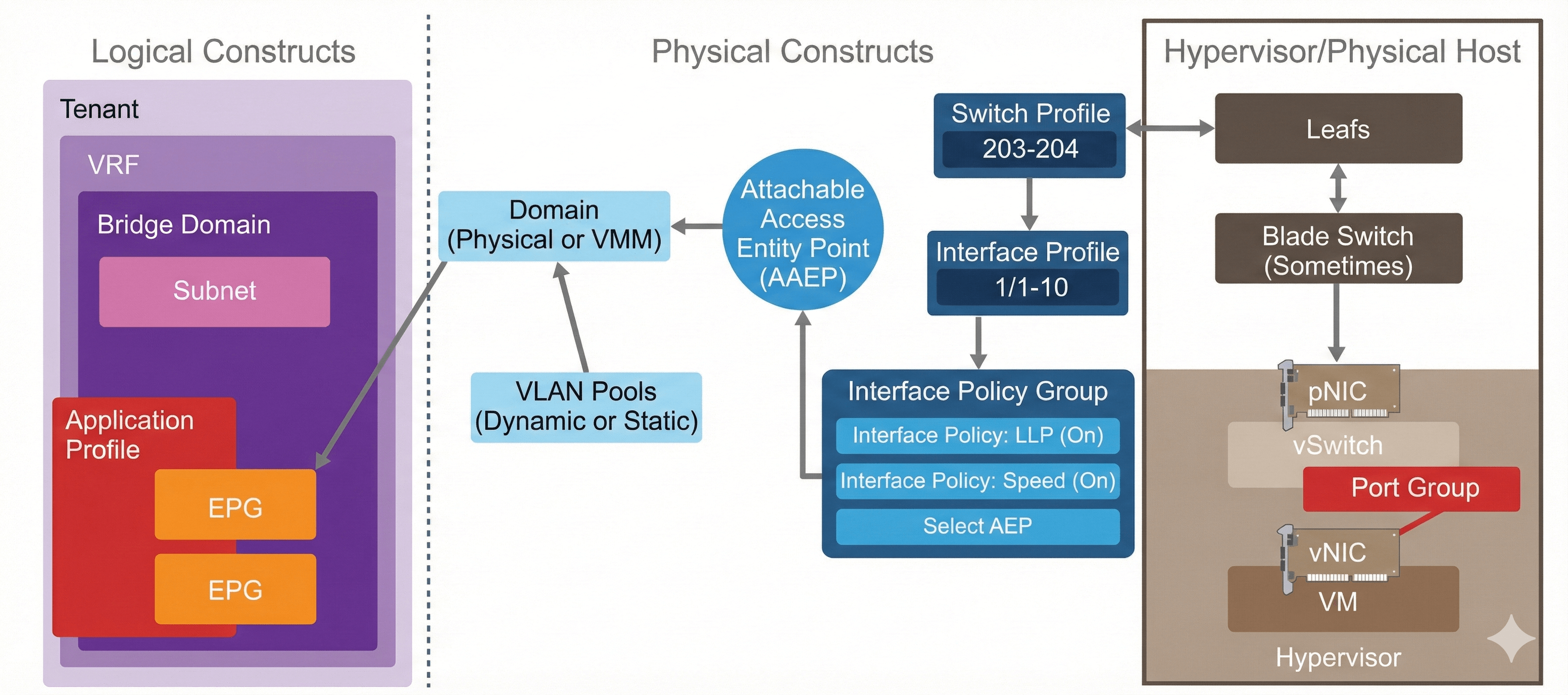
When there is a virtual endpoint connectivity problem, you can start from the VM itself and inspect its current state. By finding answers to the following questions, you can determine the paths you need to follow and the components that you should investigate further:
- What is its IP address?
- What is the MAC address?
- What is the configured default gateway (and other static routes)?
- Is the port configured for the right VLAN?
- Is the cable plugged in?
- Check the ARP table.
This starting point should be similar, disregard whether you are troubleshooting connectivity issues to a physical endpoint or virtual one.
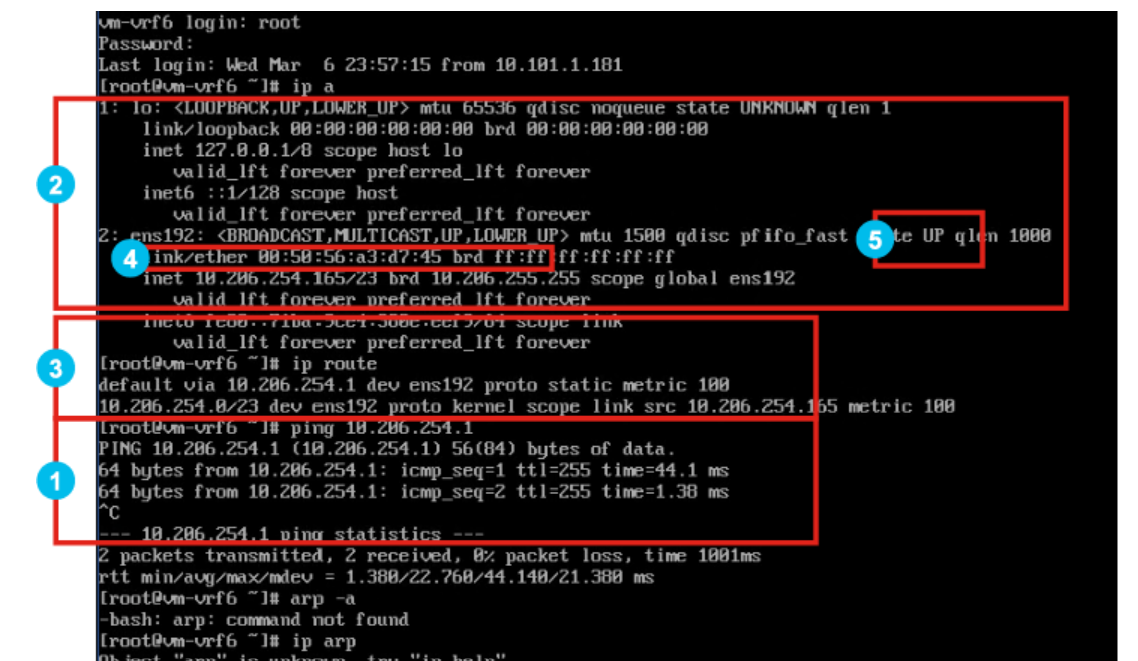
If you have system access to the endpoint, you should log in and run commands to inspect its state. The following example shows the commands that you can use on a Linux endpoint:
- Verify that the VM can ping the default gateway (contracts will not prevent it).
- Verify the IP/gateway configuration.
- Check the routing table.
- Verify the VM's MAC address.
- Verify that the VM sees the link as up.
- Check the VM's ARP table.
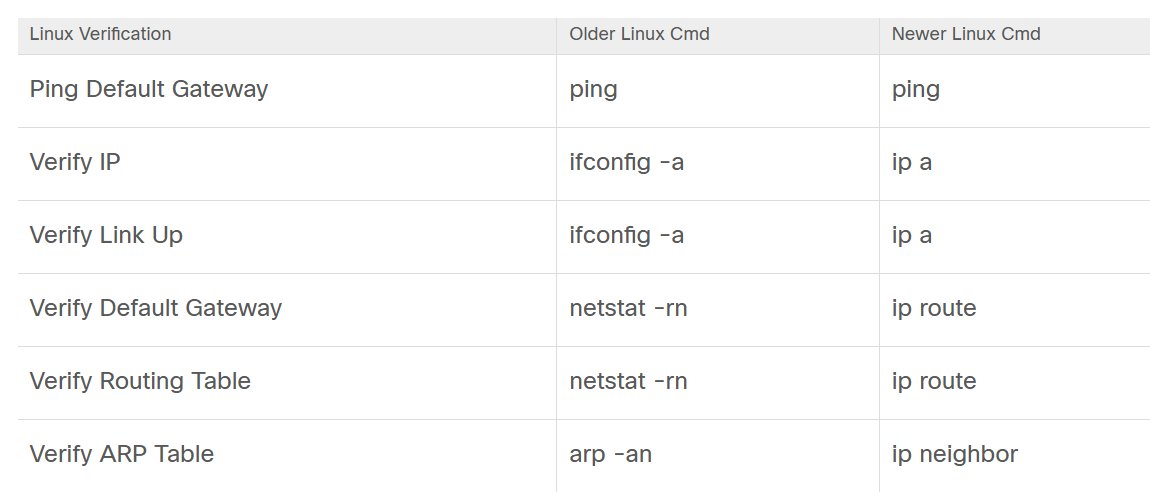
This table summarizes the verification tasks you can perform on a Linux endpoint, and the commands you can use during troubleshooting:
If you are using Microsoft Windows as the operating system in the VM, you can perform similar verifications during troubleshooting. For example, you can use the ipconfig command to display all TCP/IP network configuration values, including IP address and gateway.

Comment
TABLE OF CONTENTS
RECENT POSTS
- Enterprise Network Access Control and Policy Enforcement using Cisco ISE
- Secure Device Administration and Network Access Using AAA Architecture
- Designing Enterprise-Class Hybrid Cloud Connectivity Using AWS Networking Services
- Exploring Core AWS Networking and Messaging Concepts for Modern Cloud Architectures
- Understanding Key AWS Services for Modern Cloud Architectures
- Building a Strong AWS Foundation with Amazon S3, EC2, and Virtual Private Cloud
- Understanding the ENSDWI Course: Advanced Cisco SD-WAN (Viptela) Concepts
- A Complete Guide to the DCACI-A Course: Mastering Advanced Cisco ACI Concepts
- How Our Online Python Certification Will Prepare You for a Career in Network Automation
- What You'll Learn in Juniper Mist Labs: A Deep Dive into AI-Driven Wireless Networking



LEAVE A COMMENT
Please login here to comment.