
EMAIL SUPPORT
dclessons@dclessons.comLOCATION
USLayer 3 Transit Routing
Cisco ACI fabric supports transit routing, which enables border leafs to perform bidirectional redistribution with other routing domains. Unlike the stub routing domains of earlier releases of the Cisco ACI fabric that block transit redistribution, bidirectional redistribution passes routing information from one routing domain to another. Such redistribution lets the ACI fabric provide full IP connectivity between different routing domains. Doing so can also provide redundant connectivity by enabling backup paths between routing domains.
First, you should advertise external routes that are learned from one L3Out to another, typically referred to as “export.” Then, you can apply the contract between the two L3Outs.
There are two simple and recommended ways to export the external routes (advertise the external routes from one L3Out to another):
- Default-export route control profile with a prefix-list in the L3Out. It enables you to utilize route-maps for export route controls.
- Export Route Control Subnet scope with L3Out subnets in the L3Out EPG.
The following figure shows an example for Cisco ACI transit routing between two routers connected to the fabric, each with different routing protocol peering with the fabric.
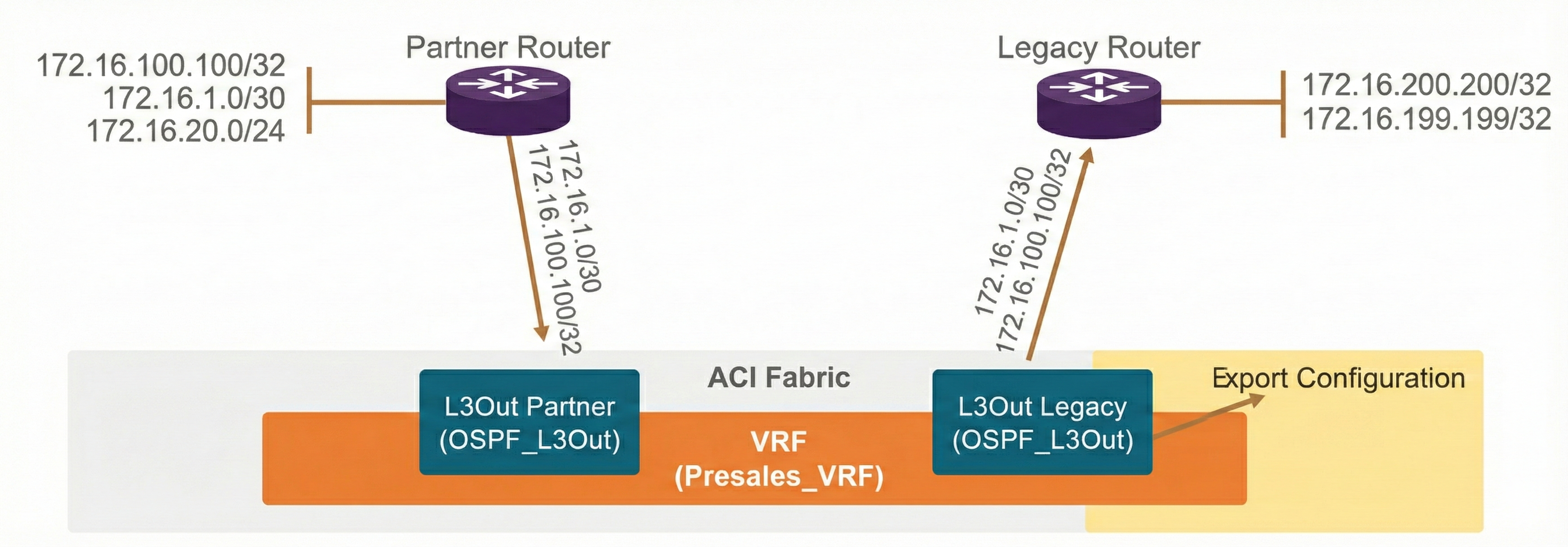
In this scenario, the router in the legacy network (on the right in the picture) needs to communicate to the 172.16.1.0/30 subnet behind the router in the partner network (on the left in the picture) through the Cisco ACI fabric. This scenario is the transit routing between L3Out Legacy and L3Out Partner.
The Cisco ACI fabric needs to advertise (export) 172.16.1.0/30 that is learned from L3Out Partner to L3Out Legacy. The export configuration is performed on L3Out Legacy that advertises and exports out the subnet. The following are the two export configuration examples.
Option 1—default-export route control profile:
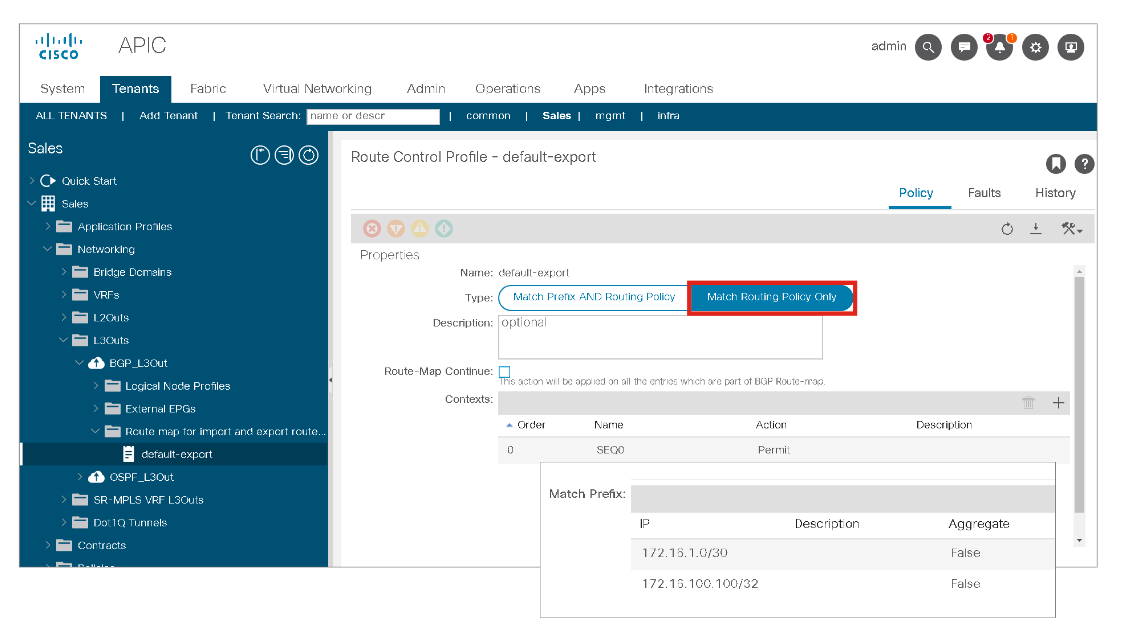
In Cisco ACI, there are many ways to configure and apply route controls (route-maps). For transit routing (and for BD subnets), the recommended configuration with a route control profile (route-map) is to use default-export with Type Match Routing Only and prefix-lists. Here, routing protocol controls are solely with the route-map default-export and no need to configure the L3Out subnets under the External EPG (L3Out EPG) with the selected scope Export Route Control Subnet. However, if you want to apply contracts, you still need to use L3Out subnets under the L3Out EPG, where you would choose the External Subnets for the External EPG option for that subnet.
In this example, Cisco ACI is configured to advertise 172.16.100.100/32 and 172.16.1.0/30, which should be learned from other L3Outs, to L3Out BGP.
Please note that the default-export route control profile takes effect on the L3Out without associating it to L3Out EPG or subnets unlike other route control profiles with custom names.
Another option is to use the scope Export Route Control Subnet with L3Out subnets in the L3Out EPG. This configuration is the original option for the transit routing (to advertise [export] external routes to the L3Out from another L3Out prior to the route control profile). This configuration is very simple and designed to reflect the intent directly without going through the traditional route-map configuration.
Option 2—Export Route Control Subnet option with L3Out subnets:
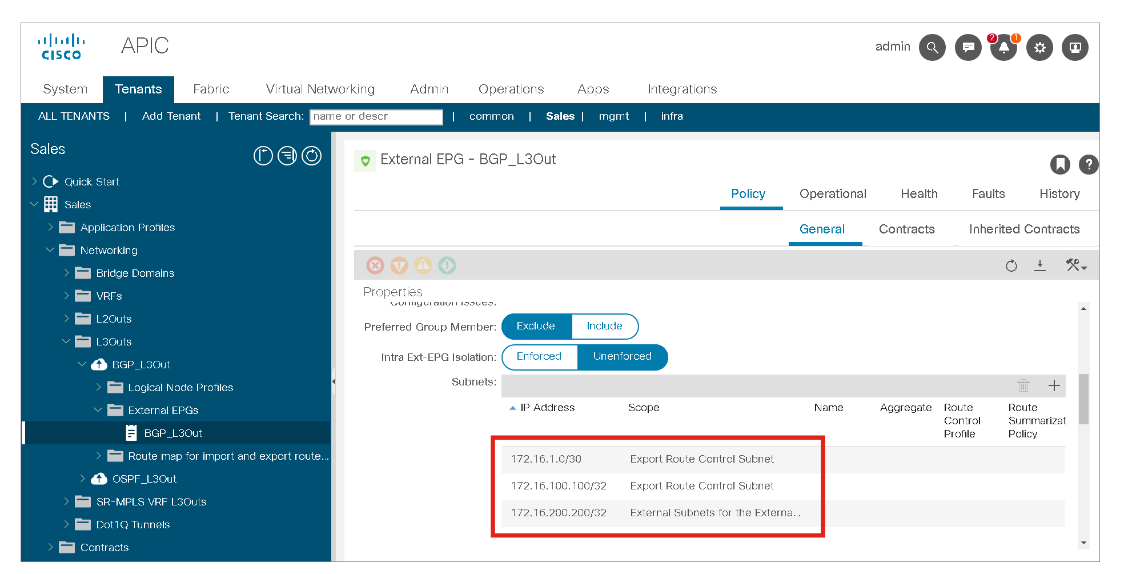
With either option 1 or option 2 export configuration, the external route 172.16.1.0/30 learned from L3Out Partner is advertised to L3Out Legacy. For the mutual communication, the export configuration needs to be done in L3Out Partner for the subnet from L3Out Legacy (x.x.x.x/y).
Once the external routes are exchanged correctly through the export configuration for both L3Outs, the contract needs to be configured between L3Out EPGs. Like a normal L3Out to internal EPG communication, the L3Out EPG needs to define the external subnet that belongs to itself via the scope External Subnets for the External EPG.
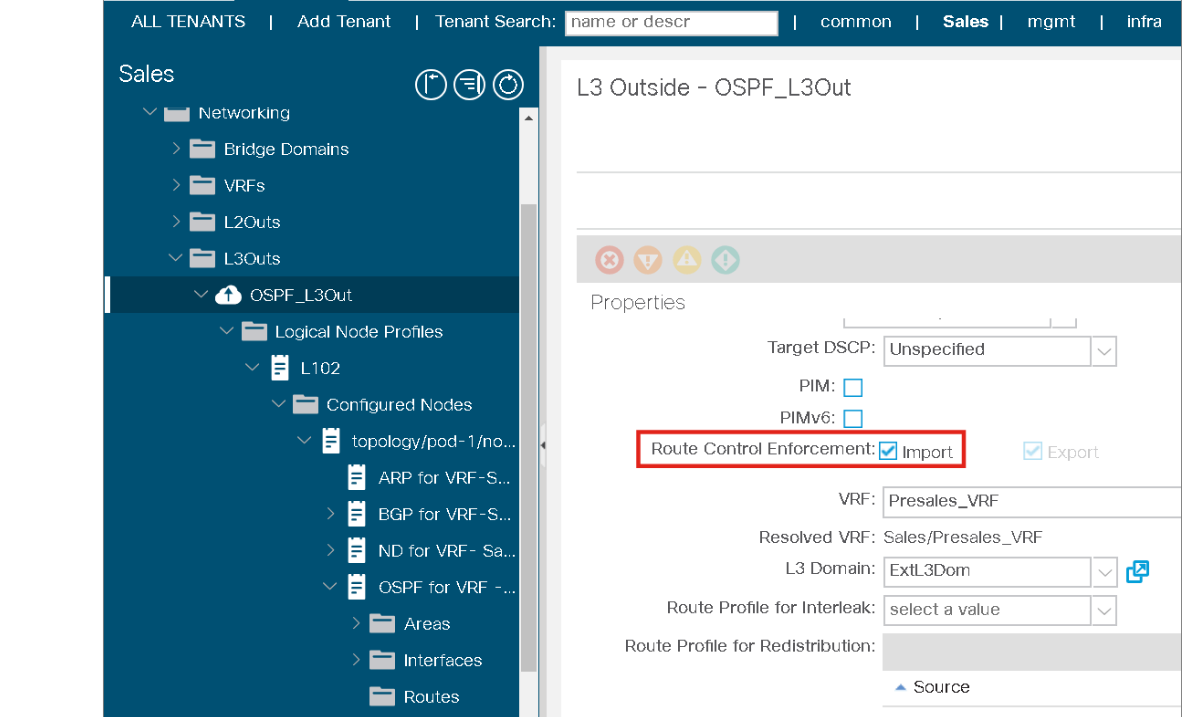
The Import Route Control Subnet scope under the L3Out EPG subnet for the option 2 was also introduced as part of Transit Routing to provide controls not only for external routes that ACI advertises out, but also for the external routes that ACI may learn. However, the Import Route Control Subnet scope is not used as often because the default import behavior where ACI learns all external routes suffices in most situations. By default, these import direction controls are disabled and ACI learns all external routes that the routing protocol advertises. To use import direction controls, you need to check the Import under the Route Control Enforcement in the L3Out policy itself, as shown in this figure:
Similarly, when it is selected, you can use the default-import route control profile with a prefix-list in the L3Out for the option 1.
Layer 3 Transit Routing Troubleshooting Example
In the following example, two different OSPF areas are connected to the same border leaf using Cisco ACI as the transit. The fabric also has a contract applied between the two L3Outs.
This example brings up certain challenges and can help you understand and troubleshoot Layer 3 transit routing. It has the following:
- Assumptions:
- Layer 3 external routers are configured.
- Cisco ACI can see all the routes on each external router.
- Currently, the external routers are not exchanging routes.
- Goal:
- Routes from router in Area 0 are imported into router in Area 1.
- Routes from router in Area 1 are imported into router in Area 0.
To achieve the goal, you should enabled redistribution of the subnets from Area 0, over the ACI fabric as transit routing, to Area 1, as shown in this figure:
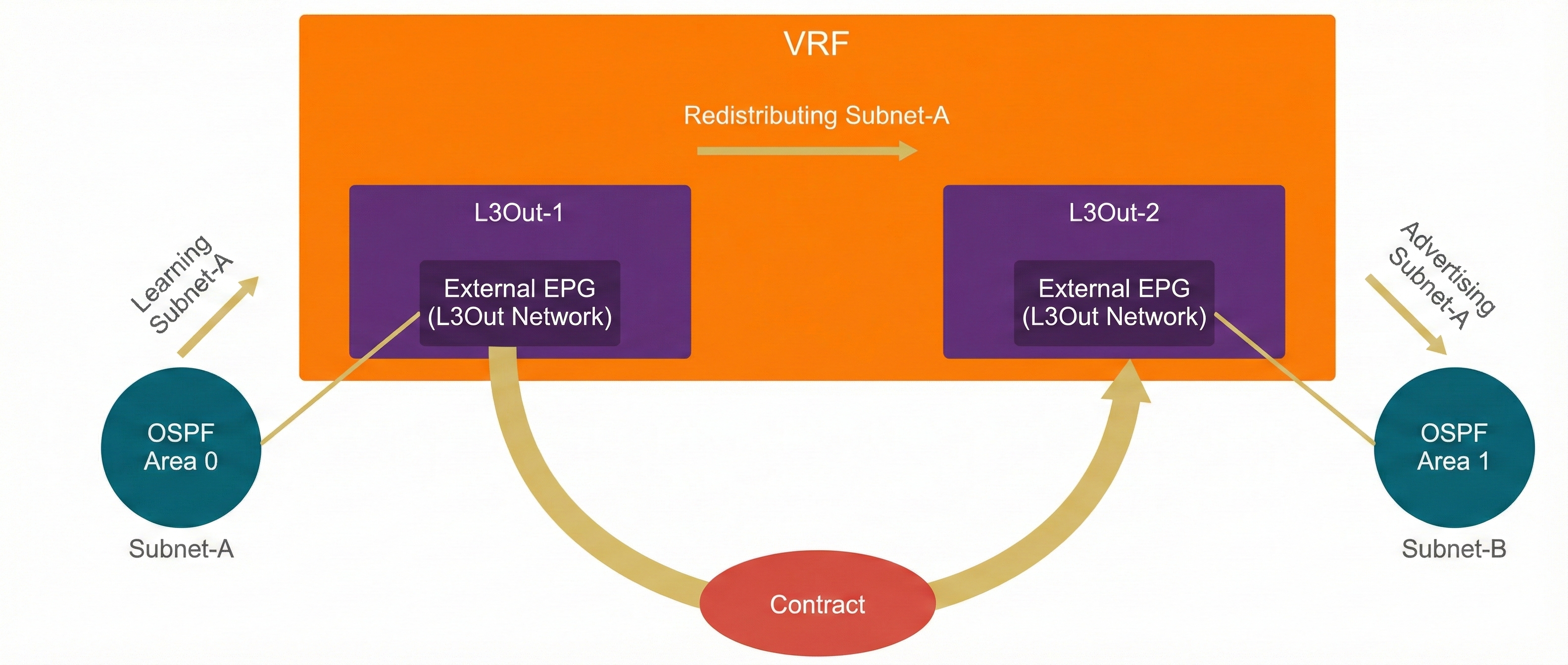
At the same time, the subnets from Area 1 should be redistributed into Area 0.
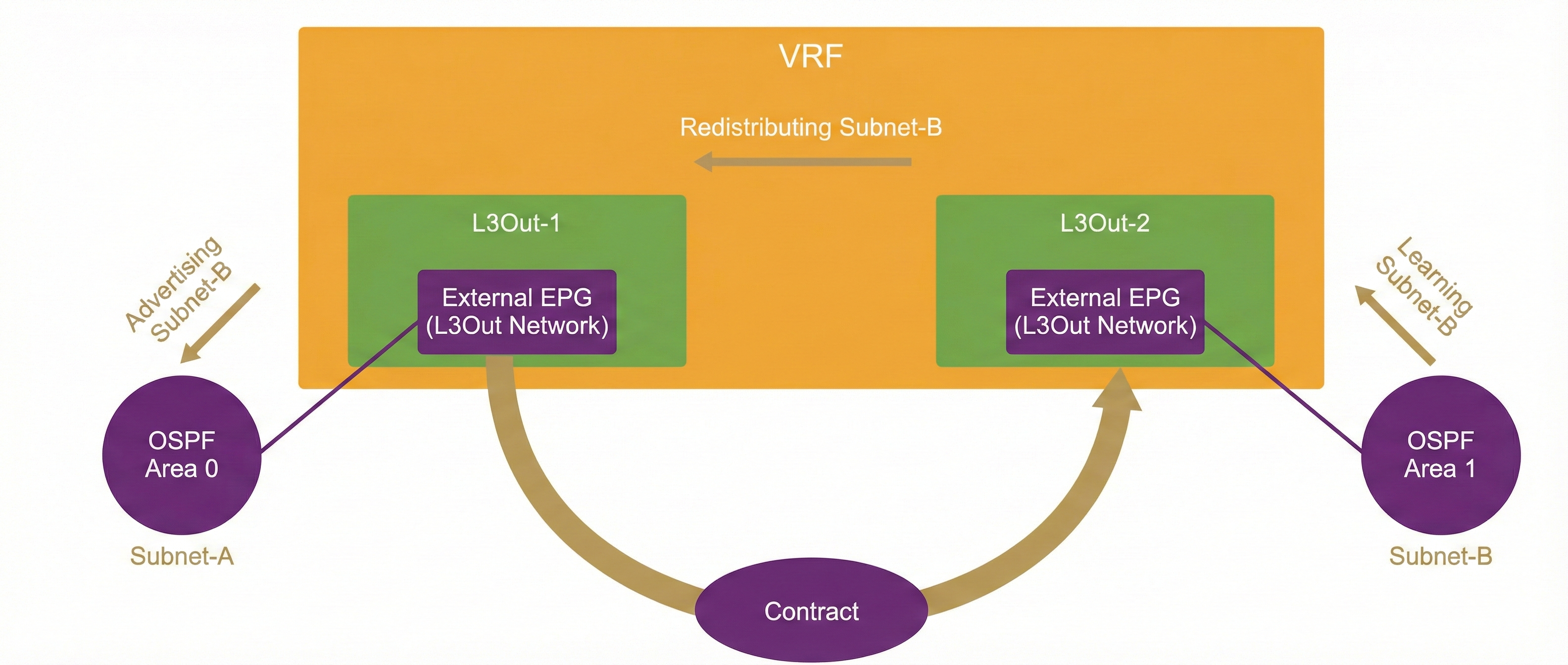
When a border leaf switch is connected to multiple OSPF areas, the border leaf switch will become an OSPF Area Border Router (ABR). The OSPF rules for an ABR state that one area must be connected to Area 0; OSPF virtual links are not supported in Cisco ACI. This rule holds true for a Cisco ACI border leaf switch. When a Cisco ACI border leaf connects to multiple OSPF areas in the same VRF instance, one area should be in Area 0. This is required to support transit routing between the areas.

Comment
TABLE OF CONTENTS
RECENT POSTS
- Enterprise Network Access Control and Policy Enforcement using Cisco ISE
- Secure Device Administration and Network Access Using AAA Architecture
- Designing Enterprise-Class Hybrid Cloud Connectivity Using AWS Networking Services
- Exploring Core AWS Networking and Messaging Concepts for Modern Cloud Architectures
- Understanding Key AWS Services for Modern Cloud Architectures
- Building a Strong AWS Foundation with Amazon S3, EC2, and Virtual Private Cloud
- Understanding the ENSDWI Course: Advanced Cisco SD-WAN (Viptela) Concepts
- A Complete Guide to the DCACI-A Course: Mastering Advanced Cisco ACI Concepts
- How Our Online Python Certification Will Prepare You for a Career in Network Automation
- What You'll Learn in Juniper Mist Labs: A Deep Dive into AI-Driven Wireless Networking



LEAVE A COMMENT
Please login here to comment.