
EMAIL SUPPORT
dclessons@dclessons.comLOCATION
USSoftware-Defined Access Architecture
Cisco SDA Design & Architecture enables campus the use of Virtual network (Overlay Networks) which run over Underlay Network or Physical network to achieve the Intent based network.
There are some components which needs to learn for Cisco SDA Design .
Underlay Network:
Underlay network consists of physical router, Switches that runs using traditional protocols like BGP, OSPF, etc. to provide IP connectivity so that sites are reachable to each other and devices connectivity can be achieved at each site.
Cisco DNA Center LAN automation feature provides a method to do underlay network development for new networks and uses IS-IS routed access design. DNA LAN automation uses Cisco Network Plug and Play feature to deploy unicast as well as Multicast routing configuration in underlay network.
Ovelylay Network:
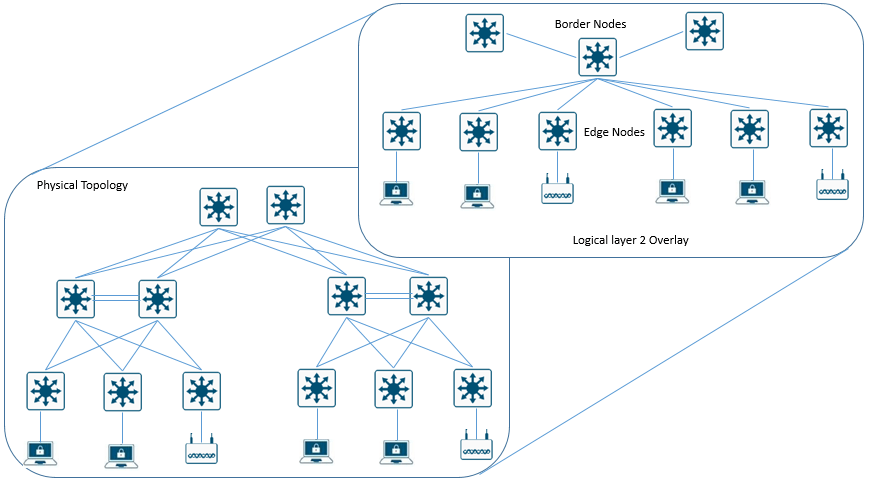
Overlay network is configured on top of Underlay network in order to achieve virtual network. In Overlay network fabric Border nodes are present at boundaries of every fabric network whereas wired client are connected to Edge node and wireless clients are connected to Fabric AP.
Multiple Overlay network can run over same underlay network to support multitenancy. Overlay separation is preserved by using VRF-Lite when we extend the network outside Overlay fabric. In SD-Access Multicast configuration can be configured manually or by using LAN automation feature by DNA center.
Layer 2 Overlay: It helps to transport layer 2 frames and carry a single subnet over Layer 3 underlay. SD-Access transport IP frames without Layer 2 flooding of broadcast and unknown multicast traffic. In SD-Access Fabric Control plane node is used to address ARP functions to see MAC to IP address table lookups.
Below figure shows Layer 2 Overlay –connectivity logically switched.
Layer 3 Overlay: Layer 3 Overlay abstracts IP based connectivity over Layer 3 Underlay network and allow multiple IP network as virtual network. Example IPSEC, VXLAN, LISP.

Comment
TABLE OF CONTENTS
RECENT POSTS
- Installing Context-Aware Network Access Control using Cisco ISE Policies
- Designing Network Access Control that is Scalable using Cisco ISE Architecture
- Enterprise Network Access Control and Policy Enforcement using Cisco ISE
- Secure Device Administration and Network Access Using AAA Architecture
- Designing Enterprise-Class Hybrid Cloud Connectivity Using AWS Networking Services
- Exploring Core AWS Networking and Messaging Concepts for Modern Cloud Architectures
- Understanding Key AWS Services for Modern Cloud Architectures
- Building a Strong AWS Foundation with Amazon S3, EC2, and Virtual Private Cloud
- Understanding the ENSDWI Course: Advanced Cisco SD-WAN (Viptela) Concepts
- A Complete Guide to the DCACI-A Course: Mastering Advanced Cisco ACI Concepts



LEAVE A COMMENT
Please login here to comment.