
EMAIL SUPPORT
dclessons@dclessons.comLOCATION
USLAB: FabricPath
Configure Fabric Path and test its function as per given task below.
Topology:
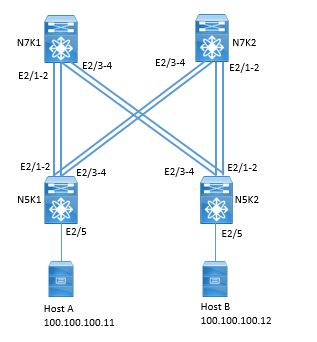
Refer the below topology to configure FabricPath
TASK:
Task 1:
- Configure the fabric path on all switches with switch ID N7K1: 71, N7K2: 72, N5K1:51, N5K2:52 and enable fabric path on all inter connecting switch.
- Configure N7K1 as root for Multidestination tree 1 and N7K2 as root for Multidestination tree 2
- Configure link from N5K1 to Host 1 as access Port in vlan 100
- Configure link from N5K2 to Host 2 as access Port in vlan 100
- Host 1 has IP address of 100.100.100.11/24. Default gateway: 100.100.100.254.
- Host 2 has IP address of 100.100.100.12/24. Default gateway: 100.100.100.254
TASK 2:
Check Fabric Path failure scenario with Fabric Path core ports between N5K-1 and N7K-1 down
Solution:
TASK 1:
- Configure the fabric path on all switches with switch ID N7K1: 71, N7K2: 72, N5K1:51, N5K2:52
- Configure N7K1 as root for Multidestination tree 1 and N7K2 as root for Multidestination tree 2
- Configure link from N5K1 to Host 1 as access Port in vlan 100
- Configure link from N5K2 to Host 2 as access Port in vlan 100
- Host 1 has IP address of 100.100.100.11/24. Default gateway: 100.100.100.254.
- Host 2 has IP address of 100.100.100.12/24. Default gateway: 100.100.100.254
Enable Fabric Path feature on all switches:
N7K1(config)# install feature-set fabricpath
N7K1(config) # feature-set fabricpath
N7K2(config)# install feature-set fabricpath
N7K2(config) # feature-set fabricpath
N5K1(config) # install feature-set fabricpath
N5K1(config) # feature-set fabricpath
N5K2(config) # installs feature-set fabricpath
N5K2(config) # feature-set fabricpath
Configure VLAN 100 on all switches with Mode Fabric Path
N7K1(config)# vlan 100
N7K1(config-vlan)# mode fabricpath
N7K2(config)# vlan 100
N7K2(config-vlan)# mode fabricpath
N5K1(config)# vlan 100
N5K1(config-vlan)# mode fabricpath
N5K2(config)# vlan 100
N5K2(config-vlan)# mode fabricpath
Enable Fabric Path on all interconnecting switch interface:
N7K1(config)# int eth2/1-4
N7K1(config-if-range)# switchport
N7K1(config-if-range)# switchport mode fabricpath
N7K1(config-if-range)# no shut
N5K1(config)# int eth2/1-4
N5K1(config-if-range)# switchport
N5K1(config-if-range)# switchport mode fabricpath
N5K1(config-if-range)# no shut
N7K2(config)# int eth2/1-4
N7K2(config-if-range)# switchport
N7K2(config-if-range)# switchport mode fabricpath
N5K2(config)# int eth2/1-4
N5K2(config-if-range)# switchport
N5K2(config-if-range)# switchport mode fabricpath
N5K2(config-if-range)# no shut
Configure Switch ID as Per task :

Comment
TABLE OF CONTENTS
- VPC Terminology & Deployment Scenarios
- VPC Configuration Best Practices
- VPC Consistency Check and failover Scenarios
- VPC Traffic Flows
- VPC in Mixed Chassis Mode
- Attaching Devices to VPC domain
- STP Behaviour in VPC
- VPC and L3 Design Scenarios
- Fex With vPC and ISSU
- VPC Enhancements
- Nexus 5500 & vPC
- LAB:Configuring vPC & its Components
- LAB: VPC Consistency Check and failover Scenarios
- LAB: Back to Back VPC
- OTV Terminology & Concepts
- OTV Control plane over Multicast & Unicast Infrastructure
- OTV Data Traffic
- OTV Advance Functions
- OTV Multi-Homing
- OTV FHRP Isolation & Stability Conditions
- OTV Single Edge Device – Multicast Mode Configuration
- OTV in Unicast Mode Configration Guidelines
- LAB OTV Configuration
RECENT POSTS
- Understanding Cisco ISE Authentication and Authorization Policies
- Installing Context-Aware Network Access Control using Cisco ISE Policies
- Designing Network Access Control that is Scalable using Cisco ISE Architecture
- Enterprise Network Access Control and Policy Enforcement using Cisco ISE
- Secure Device Administration and Network Access Using AAA Architecture
- Designing Enterprise-Class Hybrid Cloud Connectivity Using AWS Networking Services
- Exploring Core AWS Networking and Messaging Concepts for Modern Cloud Architectures
- Understanding Key AWS Services for Modern Cloud Architectures
- Building a Strong AWS Foundation with Amazon S3, EC2, and Virtual Private Cloud
- Understanding the ENSDWI Course: Advanced Cisco SD-WAN (Viptela) Concepts



LEAVE A COMMENT
Please login here to comment.