
EMAIL SUPPORT
dclessons@dclessons.comLOCATION
USLAB Service Graph with PBR
Topology:
Task:
- Deploy the Cisco Adaptive Security Virtual Appliance (ASAv) as a firewall service in the Cisco ACI fabric. Use policy-based redirect (PBR) to bend the traffic from DB_EPG to BACKUP_EPG to go through the Cisco ASAv.
Solution
In the logical view shown above, traffic between DB_VM and BACKUP_VM would be normally routed by Cisco ACI without ACI Service Graph PBR, because Cisco ACI is the default gateway. You will use Cisco ACI Service Graph PBR to selectively force the traffic to go through Cisco ASAv.
Here We are assuming that Web_EPG, App_EPG and DB_EPG and thier related BD , VRF you can configure and will push to VMM domain.
We will create the Backup_BD and EPG.
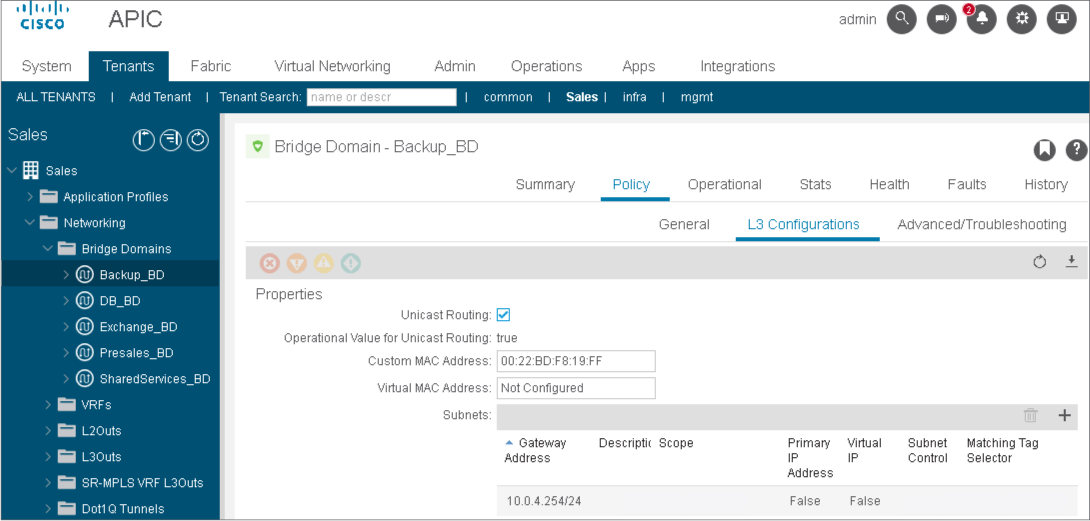
Go to Networking > Bridge Domains. Configure a new bridge domain Backup_BD, associate it with the Presales_VRF and use default values (Next >Next>Finish).
Choose the bridge domain Backup_BD, add a subnet 10.0.4.254/24 with default settings, and click Submit.
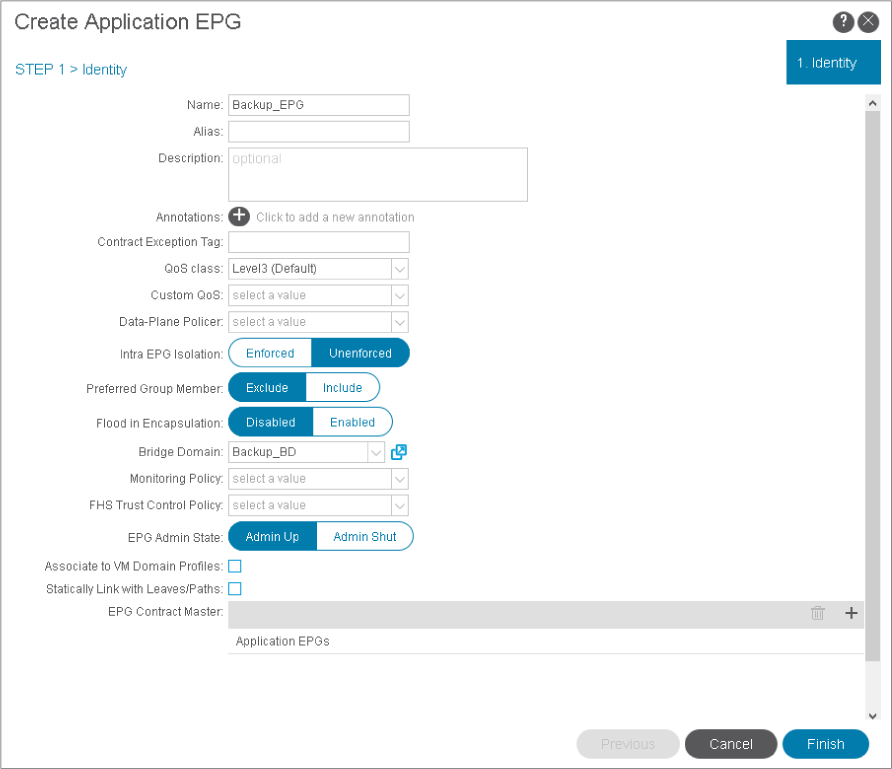
Go to Application Profiles > eCommerce_AP > Application EPGs. Create a new EPG Backup_EPG, associate it with the bridge domain Backup_BD and click Finish.
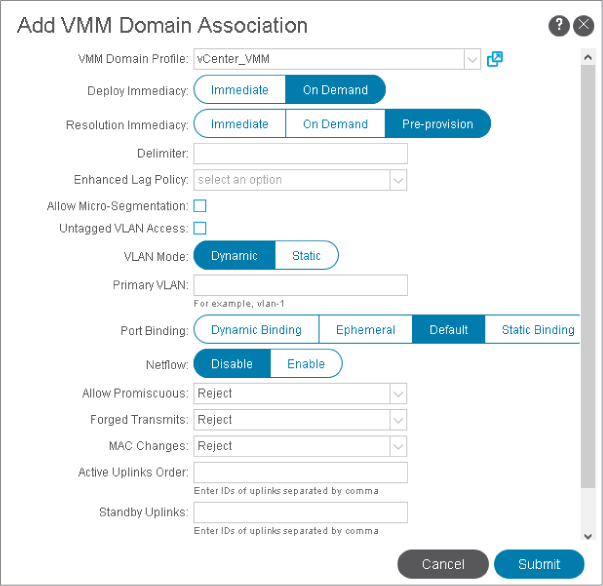
Right-click Backup_EPG, choose Add VMM Domain Association, and associate it with the VMM domain vCenter_VMM. Click Submit.
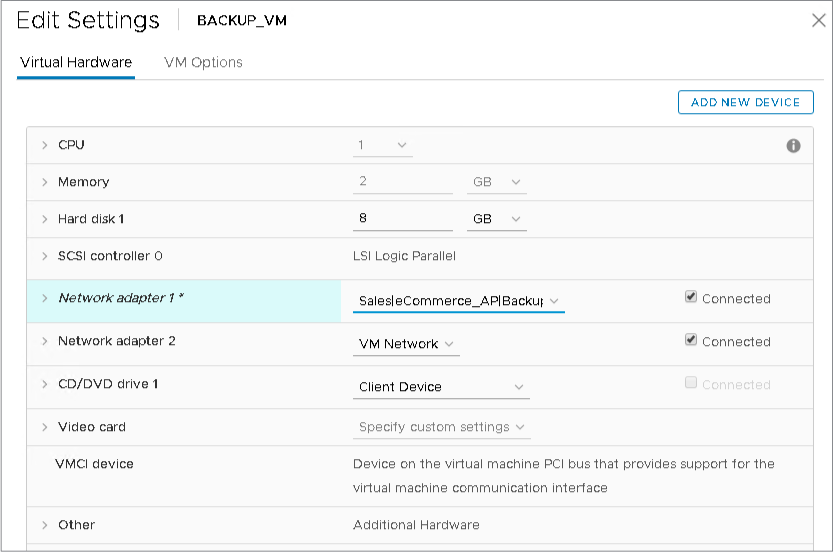
In the vSphere Client, choose the BACKUP_VM, choose and click the Edit Settings button in the top taskbar. Assign the first network adapter to the port group created for the BACKUP_EPG.
After clicking the Edit Settings button, choose Browse from the network drop-down for Network adapter 1, choose the port group created for the BACKUP_EPG, and click OK:
After clicking OK, the port group should be selected:
Create Layer 4–Layer 7 Device for Cisco ASAv
You will create a Layer 4–Layer 7 device. Cisco APIC will only allocate the network resources and program the VLAN on the fabric side. The Cisco ASAv VM has already been configured for basic firewall functionality. Before configuring the Layer 4–Layer 7 device, you will check the initial state of the ASAv VM.
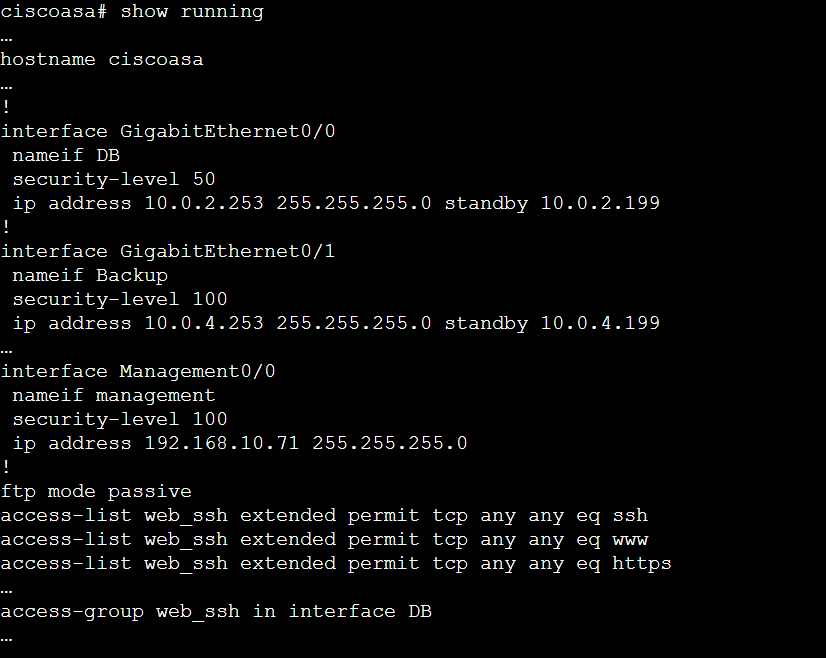
Use PuTTY to connect to ASAv by name asav. Log in as admin with password XXXX and briefly examine the configuration.
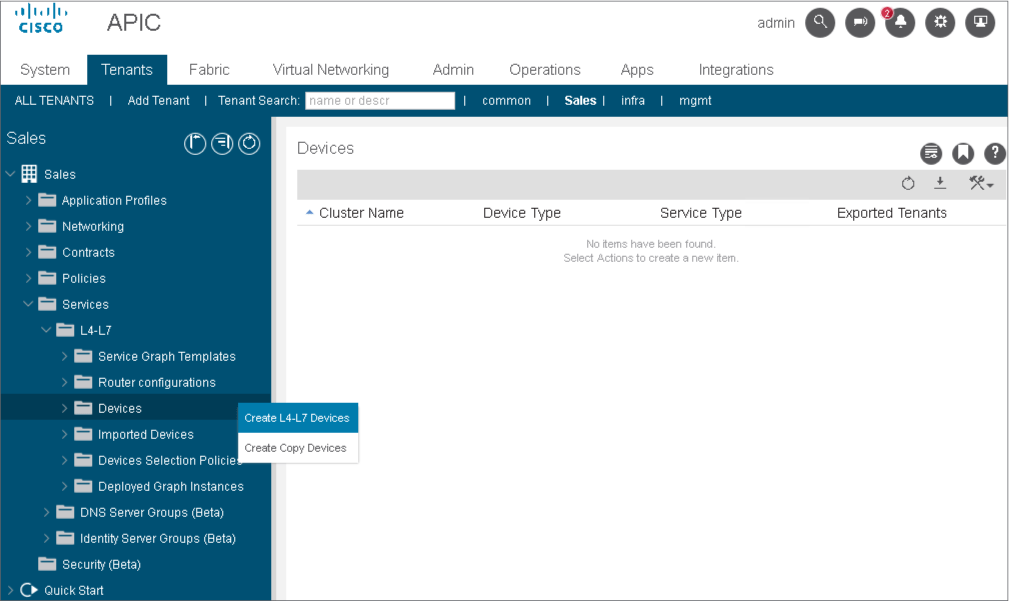
In the Cisco APIC user interface, within tenant Sales, go to Services > L4–L7 > Devices, right-click the menu, and choose Create L4–L7 Devices.
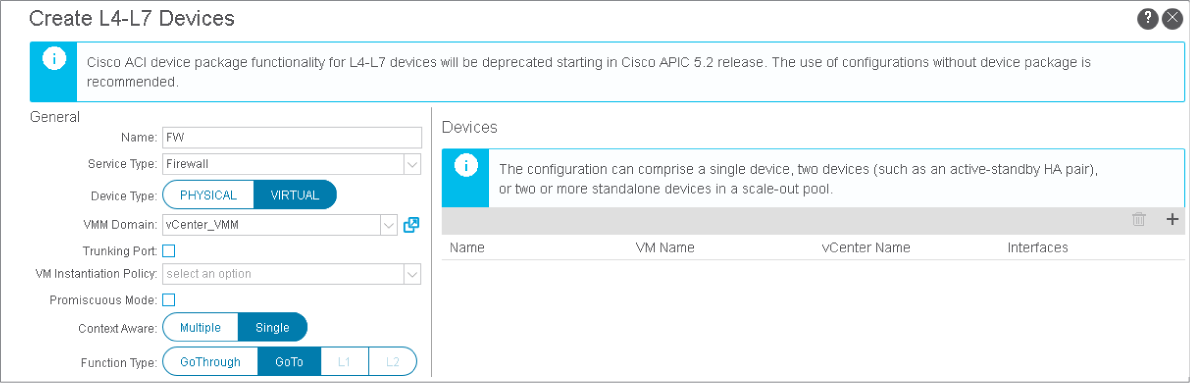
A device cluster (also known as a logical device) is one or more concrete devices that act as a single device. A device cluster has cluster (logical) interfaces. In this example, you have ASAv without any clustering. You will create a device cluster that includes only one concrete device (ASAv VM). The interfaces of the device cluster (cluster interfaces) are the interfaces of the ASAv VM adapters. These interfaces specify how the ASAv VM connects to the ACI.
Start creating a Layer 4–Layer 7 device with the settings below. Leave other settings at their defaults.
-
Name: FW
-
Service Type: Firewall
-
Device Type: Virtual
-
VMM Domain: vCenter_VMM
In the Devices area, click the plus sign (+), enter the name of the concrete device FW_concrete, choose the ASAv VM, and click Next.

You could configure the concrete and cluster devices in the configuration wizard or add them as separate configuration elements. You will add a concrete device in the next step.
A concrete device has concrete interfaces that you will configure in the next step.
Click the plus sign (+) to add the following two interfaces, click Update each time, and then OK.
-
concrete_db_int mapped to vNIC Network Adapter 2
-
concrete_backup_int mapped to vNIC Network Adapter 3
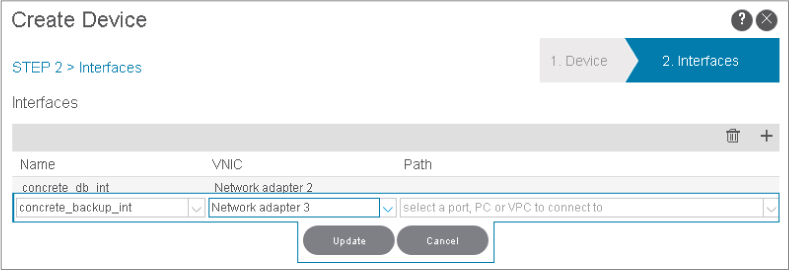
ASAv management0/0 interface is mapped to network adapter 1, so you omit it here. GigabitEthernet0/0 is mapped to network adapter 2 and GigabitEthernet0/1 to network adapter 3. These interfaces will be connected to DB_EPG and Backup_EPG, respectively.
When a concrete device is added to a logical device, concrete interfaces are mapped to the logical interfaces. You will map the interfaces in the next step.

Comment
TABLE OF CONTENTS
RECENT POSTS
- Installing Context-Aware Network Access Control using Cisco ISE Policies
- Designing Network Access Control that is Scalable using Cisco ISE Architecture
- Enterprise Network Access Control and Policy Enforcement using Cisco ISE
- Secure Device Administration and Network Access Using AAA Architecture
- Designing Enterprise-Class Hybrid Cloud Connectivity Using AWS Networking Services
- Exploring Core AWS Networking and Messaging Concepts for Modern Cloud Architectures
- Understanding Key AWS Services for Modern Cloud Architectures
- Building a Strong AWS Foundation with Amazon S3, EC2, and Virtual Private Cloud
- Understanding the ENSDWI Course: Advanced Cisco SD-WAN (Viptela) Concepts
- A Complete Guide to the DCACI-A Course: Mastering Advanced Cisco ACI Concepts



LEAVE A COMMENT
Please login here to comment.